How-to · Ecommerce · Postscript · Oct 17, 2026
Turn on Postscript Shopper Responses with consent and quiet-hour rules, and have the retention lead approve every send
Postscript's Shopper Responses answers subscribers who text in — product questions, objections, recommendations — using what you put in Brand Center. An expired offer or old returns policy there gets repeated to every subscriber who asks. This page shows how to fill Brand Center, write the consent and quiet-hour rules, and have the retention lead approve before and after launch.
Who this is for
Retention leads at Shopify brands on Postscript who want to try Shopper Responses or Infinity Testing without losing control of what is promised by text. For one Attentive AI Journey approved by the retention lead — a different job — see Attentive AI Journey approval.
How to do it
This is a how-to, not a ranking of SMS tools. Per the Postscript AI review, Shopper Responses is trained on Brand Center, your Shopify store, and knowledge base; Infinity Testing writes many message variants; and Shopper inherits Postscript's opt-out, quiet-hour, and consent rules. Shopper Campaigns was listed as Alpha, so this routine does not use it. The brand still owns consent and quiet hours, and tests use no live customer numbers.

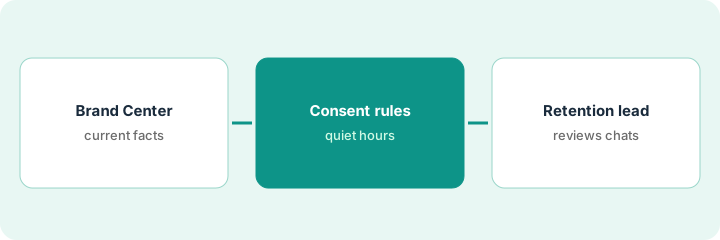
1. Fill Brand Center
What it is: Put current guidelines, policies, FAQs, sizing, shipping details, and offers into Brand Center before any AI message goes out.
- Write tone, style, and banned language.
- Add the current returns and shipping policies — remove old ones.
- Add only offers that are live, with end dates.
- Name one owner who updates Brand Center when a policy changes.
The retention lead removes last month's free-shipping offer and adds the 30-day returns policy. She lists health claims the brand never makes as banned language.
Read Brand Center top to bottom and delete anything that is no longer true today.
2. Set consent and quiet-hour rules
What it is: Write the brand's own rules for consent, quiet hours, opt-out words, and hand-off to support, and check Postscript's settings match.
- Confirm how each subscriber opted in.
- Set quiet hours in each subscriber's time zone.
- List extra opt-out words your customers use.
- Choose the hand-off: support email, phone, or a Gorgias or Zendesk ticket.
- Test in the Shopper Playground with made-up data only.
The Playground test shows Shopper handing a refund request to Gorgias with the last ten messages, as set. A test at 10 at night local time is held until morning.
Keep the rules on one page signed by the retention lead and the owner.
3. Retention lead reviews conversations and test copy
What it is: The retention lead reads Playground conversations before launch and a week of real conversations after, and reads every variant of a 10-version Infinity Testing campaign.
- Approve go-live only after the Playground review.
- Read a week of real conversations for wrong promises.
- Read each variant of a small Infinity Testing campaign before it sends.
- Fix Brand Center, not individual replies, when an answer is wrong.
- Watch unsubscribes and complaints alongside revenue.
In week one, Shopper tells two subscribers delivery takes 3–5 days; the policy says 5–7. The lead fixes the shipping page in Brand Center and checks the next day's answers.
Book a weekly conversation review with the retention lead for the first month.
Pricing context (October 2026)
This how-to isn't a price sheet. Per the Postscript AI review and Postscript's pricing page (checked Oct 17, 2026), Starter is $0 a month with a $49 monthly minimum, Growth $100 and Professional $500 a month, and the Postscript AI Plan (Brand Center, Infinity Testing, and Shopper) is $699 a month plus per-message rates. Dated October 2026.
Checked Oct 17, 2026 on the vendor’s own pricing page: Postscript’s pricing page lists Starter at $0 a month with a $49 monthly minimum, Growth at $100 and Professional at $500 a month, and the Postscript AI Plan at $699 a month plus per-message rates. Carrier fees pass through.
Uncertainty: The only prices this site sells here are the optional $9 AI toolkit spreadsheet and $19 AI toolkit audit.
When this helps (honest take)
Useful when you run SMS on Postscript, subscribers text in with questions, and a retention lead can read conversations weekly.
Not useful when nobody keeps policies current, or you want one triggered journey on Attentive — see the Attentive how-to.
Related options (educational)
| Need | Where to look | Why |
|---|---|---|
| Postscript AI features | Postscript AI | Primary path |
| Attentive vs Postscript | Attentive vs Postscript | Side-by-side |
| Attentive AI Journeys | Attentive AI Journey approval | A different job |
| Shopify helpdesk unknowns | Gorgias on Shopify | Support hand-off |
FAQ
How is this different from the Attentive how-to?
A different job: this page is Postscript Shopper Responses with brand-owned consent and quiet-hour rules. The Attentive page is one AI Journey approved by the retention lead.
Can we test with real subscriber numbers?
No. Use the Shopper Playground and staff phones with made-up data only.
Where do Postscript prices live?
Plans from $0 (with a $49 minimum) to $500 a month, and the AI Plan at $699 a month, on the page we checked; see the pricing section. Our Oct 17, 2026 check of the vendor’s own pricing page is summarized in the pricing section above.
Does this routine use Shopper Campaigns?
No. Postscript listed Shopper Campaigns as Alpha when we checked, so this page sticks to Shopper Responses and Infinity Testing.
Optional next step
If you want a one-page toolkit map for the tools you already pay for, use the optional $9 AI toolkit spreadsheet. If you want a short review of seat waste and unused tools, use the optional $19 AI toolkit audit. Neither is required to follow this how-to.