How-to · Ecommerce · Attentive · Oct 17, 2026
Build one Attentive AI Journey, and have the retention lead approve every send
Attentive's AI Journeys adapt triggered messages — timing, products, copy — to each shopper, and AI Pro drafts brand-voice copy and refines audiences. When AI picks the offer inside a triggered message, nobody sees each one before it sends. This page shows how to set up one journey and have the retention lead approve the rules and the copy first.
Who this is for
Retention and CRM leads at ecommerce brands on Attentive who want to try AI Journeys or AI Pro on one flow. For turning on Postscript Shopper Responses with consent and quiet-hour rules — a different job — see Postscript Shopper Responses guardrails.
How to do it
This is a how-to, not a ranking of SMS tools. Per the Attentive AI review, AI Pro includes Audiences AI, Send Time AI, and brand-voice copy; AI Journeys adapts triggered messages; and the Reporting Agent and Attentive MCP were in beta. The brand owns consent, quiet hours, and frequency caps, and no live customer numbers are used in tests.

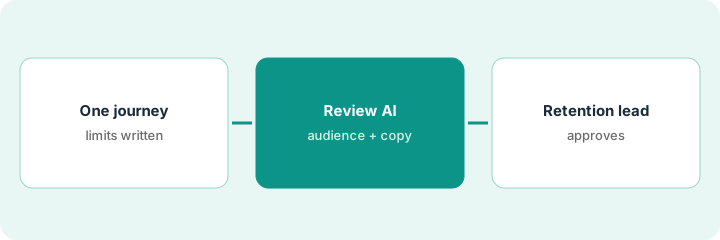
1. Pick one journey and write its limits
What it is: Choose one triggered journey, such as browse abandonment, and write the rules people set before AI touches it.
- Pick one journey with steady volume.
- Write quiet hours, frequency caps, and the largest discount allowed.
- List products that must never be pushed (final sale, low stock).
- Name the retention lead who approves.
The retention lead picks browse abandonment. She caps it at two texts in 48 hours, keeps quiet hours as they are, and allows no discount above 10%.
Write the journey, caps, quiet hours, discount limit, and approver on one sheet.
2. Review Audiences AI and the brand-voice copy
What it is: Turn on AI Journeys for that flow, check who Audiences AI adds or removes, and read every copy variant the AI drafts.
- Compare Audiences AI's audience with your usual segment on size.
- Read each copy draft for wrong discounts, dates, or claims.
- Test with internal team phones only — no live customer numbers.
- Check that the journey respects the caps from step 1.
One AI draft says 'free shipping this weekend', which is not running. The lead edits it. Test texts to three staff phones arrive inside quiet-hour rules.
Keep a copy sheet: draft, edits, approved by.
3. Retention lead approves, then reads results
What it is: The retention lead approves the journey, it goes live, and a weekly check reads results and a sample of sent messages.
- Approve the journey and copy in writing.
- Read a sample of real sends every week.
- Watch unsubscribes and complaints, not just revenue.
- Ask the Reporting Agent (beta) what changed, then check the answer in Attentive's own reports.
- Pause the journey if any message breaks the limits.
The journey runs for a week. Revenue is up a little and unsubscribes are flat. The Reporting Agent's summary matches the standard report, so the lead keeps the journey running.
Book a weekly 15-minute review with the retention lead: sample sends, unsubscribes, complaints.
Pricing context (October 2026)
This how-to isn't a price sheet. Per the Attentive AI review, Attentive shows no published prices; pricing is usage-based on messages, list size, channels, and premium AI products such as AI Pro and AI Journeys. Treat it as quote-only. Dated October 2026.
Checked Oct 17, 2026 on the vendor’s own pricing page: Attentive shows no public list price. Attentive’s pricing page describes usage-based pricing built on messages sent, list size, channels, and premium AI products; a free trial is available through sales. This page quotes no Attentive dollar figure; confirm what your contract includes with Attentive or your admin.
Uncertainty: The only prices this site sells here are the optional $9 AI toolkit spreadsheet and $19 AI toolkit audit.
When this helps (honest take)
Useful when you send triggered SMS or email through Attentive and have a retention lead who reads messages weekly.
Not useful when nobody owns consent and quiet hours, or you want conversational replies to texts — see the Postscript how-to.
Related options (educational)
| Need | Where to look | Why |
|---|---|---|
| Attentive AI features | Attentive AI | Primary path |
| Attentive vs Postscript | Attentive vs Postscript | Side-by-side |
| Postscript Shopper Responses | Postscript guardrails | A different job |
| Loomi segments in Bloomreach | Bloomreach Loomi segment approval | Email-and-SMS platform option |
FAQ
How is this different from the Postscript how-to?
A different job: this page is one Attentive AI Journey approved by the retention lead. The Postscript page is conversational Shopper Responses with consent and quiet-hour rules.
Is the Reporting Agent generally available?
Not when we checked: Attentive's release lists the Reporting Agent and Attentive MCP as beta.
Where do Attentive prices live?
Attentive publishes no prices; ask for a usage-based quote. Our Oct 17, 2026 check of the vendor’s own pricing page is summarized in the pricing section above.
Can we test with real customer numbers?
No. Test with staff phones only, and keep quiet hours and frequency caps set by people.
Optional next step
If you want a one-page toolkit map for the tools you already pay for, use the optional $9 AI toolkit spreadsheet. If you want a short review of seat waste and unused tools, use the optional $19 AI toolkit audit. Neither is required to follow this how-to.