How-to · Ecommerce · Bloomreach · Oct 17, 2026
Build a Loomi AI segment in Bloomreach, and have the CRM lead approve the segment and every send
Bloomreach's Loomi AI can build a customer segment from a plain-English prompt, and the Loomi Marketing Agent can turn a goal into a whole campaign. Bloomreach says nothing builds until you approve. This page shows how to make that approval real: one segment, read in plain words, signed off by the CRM lead before any send.
Who this is for
CRM and lifecycle leads at ecommerce brands on Bloomreach Marketing Automation who want to try Loomi segments and the Loomi Marketing Agent without losing control of who gets what. For Algolia search rules owned by a merchandiser — a different job — see Algolia search rule owner.
How to do it
This is a how-to, not a ranking of marketing platforms. Per the Bloomreach AI review, Loomi Analytics builds segments from prompts, the Loomi Marketing Agent proposes audience, timing, channels, and copy, and Bloomreach says 'nothing builds until you approve'. Campaign Approval Workflow adds named approval steps. Loomi Connect (MCP) was limited availability when we checked, so this routine does not rely on it.

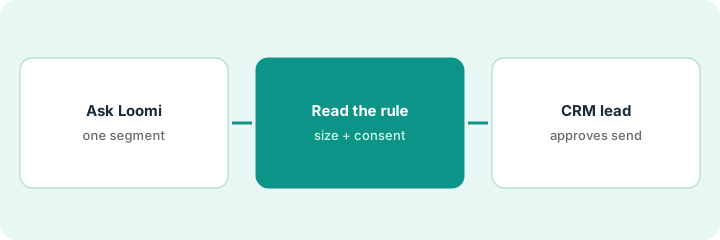
1. Ask Loomi for one segment
What it is: Type one plain-English request for a segment tied to a single campaign idea.
- Pick one idea (for example lapsed buyers of one category).
- Ask Loomi for the segment in one sentence.
- Name the CRM lead who approves the segment and the send.
- Keep consent and frequency caps as they are; do not loosen them for the test.
The CRM manager asks Loomi for 'customers who bought bedding 6 to 12 months ago and have not bought since'. Loomi returns a segment of about 18,000 profiles.
Write the prompt, the expected audience size, and the approver's name before you press enter.
2. Read the segment rule and check the size
What it is: Open the segment Loomi built, read its rule in plain words, and compare the size with what you expected.
- Read every condition; look for date windows and event names you did not ask for.
- Compare the size with your own rough estimate.
- Open five sample profiles and check they fit.
- Confirm everyone in the segment has opted in for the channel you plan to use.
The rule uses 'viewed bedding' instead of 'purchased bedding', which explains why the size is larger than expected. The manager fixes the event and the size drops to about 9,000.
Copy the final rule into your notes in plain words, with the size, before asking for approval.
3. CRM lead approves before the Marketing Agent schedules
What it is: The CRM lead approves the segment; then the offer and copy get their own approval before the Loomi Marketing Agent schedules any send.
- CRM lead signs off on the segment rule and size.
- Owner or merchandiser approves any discount code the agent attaches.
- Someone reads every email and SMS the agent drafts.
- Use Campaign Approval Workflow so each approver is named in the canvas.
- Check results against your own reports after the first send.
The CRM lead approves the 9,000-profile segment. The merchandiser cuts the agent's suggested discount from 20% to 10%. The send goes out the next morning.
Set up Campaign Approval Workflow with three named steps — segment, offer, copy — before the next agent-built campaign.
Pricing context (October 2026)
This how-to isn't a price sheet. Per the Bloomreach AI review, Bloomreach publishes no rate card; pricing is a custom platform fee plus usage, billed annually, and AI agents and tools are add-ons without public prices. Treat it as quote-only. Dated October 2026.
Checked Oct 17, 2026 on the vendor’s own pricing page: Bloomreach shows no public rate card. Bloomreach’s pricing page describes custom pricing — a platform fee plus usage, billed annually — and says AI agents and tools are add-ons. This page quotes no Bloomreach dollar figure; confirm what your contract includes with Bloomreach or your admin.
Uncertainty: The only prices this site sells here are the optional $9 AI toolkit spreadsheet and $19 AI toolkit audit.
When this helps (honest take)
Useful when you run Bloomreach Marketing Automation, have a CRM lead with time to read segment rules, and want to try Loomi on one campaign.
Not useful when nobody owns consent and frequency rules, or your real gap is site search — see the Algolia how-to.
Related options (educational)
| Need | Where to look | Why |
|---|---|---|
| Bloomreach AI features | Bloomreach AI | Primary path |
| Algolia vs Bloomreach | Algolia vs Bloomreach | Side-by-side |
| Algolia search rules | Algolia search rule owner | A different job |
| SMS journeys with a retention lead | Attentive AI Journey approval | Messaging-first option |
FAQ
How is this different from the Algolia how-to?
A different job: this page is a Loomi customer segment and send approved by the CRM lead. The Algolia page is search rules and pins owned by the merchandiser.
Does the Loomi Marketing Agent send on its own?
Bloomreach says nothing builds until you approve and you can route every campaign for sign-off. In this routine, three named people approve segment, offer, and copy.
Where do Bloomreach prices live?
Bloomreach publishes no rate card; ask for a quote that names each agent add-on. Our Oct 17, 2026 check of the vendor’s own pricing page is summarized in the pricing section above.
Is Loomi Connect available?
Access was limited when we checked: Bloomreach’s page invited sign-ups for when expanded access opens. This routine does not use it.
Optional next step
If you want a one-page toolkit map for the tools you already pay for, use the optional $9 AI toolkit spreadsheet. If you want a short review of seat waste and unused tools, use the optional $19 AI toolkit audit. Neither is required to follow this how-to.