How-to · Ecommerce · Algolia · Oct 17, 2026
Fix your top no-result searches in Algolia, and have the merchandiser own every rule and pinned result
Algolia's analytics show which searches return nothing and which get no clicks. AI Synonyms and AI Ranking can help, but every accepted synonym and pinned product is a decision someone made. This page shows how to fix the worst searches and keep a named merchandiser in charge of every rule.
Who this is for
Ecommerce merchandisers and managers who run site search on Algolia and want fewer dead-end searches. The job here is search rules and pins. For building a Loomi AI customer segment in Bloomreach with a CRM lead approving every send — a different job — see Bloomreach Loomi segment approval.
How to do it
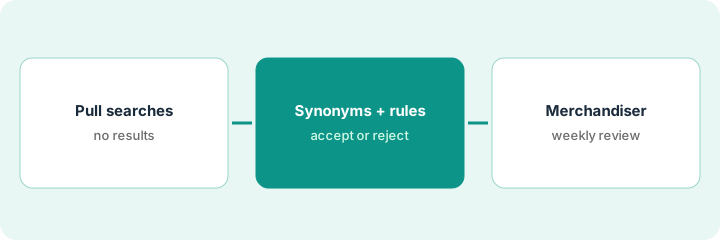
This is a how-to, not a ranking of search tools. Per the Algolia AI review, Algolia's analytics track no-result searches and click-through, AI Synonyms suggests synonym pairs you accept or reject, and AI Ranking (Dynamic Re-Ranking) reorders results from clicks and conversions on Grow Plus and Elevate. The ground rule: the merchandiser owns every rule, pinned result, and accepted synonym.
1. Pull your no-result and low-click searches
What it is: Open search analytics and list the most frequent searches that return nothing or get almost no clicks.
- Export the 20 most frequent no-result searches for the last 30 days (or 7 on Free).
- Add the 10 most frequent searches with the lowest click-through.
- Run each one yourself and note what a shopper sees.
- Mark which are spelling, which are missing words, and which are products you do not sell.
The list shows 'rain shell' with no results (the catalog says 'waterproof jacket') and 'size 11 boots' with low clicks because sold-out sizes rank first.
Save the list with each search, what it returns today, and a one-line diagnosis.
2. Fix with AI Synonyms and rules
What it is: Review AI Synonyms suggestions for the listed searches and add rules only where a synonym is not enough.
- Open AI Synonyms suggestions; accept only pairs a shopper would agree with.
- Reject suggestions that blur sizes, part numbers, or product lines.
- Add a rule (promote, demote, pin, or redirect) for searches synonyms cannot fix.
- Give each rule an end date if it is tied to a campaign.
- If you use Dynamic Re-Ranking, note its goal next to your rules.
The merchandiser accepts 'rain shell' ↔ 'waterproof jacket', rejects a suggestion pairing 'trail runner' with 'hiking boot', and adds one rule that demotes out-of-stock sizes for boot searches.
Write each accepted synonym and new rule in a log with an owner and a review date.
3. Merchandiser reviews rules and pins weekly
What it is: Once a week, the merchandiser rereads every active rule and pinned result and checks the same search list again.
- Rerun the original 30 searches and compare with last week.
- Remove expired campaign pins and rules.
- Check that pinned products are in stock.
- Read Dynamic Re-Ranking's effect on two key searches.
- Record what changed and why.
Two weeks later, 'rain shell' returns jackets and gets clicks. A pin for last month's sale is still active; the merchandiser removes it.
Book a 20-minute weekly slot named 'search rules review' with the merchandiser as owner.
Pricing context (October 2026)
This how-to isn't a price sheet. Per the Algolia AI review and Algolia's pricing page (checked Oct 17, 2026), Grow includes 10,000 search requests a month then $0.50 per 1,000; Grow Plus, which adds AI Ranking and AI Synonyms, is $1.75 per 1,000 after the included requests, with records at $0.40 per 1,000 beyond 100,000. Elevate is custom. Dated October 2026.
Checked Oct 17, 2026 on the vendor’s own pricing page: Algolia’s pricing page lists Grow at $0.50 per 1,000 search requests after 10,000 included, Grow Plus (AI Ranking, AI Synonyms) at $1.75 per 1,000 after 10,000 included, and records at $0.40 per 1,000 beyond 100,000. Elevate is custom-priced on an annual contract.
Uncertainty: The only prices this site sells here are the optional $9 AI toolkit spreadsheet and $19 AI toolkit audit.
When this helps (honest take)
Useful when site search drives real revenue, analytics are switched on, and one merchandiser has time for a weekly review.
Not useful when nobody owns search rules, or your real gap is customer segments and sends — see the Bloomreach how-to.
Related options (educational)
| Need | Where to look | Why |
|---|---|---|
| Algolia AI features | Algolia AI | Primary path |
| Algolia vs Bloomreach | Algolia vs Bloomreach | Side-by-side |
| Bloomreach Loomi segments | Bloomreach Loomi segment approval | A different job |
| Nosto merchandising suggestions | Nosto AI Reveals approval | Suggestion queue |
FAQ
How is this different from the Bloomreach Loomi how-to?
A different job: this page is Algolia search rules and pins owned by the merchandiser. The Bloomreach page is a Loomi AI customer segment approved by the CRM lead before any send.
Should we accept every AI Synonyms suggestion?
No. Accept only pairs a shopper would agree with, and reject anything that blurs sizes or part numbers.
Where do Algolia prices live?
Usage prices for Grow and Grow Plus are on Algolia's pricing page; see the pricing section. Our Oct 17, 2026 check of the vendor’s own pricing page is summarized in the pricing section above.
Does AI Synonyms work in every language?
Per our review, Algolia says it works for Latin-alphabet languages and has not yet been tested for non-Latin languages.
Optional next step
If you want a one-page toolkit map for the tools you already pay for, use the optional $9 AI toolkit spreadsheet. If you want a short review of seat waste and unused tools, use the optional $19 AI toolkit audit. Neither is required to follow this how-to.