How-to · Hotels · OPERA Cloud · Oct 15, 2026
Use OPERA Cloud's AI Room Assignment, and have the front office manager check accessible-room and VIP picks
OPERA Cloud's AI-assisted room assignment can place tomorrow's arrivals, including accessible and VIP rooms. Those picks still need a person. This page shows how to set the controls, run one night's arrivals, and have the front office manager check every accessible-room and VIP assignment before guests arrive.
Who this is for
Front office managers and rooms controllers at full-service hotels on OPERA Cloud who want AI Room Assignment help without letting accessible or VIP rooms go unchecked. The job here is one night's arrivals with a named checker. For timed room moves and upsell rules on a different PMS, see a different job: Set Stayntouch timed room assignment rules.
How to do it
This is a how-to, not a ranking of hotel PMS products. Per the OPERA Cloud AI review, OPERA Cloud Assistant includes AI-assisted room assignment and related OPERA Controls, listed at no additional cost in Oracle's materials. The review's ground rule: the front office manager checks accessible-room and VIP assignments.

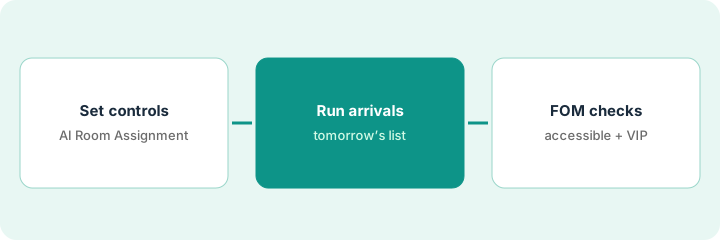
1. Step 1 — Set AI Room Assignment controls
What it is: Confirm AI Room Assignment is enabled and write which room attributes the tool may use.
- Ask the OPERA Cloud admin which AI Room Assignment controls are on.
- List accessible-room codes and VIP flags the property uses.
- Write who may override an assignment.
- Name the front office manager who checks tonight's list.
The rooms controller confirms the Assistant room-assignment control is on. Accessible rooms use codes A1/A2; VIP is a profile flag. Only the front office manager and night manager may override.
Write a one-page control sheet: “Controls on / Accessible codes / VIP flag / Who may override.” Keep it at the desk.
2. Step 2 — Run tomorrow's arrivals
What it is: Generate AI-assisted assignments for tomorrow's arrivals and export or print the list the desk will use.
- Run AI Room Assignment for tomorrow's arrival date.
- Export or print the assignment list with room type, guest name, and special flags.
- Flag every accessible and VIP row before anyone moves rooms.
- Do not auto-assign walk-ins until the same check exists for same-day arrivals.
Tomorrow has 48 arrivals, including three accessible and two VIP. The list shows all five flagged. The controller holds those five for the manager before releasing the rest to the board.
Run the list once in the afternoon, then again after any group block change. Mark the five (or however many) flagged rows in a bright color.
3. Step 3 — Front office manager checks accessible and VIP picks
What it is: The front office manager reviews every accessible-room and VIP assignment before arrival day.
- Open each flagged assignment.
- Confirm the room matches the accessibility need or VIP standard.
- Override and note why when it does not.
- Sign the list (name and time) before the night audit.
- Re-check if a room goes out of order overnight.
One accessible assignment landed in a tub-only room; the manager moves it to a roll-in shower room and notes the override. Both VIP rooms match the floor and view standard, so they stay.
Keep a short log: “Date, accessible/VIP count, overrides, signed by.” Review it weekly for patterns.
Pricing context (October 2026)
This how-to isn't a price sheet. Per the OPERA Cloud AI review, OPERA Cloud itself is quote-only; Assistant AI features are described at no additional cost. Dated October 2026.
Checked Oct 15, 2026 on the vendor’s own pricing page: OPERA Cloud shows no public list price. Oracle’s OPERA Cloud product page describes the product with quote-only commercial terms; OPERA Cloud Assistant AI features are listed at no additional cost in Oracle’s materials, with no dollar figures for the PMS itself. This page quotes no OPERA Cloud dollar figure; confirm what your contract includes with OPERA Cloud or your admin.
Uncertainty: Oracle does not publish a public OPERA Cloud dollar amount on the product pages we checked. Confirm your chain's contract. The only prices this site sells here are the optional $9 AI toolkit spreadsheet and $19 AI toolkit audit.
When this helps (honest take)
Useful when you already use OPERA Cloud room assignment and have a named front office manager who can check flagged rooms every afternoon.
Not useful when accessible and VIP needs are not coded in the PMS, or nobody owns the afternoon check. Fix the codes and the owner first.
Related options (educational)
| Need | Where to look | Why |
|---|---|---|
| OPERA Cloud AI features | OPERA Cloud AI | Primary path on this page |
| PMS comparison context | Mews vs Cloudbeds | Side-by-side for other stacks |
| Timed moves on another PMS | Stayntouch timed rules | A different job |
| Guest messaging on Mews | Mews Agent reply rules | Same day's how-to |
| Hospitality stack map | Stack map: hospitality ops | Where OPERA fits |
FAQ
Should AI assign every room without a person?
Not in this routine. Accessible and VIP rows always get a human check before arrival.
What about same-day walk-ins?
Use the same flag rules. If the tool assigns an accessible or VIP walk-in, the desk lead checks it before the key is cut.
Where do OPERA Cloud prices live?
OPERA Cloud is quote-only on the pages we checked; see the pricing section and your Oracle contract. Our Oct 15, 2026 check of the vendor’s own pricing page is summarized in the pricing section above.
What if AI Room Assignment is not on in our property?
Ask your OPERA Cloud administrator whether the AI Room Assignment OPERA Controls and Assistant features are enabled for your chain. This routine only applies when they are.
Optional next step
If you want a one-page toolkit map for the tools you already pay for, use the optional $9 AI toolkit spreadsheet. If you want a short review of seat waste and unused tools, use the optional $19 AI toolkit audit. Neither is required to follow this how-to.