How-to · Hotels · Mews · Oct 15, 2026
Write three Mews Agent guest-messaging reply rules and have the front office manager approve each
Mews Guest Messaging with the Mews Agent and Automations can draft replies to repeat guest questions. Rules that send without review still need a front office manager. This page shows how to pick three questions, draft reply rules, and approve each one before you rely on the audit log.
Who this is for
Front office managers drowning in repeat guest questions on Mews. The job here is three reply rules with a named approver. For Cloudbeds RMS Autopilot rate limits — a different job — see Cloudbeds RMS Autopilot limits.
How to do it
This is a how-to, not a ranking of hotel platforms. Per the Mews AI review, Guest Messaging with the Mews Agent plus Automations includes approval and audit controls. The review's ground rule: a named front-office manager approves every reply rule and automation.
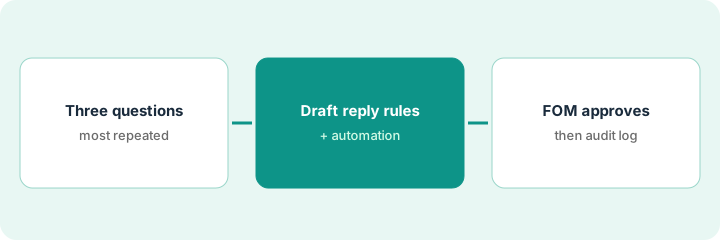
1. Step 1 — Pick three repeat questions
What it is: Find the three guest questions you answer most, with one stable answer each.
- Search last month's guest messages.
- Pick three questions with stable answers (parking, Wi-Fi, check-in time are typical).
- Skip refund and rate questions for this routine.
- Name the front office manager who approves rules.
Top questions: parking garage hours, breakfast time, late checkout policy. Late checkout varies by occupancy, so they pick parking, breakfast, and Wi-Fi instead.
Write the three questions and the correct answer for each room type where it differs.
2. Step 2 — Draft reply rules and automation
What it is: Draft a Mews Agent reply rule and matching automation for each question; keep them off until approved.
- Draft the trigger and the reply text.
- Attach only approved knowledge for those three topics.
- Keep send-without-review off until step 3.
- Note where the audit log will show each send.
Three rules sit in draft. Parking reply includes garage hours and height limit. Breakfast reply includes days and hours only — no comp offers.
Read three sample drafts per rule before you ask for approval.
3. Step 3 — Front office manager approves, then check the audit log
What it is: The front office manager approves each rule, then reads the audit log daily for a week.
- Manager approves or edits each rule in writing.
- Turn on only the approved rules.
- Check the audit log every day for seven days.
- Fix wrong facts in the knowledge, not only in the reply.
- Pause any rule that surprises guests.
Parking and Wi-Fi go live. Breakfast stays draft after one wrong weekend-hours reply. Audit log is checked at 4 p.m. daily.
Keep a rule log: “Rule, approved by, date.” Re-check when hours or policies change.
Pricing context (October 2026)
This how-to isn't a price sheet. Per the Mews AI review, Mews Core, Pro, and Enterprise are priced per room by quote. Dated October 2026.
Checked Oct 15, 2026 on the vendor’s own pricing page: Mews shows no public list price for Core, Pro, or Enterprise. Mews’ pricing page routes you to sales; plan amounts are quoted per room. This page quotes no Mews dollar figure; confirm what your contract includes with Mews or your admin.
Uncertainty: No public plan dollar amount on the Mews pricing page we checked. The only prices this site sells here are the optional $9 AI toolkit spreadsheet and $19 AI toolkit audit.
When this helps (honest take)
Useful when repeat questions have stable answers and someone owns the audit log.
Not useful when answers change by booking, or refunds and rates are in the first three rules.
Related options (educational)
| Need | Where to look | Why |
|---|---|---|
| Mews AI features | Mews AI | Primary path |
| Mews vs Cloudbeds | Mews vs Cloudbeds | Side-by-side |
| Cloudbeds Autopilot limits | Cloudbeds RMS Autopilot | A different job |
| Apaleo Agent Hub permissions | Apaleo Agent Hub | Same day's how-to |
| Hospitality stack map | Stack map: hospitality ops | Where Mews fits |
FAQ
How is this different from Cloudbeds Autopilot?
A different job: this page is guest-messaging reply rules. Cloudbeds Autopilot limits are about rate changes.
Should the Agent answer refund questions?
Not in this routine. Keep refunds and rate exceptions with a person.
Where do Mews prices live?
Quote-only on the page we checked; see the pricing section. Our Oct 15, 2026 check of the vendor’s own pricing page is summarized in the pricing section above.
How is this different from Cloudbeds Autopilot limits?
A different job: this page is guest-messaging reply rules. For revenue Autopilot limits on Cloudbeds RMS, see the Cloudbeds Autopilot how-to.
Optional next step
If you want a one-page toolkit map for the tools you already pay for, use the optional $9 AI toolkit spreadsheet. If you want a short review of seat waste and unused tools, use the optional $19 AI toolkit audit. Neither is required to follow this how-to.