How-to · Hotels · Cloudbeds · Oct 15, 2026
Set Cloudbeds RMS Autopilot limits, and have the revenue owner approve every one
Cloudbeds RMS (launched 15 Sep 2026) can run Autopilot inside limits you set. Those limits still need the revenue owner. This page shows how to set min/max per room type and review a week of changes. Ask Signals is an early pilot — leave it out of this routine. For Mews Agent reply rules — a different job — see that how-to.
Who this is for
Independent hotel revenue owners trying Cloudbeds RMS Autopilot. The job here is written limits and a one-week review. Ask Signals stays out while it is an early pilot.
How to do it
This is a how-to, not a ranking of hotel platforms. Per the Cloudbeds AI review, Cloudbeds RMS launched 15 Sep 2026 with Autopilot inside your limits; Ask Signals is an early pilot. The revenue owner approves every Autopilot limit.

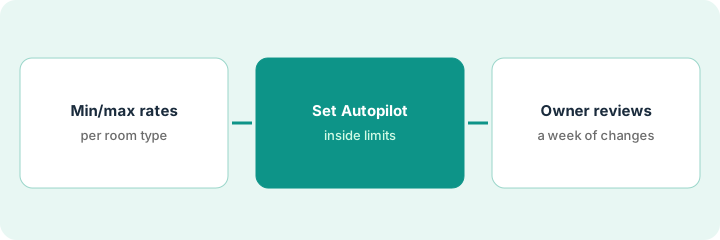
1. Step 1 — Decide min and max per room type
What it is: Write a minimum and maximum rate per room type from your own floors and ceilings — not from a single competitor night.
- List each room type you will put on Autopilot.
- Write min and max from your cost floor and owner ceiling.
- Name the revenue owner who approves limits.
- Leave Ask Signals out of this routine.
Queen min/max and suite min/max written from last year's accepted lows and owner ceilings. Comp set is context only.
Save “Room type / Min / Max / Owner / Date” before you open Autopilot settings.
2. Step 2 — Set Autopilot limits
What it is: Enter the limits in Cloudbeds RMS Autopilot and confirm the tool cannot push outside them.
- Enter min/max per room type.
- Confirm Autopilot is bounded by those values.
- Keep a export or screenshot of the settings.
- Do not enable unbounded modes for the pilot week.
Autopilot enabled for queens only in week one. Suites stay manual until queens are quiet.
Have a second person read the limit screenshot before go-live.
3. Step 3 — Owner reviews a week of changes
What it is: The revenue owner reviews Autopilot changes daily for one week and tightens limits as needed.
- Review the change log each day.
- Override with a written reason when needed.
- Tighten min/max if pushes cluster badly.
- Only then add the next room type.
- Still leave Ask Signals off unless your account marks it generally available.
Two midweek pushes look low versus a city event; owner raises the minimum one step and notes the event calendar gap.
End the week with a one-page summary: “Changes / Overrides / Limit edits.”
Pricing context (October 2026)
This how-to isn't a price sheet. Per the Cloudbeds AI review, Flex, One, Experience, and Enterprise have no public prices. Dated October 2026.
Checked Oct 15, 2026 on the vendor’s own pricing page: Cloudbeds shows no public list price. Cloudbeds’ pricing page lists Flex, One, Experience, and Enterprise with no dollar figures on our check. This page quotes no Cloudbeds dollar figure; confirm what your contract includes with Cloudbeds or your admin.
Uncertainty: Ask Signals is an early pilot per our review — do not build this routine on it. The only prices this site sells here are the optional $9 AI toolkit spreadsheet and $19 AI toolkit audit.
When this helps (honest take)
Useful when Cloudbeds RMS is on in your account and someone will read the change log daily for a week.
Not useful when you cannot set min/max, or Autopilot is already unbounded.
Related options (educational)
| Need | Where to look | Why |
|---|---|---|
| Cloudbeds AI | Cloudbeds AI | Primary path |
| Mews vs Cloudbeds | Mews vs Cloudbeds | Side-by-side |
| Mews Agent reply rules | Mews Agent reply rules | A different job |
| Duetto Autopilot floors | Duetto Autopilot floors | Same day's how-to |
| Hospitality stack map | Stack map: hospitality ops | Where Cloudbeds fits |
FAQ
What about Ask Signals?
Early pilot per our review. Leave it out until your account marks it generally available.
How is this different from Mews reply rules?
A different job: this page is rate Autopilot limits. Mews is guest-messaging rules.
Where do Cloudbeds prices live?
No public plan dollars on the page we checked; see the pricing section. Our Oct 15, 2026 check of the vendor’s own pricing page is summarized in the pricing section above.
What about Ask Signals?
Per our review, Ask Signals is an early pilot. This routine uses Cloudbeds RMS Autopilot limits only; leave Ask Signals out until your account marks it generally available.
Optional next step
If you want a one-page toolkit map for the tools you already pay for, use the optional $9 AI toolkit spreadsheet. If you want a short review of seat waste and unused tools, use the optional $19 AI toolkit audit. Neither is required to follow this how-to.