How-to · Hotels · Duetto · Oct 15, 2026
Set Duetto floors and ceilings before Autopilot pushes a single rate
Duetto GameChanger Open Pricing with Autopilot can push rates inside limits you set. Floors, ceilings, and automated pushes still need the revenue manager. This page shows how to set those limits before Autopilot pushes a single rate, and how to approve pushes for the first two weeks. For IDeaS G3 group Wish/Walk overrides — a different job — see that how-to.
Who this is for
Hotel revenue managers on Duetto who want Autopilot help without unbounded rate pushes. The job here is floors, ceilings, and a two-week approval window.
How to do it
This is a how-to, not a ranking of revenue systems. Per the Duetto AI review, GameChanger Open Pricing and Autopilot require the revenue manager to approve every automated rate push and every floor or ceiling.

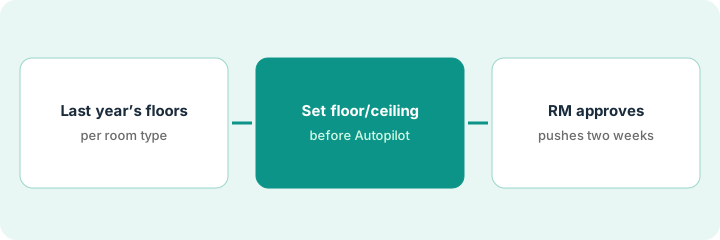
1. Step 1 — Pull last year's floors
What it is: Rebuild a simple floor from last year's costs and worst acceptable rate per room type — not from competitor screenshots alone.
- Export last year's low accepted rates by room type.
- Add today's known cost floor (or owner minimum).
- Write one floor number per room type.
- Name the revenue manager who owns overrides.
Standard king floor set from last year's lowest accepted paid rate plus today's owner minimum. Suites get a higher floor. Comp-set screenshots are context only.
Save a sheet: “Room type / Floor / Source / Date.” Do not use a competitor's BAR as your floor.
2. Step 2 — Set floor and ceiling per room type
What it is: Enter floors and ceilings in Duetto before Autopilot may push, and keep Autopilot off until they are saved.
- Enter floor and ceiling per room type.
- Confirm Autopilot cannot push outside those limits.
- Document which seasons use different ceilings.
- Keep a screenshot or export of the limits.
King floor and ceiling set for shoulder season from the sheet. Autopilot stays off until both values are saved and checked by a second set of eyes.
Have a second revenue person read the limit export before Autopilot is enabled.
3. Step 3 — Revenue manager approves pushes for the first two weeks
What it is: For the first two weeks, the revenue manager reviews every Autopilot push (or a daily digest) and records overrides.
- Enable Autopilot inside the limits.
- Review pushes daily for fourteen days.
- Override with a written reason when needed.
- Tighten floors or ceilings if pushes cluster at a bad edge.
- Only then stretch the review cadence.
Week one shows pushes pinning at the ceiling on event nights — expected. One midweek push below strategy is overridden and the floor raised one step.
Keep an override log: “Date, room type, Autopilot rate, decision, reason.”
Pricing context (October 2026)
This how-to isn't a price sheet. Per the Duetto AI review, Duetto is quote-only. Dated October 2026.
Checked Oct 15, 2026 on the vendor’s own pricing page: Duetto shows no public list price. Duetto’s site was not a public price sheet on our check; commercial terms are quote-only. This page quotes no Duetto dollar figure; confirm what your contract includes with Duetto or your admin.
Uncertainty: No public list price on the pages we checked. The only prices this site sells here are the optional $9 AI toolkit spreadsheet and $19 AI toolkit audit.
When this helps (honest take)
Useful when you can name floors from your own history and staff a two-week daily review.
Not useful when Autopilot is already live with no floors, or nobody reads pushes.
Related options (educational)
| Need | Where to look | Why |
|---|---|---|
| Duetto AI | Duetto AI | Primary path |
| Duetto vs IDeaS | Duetto vs IDeaS | Side-by-side |
| IDeaS group pricing override | IDeaS G3 group pricing | A different job |
| Lighthouse weekly read | Lighthouse comp set read | Same day's how-to |
| Hospitality stack map | Stack map: hospitality ops | Where Duetto fits |
FAQ
How is this different from IDeaS group pricing?
A different job: this page is Autopilot floors and ceilings. IDeaS G3 covers Wish/Walk group quote overrides.
Can Autopilot ignore the ceiling on event nights?
Not in this routine. Raise the ceiling in writing first.
Where do Duetto prices live?
Quote-only; see the pricing section. Our Oct 15, 2026 check of the vendor’s own pricing page is summarized in the pricing section above.
How is this different from IDeaS group pricing?
A different job: this page is Autopilot floors and ceilings. For a group quote Wish/Walk Price override, see the IDeaS G3 how-to.
Optional next step
If you want a one-page toolkit map for the tools you already pay for, use the optional $9 AI toolkit spreadsheet. If you want a short review of seat waste and unused tools, use the optional $19 AI toolkit audit. Neither is required to follow this how-to.