How-to · Hotels · Apaleo · Oct 15, 2026
Give one Apaleo Agent Hub agent the smallest permissions it needs, and have the GM approve them
Apaleo Agent Hub can run Sales, Email, and Migration agents, and it is early access. Permissions that let an agent act still need a named approver. This page shows how to pick one Email agent, write the smallest permission list, and have the GM or IT lead approve it before you review the first week of actions.
Who this is for
General managers and IT leads at hotels or serviced-apartment groups on Apaleo who want to pilot Agent Hub without wide permissions. The job here is one Email agent with a written permission list. Agent Hub is early access — treat this as a pilot.
How to do it
This is a how-to, not a ranking of hotel PMS products. Per the Apaleo AI review, Apaleo Agent Hub includes Sales, Email, and Migration agents in early access, and the GM or IT lead approves every agent's permissions and actions.

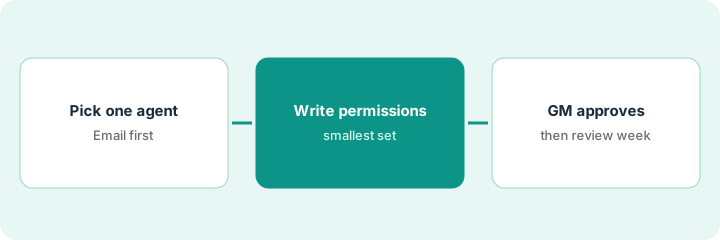
1. Step 1 — Pick one agent (Email)
What it is: Start with the Email agent only; leave Sales and Migration off until Email is quiet for a week.
- Confirm Agent Hub early access is enabled for your property.
- Pick the Email agent as the only pilot.
- Name the GM or IT lead who approves permissions.
- List the mailboxes it may read.
IT enables Agent Hub early access for one brand. Only the Email agent is selected. Sales and Migration stay off.
Write “Pilot agent: Email. Off: Sales, Migration. Approver: ___.” Keep that sheet with the permission list.
2. Step 2 — Write its permission list
What it is: List every action the Email agent may take, and ban everything else.
- Allow: draft replies to listed FAQs; read reservation status fields you name.
- Deny: refunds, rate changes, door codes, ID documents, and anything outside the FAQ list.
- Require a person before any send that is not on the FAQ list.
- Keep the list to one page.
Allowed: check-in time, parking, Wi-Fi FAQ drafts. Denied: payment links, refunds, and room moves. Anything else stays human-only.
Paste the allow/deny list into your change ticket so the GM can sign the same text.
3. Step 3 — GM or IT approves, then review the first week
What it is: The GM or IT lead approves the permission list, then reviews every Email agent action for one week.
- GM/IT signs the permission list.
- Turn the Email agent on for the listed mailboxes only.
- Each day, review the action log.
- Tighten permissions on any surprise action.
- Decide after seven days whether to keep, shrink, or turn off.
Day three shows a draft that offered a discount the FAQ list did not include. IT denies discount language and re-approves the list.
Schedule a 15-minute daily review for seven days. Do not expand to a second agent during that week.
Pricing context (October 2026)
This how-to isn't a price sheet. Per the Apaleo AI review, Apaleo publishes €8 per room per month starting at €400 per month. Dated October 2026.
Checked Oct 15, 2026 on the vendor’s own pricing page: Apaleo’s pricing page lists €8 per room per month, starting at €400 per month, with no separate license, maintenance, or integration fees shown on that page. Agent Hub is early access; confirm whether it is included in your contract.
Uncertainty: Agent Hub is early access; confirm whether it is in your contract. Euro amounts are from Apaleo's own pricing page. The only prices this site sells here are the optional $9 AI toolkit spreadsheet and $19 AI toolkit audit.
When this helps (honest take)
Useful when you are already on Apaleo, have early access, and can name a GM or IT approver for one agent.
Not useful when you need Sales or Migration agents on day one, or nobody will read the action log.
Related options (educational)
| Need | Where to look | Why |
|---|---|---|
| Apaleo AI features | Apaleo AI | Primary path |
| Mews alternative | Mews AI | Related PMS |
| Mews reply rules | Mews Agent reply rules | Same day's how-to |
| Hospitality stack map | Stack map: hospitality ops | Where Apaleo fits |
FAQ
Is Agent Hub generally available?
Per our review, it is early access. Keep the pilot label until Apaleo and your GM say otherwise.
Should one agent have refund rights?
Not in this routine. Refunds stay with a person.
Where do Apaleo prices live?
See the pricing section; we re-checked Apaleo's pricing page on Oct 15, 2026. Our Oct 15, 2026 check of the vendor’s own pricing page is summarized in the pricing section above.
Is Agent Hub generally available?
Per our review, Apaleo Agent Hub is early access. Treat it as a pilot until Apaleo and your GM say otherwise.
Optional next step
If you want a one-page toolkit map for the tools you already pay for, use the optional $9 AI toolkit spreadsheet. If you want a short review of seat waste and unused tools, use the optional $19 AI toolkit audit. Neither is required to follow this how-to.