How-to · Hotels · Stayntouch · Oct 15, 2026
Set Stayntouch's timed room assignment and upsell rules, and approve each one before it runs
Stayntouch can run automatic and timed room assignment plus attribute-based upsells. Rules that move guests or pitch upgrades still need a named approver. This page shows how to list worthwhile attributes, draft a small set of rules, and have the front office manager approve each one before it runs.
Who this is for
Front office managers at select-service hotels on Stayntouch who want timed room assignment and upsells without surprise moves. The job here is a short approved rule list. For OPERA Cloud accessible and VIP assignment checks, see a different job: OPERA Cloud room assignment check.
How to do it
This is a how-to, not a ranking of hotel PMS products. Per the Stayntouch AI review, Stayntouch supports automatic and timed room assignment and attribute-based upsells, with Guest Messaging as a separate add-on. The review's ground rule: the front office manager approves every automated room move and upsell rule.
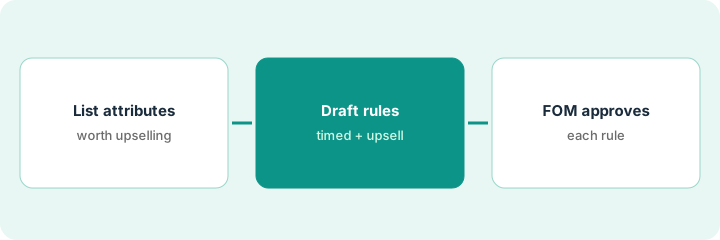
1. Step 1 — List room attributes worth upselling
What it is: Write the attributes guests will pay for and the ones that must never auto-move.
- List sellable attributes (view, floor, connecting, kitchenette).
- List protected attributes (accessible rooms, medical needs, negotiated VIP).
- Name the front office manager who approves rules.
- Decide quiet hours when timed moves are forbidden.
Sellable: high floor, city view, late checkout. Protected: all accessible rooms and any ADA request notes. Timed moves stop after 8 p.m.
Make a two-column sheet: “May auto-upsell / Never auto-move.” Post it where rules are edited.
2. Step 2 — Draft timed assignment and upsell rules
What it is: Draft one timed assignment rule and one upsell rule on a single room type first.
- Draft the timed assignment window and target room pool.
- Draft one attribute-based upsell offer with a clear price.
- Keep both rules off or in draft until approved.
- Exclude protected attributes from both rules.
Rule A moves same-day early arrivals into cleaned kings between 2–4 p.m. Rule B offers a high-floor king for a fixed upsell amount at check-in. Both sit in draft.
Write each rule in plain language on one line: “When / Then / Never.” If you cannot say it in one line, the rule is too broad.
3. Step 3 — Front office manager approves each rule
What it is: The front office manager reads and approves each rule before it can run.
- Manager reads the rule and one sample outcome.
- Manager approves, edits, or rejects in writing.
- Record who approved and when.
- Review after the first week of runs.
- Turn off any rule that creates guest complaints.
The manager approves the 2–4 p.m. move rule and holds the upsell for clearer wording on refunds. Only Rule A goes live.
Keep a rule log: “Rule, approved by, date, room types.” Revisit it whenever rates or room pools change.
Pricing context (October 2026)
This how-to isn't a price sheet. Per the Stayntouch AI review, Stayntouch pricing is by request only. Dated October 2026.
Checked Oct 15, 2026 on the vendor’s own pricing page: Stayntouch shows no public list price. Stayntouch’s pricing page asks for contact details; no plan dollar figures appear. This page quotes no Stayntouch dollar figure; confirm what your contract includes with Stayntouch or your admin.
Uncertainty: Stayntouch does not publish plan dollar amounts on the pricing page we checked. The only prices this site sells here are the optional $9 AI toolkit spreadsheet and $19 AI toolkit audit.
When this helps (honest take)
Useful when you have clean attribute data and a manager who will own the rule log.
Not useful when room attributes are wrong in the PMS or nobody reviews moves after they run.
Related options (educational)
| Need | Where to look | Why |
|---|---|---|
| Stayntouch AI features | Stayntouch AI | Primary path on this page |
| Guest messaging alternative | Canary Technologies AI | Related guest path |
| OPERA assignment check | OPERA Cloud room assignment | A different job |
| Canary after-hours voice | Canary AI Voice script | Same day's how-to |
| Hospitality stack map | Stack map: hospitality ops | Where Stayntouch fits |
FAQ
Should accessible rooms ever auto-move?
Not in this routine. Keep accessible and medical-need rooms on the protected list.
How many rules in the first week?
One timed assignment and at most one upsell. Add more only after a quiet week.
Where do Stayntouch prices live?
By request only on the page we checked; see the pricing section. Our Oct 15, 2026 check of the vendor’s own pricing page is summarized in the pricing section above.
How many rules should we approve in week one?
Start with one timed assignment rule and one upsell rule on a single room type. Add more only after a quiet week.
Optional next step
If you want a one-page toolkit map for the tools you already pay for, use the optional $9 AI toolkit spreadsheet. If you want a short review of seat waste and unused tools, use the optional $19 AI toolkit audit. Neither is required to follow this how-to.