How-to · Close · Numeric · Oct 12, 2026
Draft flux commentary in Numeric that a controller signs off
Writing variance commentary is slow, and AI drafts make it faster. The risk is a confident reason that isn't true. This page shows an accounting team how to use Numeric's AI flux explanations so the draft saves typing, every reason ties to a transaction, and the controller approves the wording before anyone outside finance reads it. Terms: ERP means enterprise resource planning, the core finance and operations system.
Who this is for
Senior accountants and controllers at small and mid-size companies who already run flux reports in Numeric, or are piloting it. If you're on FloQast, its Variance Analysis works in a similar way; see FloQast vs Numeric.
How to do it
This is a how-to, not a ranking of close tools. Feature detail lives on the Numeric review. Numeric's own guidance for AI explanations is "edit, then approve," and this page builds on that.

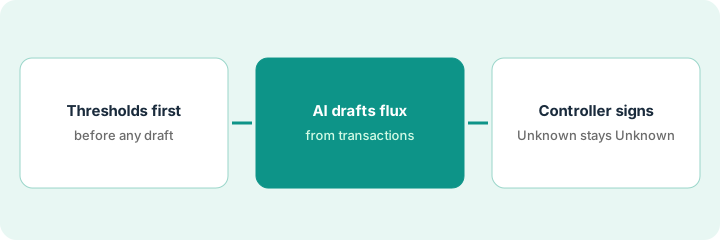
1. Step 1 — Set the thresholds before anything is drafted
What it is: Decide which variances need commentary before AI touches them, so the team doesn't explain every small swing.
- Set a dollar threshold and a percentage threshold together (for example, over 25000 USD and over 10%). Use your own numbers, agreed with your auditors.
- Group accounts the way leadership reads them, such as all operating expenses together, so the commentary matches the report people actually see.
- Assign a preparer for each group in Numeric.
- List any accounts that always need commentary regardless of size, such as revenue or anything an auditor has asked about.
The controller sets a 25000 USD and 10% threshold, plus a rule that revenue lines always get commentary. October's flux report has 11 lines over threshold instead of the 40 the team used to write up.
Write the threshold rule in one sentence at the top of the flux report: "Commentary required over $[X] and [Y]%, plus [accounts]." Get the controller to approve that sentence once.
2. Step 2 — Let AI draft from the transactions
What it is: Numeric's AI goes through the transactions behind a variance and suggests the drivers. You can add context, like a payroll CSV or a marketing budget pulled from a NetSuite saved search, and drill into the lines without leaving the report.
- Run the AI draft on each line over threshold.
- For each reason in the draft, open the transactions behind it. A reason you can trace stays. A reason you can't trace comes out.
- Add context files when the ledger alone can't explain a swing (headcount changes, a campaign budget).
- Write commentary in plain words a department head can read: what changed, by how much, and why.
Cloud hosting rose sharply month over month. The draft gives three reasons. Two match invoices in the detail. The third, "increased customer usage," has no transaction or usage data behind it, so the accountant deletes it and asks engineering for the usage report.
After each draft, write one line per reason: "Reason | Transaction or file that proves it." If the second column is empty, the reason goes.
3. Step 3 — Controller signs off; unknown stays Unknown
What it is: The controller approves every line of commentary before it's shared. When the cause genuinely isn't known yet, the commentary says so.
- The preparer marks each line ready only after Step 2's check.
- The controller reads the commentary against the numbers and approves or sends it back.
- If a cause isn't known at close, write "Cause Unknown, owner [name], expected [date]" instead of a plausible guess.
- Revisit last month's Unknowns at the start of next month's flux review.
A 40000 USD jump in professional fees can't be explained by close day five: two invoices are missing descriptions. The commentary reads "Cause Unknown: two invoices without descriptions. Owner: accounts payable lead. Expected by Oct 15." The controller approves it as written.
Add an approval column to your flux report: Prepared by | Approved by | Date. No line leaves finance without both names.
Pricing context (October 2026)
This how-to isn't a price sheet. When we checked on 6 October 2026, Numeric's pricing page listed ERP Replacement, Close Management & Analytics, Cash Management, and Billing & Revenue without figures, each leading to a demo. Packaging notes live on the Numeric review. Ask Numeric for a written quote. Dated October 2026.
Checked Oct 12, 2026 on the vendor’s own pricing page: Numeric’s pricing page lists product families (Close Management & Analytics, Cash Management, Billing & Revenue and others) with demo CTAs and no public seat figures. This page quotes no Numeric dollar amount; ask Numeric for a written quote.
Uncertainty: Features and packaging may change. If your contract and our review disagree, trust your contract. The only prices this site sells here are the optional $9 AI toolkit spreadsheet and $19 AI toolkit audit.
When this helps (honest take)
Useful when the team writes flux commentary every month, the ledger detail is clean enough to trace reasons, and a controller has time to approve the final wording.
Not useful when transaction descriptions are mostly blank or the chart of accounts changes every month. AI can't trace reasons the data doesn't hold.
Related options (educational)
| Need | Where to look | Why |
|---|---|---|
| Numeric features | Numeric | Primary path on this page |
| Comparing close tools | FloQast vs Numeric · FloQast AI | Same job, different design |
| Finance ops stack | Stack map for finance ops | Job, tool, and owner in one view |
| Close basics | Close checklist from your books | Live how-to |
Free: seat-waste calculator if a general AI assistant and Numeric are both drafting the same commentary.
FAQ
Does Numeric's AI approve the commentary?
No. It drafts. This pattern keeps approval with the controller.
Will auditors accept AI-drafted flux explanations?
That's a question for your auditors. What helps is the trail: every reason tied to a transaction, and a named approver on each line.
Where do current prices live?
With Numeric. The Numeric review notes what its pricing page showed. This page doesn't invent prices. Our Oct 12, 2026 check of the vendor’s own pricing page is summarized in the pricing section above.
What if the cause is unclear?
Leave the cause as Unknown. The controller still owns the wording; AI does not invent a driver to fill the blank.
Optional next step
Free reviews stay free. If Numeric, a general AI assistant, and a spreadsheet template are all being used to write the same commentary, the $9 AI toolkit spreadsheet helps you lay them out, or the $19 AI toolkit audit gets you a written memo.