How-to · User research · Maze · Oct 18, 2026
Build a Maze study with the AI study builder, and have the researcher approve it before AI Moderator runs
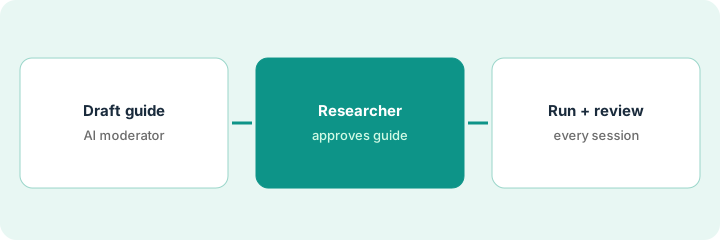
Maze's AI study builder turns a plain-language goal into a ready-to-run study, and the AI Moderator can then run voice interviews at scale. That is a lot of reach for one prompt. This page shows how to draft one study, fix its wording, and have a named researcher approve and pilot it before any participant hears the AI Moderator.
Who this is for
Product designers, product managers who run their own tests, and research ops leads on Maze's Enterprise plan. The job here is approving an AI-built study before AI Moderator runs it. For reading UserTesting's AI insight summaries and watching the clip behind every claim — a different job — see UserTesting insight summary clip check.
How to do it
This is a how-to, not a ranking of research tools. Per the Maze AI review, the AI study builder, AI-moderated interviews, and automated theme analysis sit on Enterprise, the AI Moderator is described as an Enterprise add-on, and Maze MCP is a read-only beta for Enterprise customers — it can't create, edit, or publish studies, so this routine does not use it. The ground rule: no study launches and no participant is contacted without a named researcher approving it.
1. Draft the study with the AI study builder
What it is: Type one goal, or upload a brief, and let the AI study builder draft the study — then judge every block against that one sentence.
- Write the goal in one sentence about what you need to learn.
- Let the builder draft; per our review it shows its reasoning for each block and asks instead of inventing missing context.
- For an AI-moderated study, check the two to five learning goals, the goal types, and the follow-up depth.
- Delete every question that does not map to the goal.
- Turn on your organization's review step if your plan offers it.
A designer types: find out whether returning customers can change their delivery date in the new checkout prototype. The draft adds two questions about payment methods. She deletes them.
Paste your goal at the top of the study notes and strike any block that does not answer it.
2. Run bias detection and edit the AI follow-ups
What it is: Use bias detection on every question and keep AI follow-ups to the one or two open questions where the “why” matters most.
- Accept a suggested rewrite only when you can say why the original was leading.
- Turn on AI follow-ups for one open question, not all of them.
- For AI Moderator studies, pick Structured for comparable answers or Freeform for early discovery.
- Set camera to off unless you need faces.
- Preview the study yourself three times and read every follow-up it asks.
Bias detection flags “How much would the new reporting feature help your team?” and suggests a neutral version. She takes it and adds one AI follow-up to the last open question about current workarounds.
Run bias detection, accept only the rewrites you can explain, and preview the follow-ups three times.
3. Researcher approves, pilots, then reads the themes
What it is: A named researcher approves the study, pilots it with colleagues, and only then opens it to participants — and later checks every theme against the recordings.
- Pilot an AI-moderated study with two colleagues first, as Maze's own best practice suggests.
- Fix any goal where the moderator drifts off topic before recruiting.
- After most sessions are in, run thematic analysis once — rerunning replaces themes you sorted by hand.
- Play two highlights per theme before you share it.
- Quote only words you can play or read in the transcript.
The research lead pilots a three-goal Freeform study with two colleagues, sees the moderator drift into pricing, adds a discussion instruction, and approves it for 40 panel participants. Later she plays two highlights per theme and rewrites one summary that overstated a count.
Name the approving researcher in the study description and do not recruit until the pilot is clean.
Pricing context (October 2026)
This how-to isn't a price sheet. Per the Maze AI review and Maze's pricing page (checked Oct 18, 2026), Maze shows no dollar figure for Enterprise, where most AI features sit; the review lists a Free plan with five seats and one study a month. Dated October 2026.
Checked Oct 18, 2026 on the vendor’s own pricing page: Maze’s pricing page lists its plans and AI features, but no dollar figure rendered when we read it; the AI moderator is listed for Enterprise. This page quotes no Maze dollar figure; confirm what your contract includes with Maze or your admin.
Uncertainty: The only prices this site sells here are the optional $9 AI toolkit spreadsheet and $19 AI toolkit audit.
When this helps (honest take)
Useful when your team already runs prototype tests or interviews on Enterprise and has a researcher who will approve every launch and pilot AI-moderated studies.
Not useful when you run a few tests a year, nobody will pilot studies before panel spend, or the topic is sensitive enough that a human moderator should be in the room.
Related options (educational)
| Need | Where to look | Why |
|---|---|---|
| Maze AI features | Maze AI | Primary path |
| Recorded video with AI summaries | UserTesting insight summary clip check | A different job |
| Maze and UserTesting side by side | Maze vs UserTesting | Compare the two platforms |
| In-product surveys | Sprig survey targeting | Surveys inside your product |
| Research stack map | Stack map: research ops | Where Maze fits |
FAQ
Can Maze's AI launch a study on its own?
No. Per our review, the study builder drafts a study for you to review, and Maze says organizations can add a review step so researchers sign off before anything goes live.
Can Maze MCP build the study for us?
No. Per our review, Maze MCP is read-only — it can't create, edit, or publish studies — and it is a beta for Enterprise teams.
How much does Maze cost?
Maze shows no Enterprise list price; most AI features sit on Enterprise. See the pricing section.
Can Maze’s MCP server run studies?
Not in this routine. Per our review, Maze’s MCP server was a read-only Enterprise beta.
Optional next step
If you want a one-page toolkit map for the tools you already pay for, use the optional $9 AI toolkit spreadsheet. If you want a short review of seat waste and unused tools, use the optional $19 AI toolkit audit. Neither is required to follow this how-to.