How-to · Questionnaires and RFPs · Loopio · Oct 18, 2026
Draft RFP answers with Loopio Automated Answers, and have the subject expert review every low-confidence answer
Loopio's Automated Answers draft a whole project from your Library with citations, and Confidence Pulse marks which answers are weaker. Every draft is only as current as the Library entry behind it. This page shows how to clean the Library first, then send every low-confidence answer to the subject expert who owns the topic.
Who this is for
Proposal managers, bid leads, and security leads who answer RFPs, due diligence questionnaires (DDQs), and security questionnaires from a Loopio Library. The job here is library-cited drafts with subject-expert review. For first-drafting a DDQ with Responsive AI Draft and having a reviewer approve every answer after the TRACE check — a different job — see Responsive AI Draft reviewer approval.
How to do it
This is a how-to, not a ranking of RFP tools. Per the Loopio AI review, Loopio calls its AI Response Intelligence, generative AI is never enabled automatically, Automated Answers draw from approved content with citations, and Confidence Pulse shows Loopio's view of accuracy, trust, and completeness. For a single security questionnaire row answered with evidence or Unknown, see Answer a questionnaire row with evidence or Unknown. The ground rule: a citation shows the source, not that the source is still right.

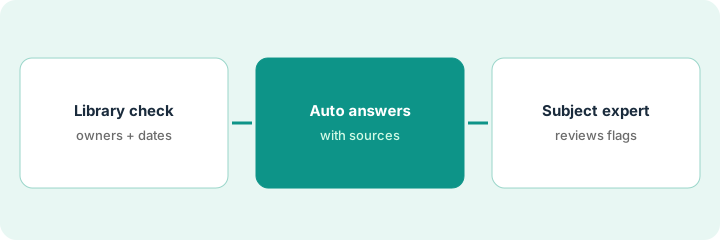
1. Fix stale Library entries first
What it is: Before drafting, pull the oldest entries in the topics this RFP covers and have each owner approve, update, or retire them.
- Filter the Library Report for entries in Needs Review, Out of Date, or Stale.
- Pick ten of the oldest in the RFP's main topics.
- Use Review Now to send each to its owner.
- Run Detect Duplicates and merge overlaps as alternate questions.
- Retiring an entry is a good outcome.
She picks ten security entries older than a year. The security lead approves three, rewrites two, and retires four describing a data center the company left; one duplicate pair is merged.
Clean ten entries in the RFP's main topic before you run Automated Answers.
2. Run Automated Answers
What it is: Populate the project from your Library and connected sources, and choose how much generation to allow.
- Count the questions in the source file and compare with what landed in the project.
- Choose verbatim library answers for security and legal sections.
- Run Automated Answers and sort by Confidence Pulse.
- List every answer that names a control, a date, a certification, or a number.
- Do not add any generated answer back to the Library yet.
Automated Answers fill all 140 questions; 22 come back at medium or low confidence, and 31 name a date, number, or certification.
Make two lists before anyone edits: low-confidence answers and answers that name a fact.
3. Route low-confidence answers to Recommended Experts
What it is: Send every medium- and low-confidence answer, and every answer naming a fact, to the subject expert — using Recommended Experts as a suggestion the proposal manager confirms.
- Use Recommended Experts to suggest who should review each answer.
- Reassign suggestions that point to someone who has left or changed roles.
- The expert opens the citation for every answer that names a fact, whatever its confidence.
- Only the topic owner promotes a strong answer back to the Library.
- Export nothing until every routed answer is approved.
The security lead reviews the 22 low-confidence answers first, then opens citations on every encryption and SOC 2 answer. Two high-confidence answers cite a 2024 report; she updates them in the Library.
Route low-confidence answers first, then every answer that names a date, number, or certification.
Pricing context (October 2026)
This how-to isn't a price sheet. Per the Loopio AI review and Loopio's pricing page (checked Oct 18, 2026), Loopio publishes no prices; Foundations, Enhanced, and Enterprise are quoted by sales, and the FAQ says Foundations includes 10 seats. Dated October 2026.
Checked Oct 18, 2026 on the vendor’s own pricing page: Loopio shows no public list price. Loopio’s pricing page lists Foundations, Enhanced, and Enterprise and says to book a call for a custom quote; Foundations starts with 10 seats. This page quotes no Loopio dollar figure; confirm what your contract includes with Loopio or your admin.
Uncertainty: The only prices this site sells here are the optional $9 AI toolkit spreadsheet and $19 AI toolkit audit.
When this helps (honest take)
Useful when a proposal team answers a steady flow of RFPs and questionnaires from a shared Library and has named experts who keep it current.
Not useful when you answer a few questionnaires a year that your compliance platform already handles, or nobody will own the Library.
Related options (educational)
| Need | Where to look | Why |
|---|---|---|
| Loopio AI features | Loopio AI | Primary path |
| Reviewer flow with the TRACE check | Responsive AI Draft reviewer approval | A different job |
| Loopio and Responsive side by side | Loopio vs Responsive | Compare the two |
| One questionnaire row with evidence | Answer a questionnaire row with evidence or Unknown | Existing how-to |
| Security reviews with Slack approvals | Conveyor Slack approval rules | Auto-return rules |
FAQ
Is Loopio's generative AI on by default?
No. Per our review, Loopio says generative AI is never enabled automatically; an admin turns it on, and drafts draw only from content each user may see.
Can we trust high-confidence answers without review?
Not for facts. Confidence Pulse helps you order the review. Have the expert open the citation for every answer that names a control, date, certification, or number.
How much does Loopio cost?
Loopio publishes no prices; all three plans are quoted. See the pricing section.
Optional next step
If you want a one-page toolkit map for the tools you already pay for, use the optional $9 AI toolkit spreadsheet. If you want a short review of seat waste and unused tools, use the optional $19 AI toolkit audit. Neither is required to follow this how-to.