How-to · Questionnaires and RFPs · Responsive · Oct 18, 2026
First-draft a DDQ with Responsive AI Draft, and have a reviewer approve every answer after the TRACE check
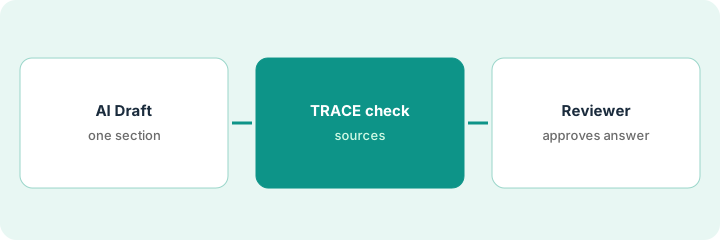
Responsive AI Draft writes first answers from your Content Library, and each AI-generated answer carries a TRACE check for accuracy, relevance, and traceability. A first draft is a starting point, not a submission. This page shows how to choose the right answer mode, draft one due diligence questionnaire (DDQ), and make reviewer approval the gate before export.
Who this is for
Proposal and bid managers, sales consultants, and security leads who answer DDQs and security questionnaires in Responsive. The job here is a reviewer flow with the TRACE check. For drafting with Loopio Automated Answers and sending low-confidence answers to the subject expert — a different job — see Loopio Automated Answers expert review.
How to do it
This is a how-to, not a ranking of RFP tools. Per the Responsive AI review, Responsive is the company formerly called RFPIO, AI Draft has two answer modes, a hand-edited answer loses its TRACE indicator, and a question can't be set back once marked reviewed. Agent Studio (early access) and Portal Automation (beta) are not used here. The ground rule: every answer that reaches a buyer is approved by a named reviewer.
1. Pick an answer mode
What it is: Decide, section by section, whether AI Draft may generate new text or must use Content Library answers only.
- Ask your Super Admin which mode the organization allows.
- Use Content Library answers only for information security and compliance sections — no exact match means a blank.
- Use library-plus-AI only for narrative sections a writer will rework.
- Set the mode per project or section on the AI Draft Instructions & Filters page.
- Write the choice in the project notes.
A security lead sets the information-security sections to Content Library answers only and leaves company overview on library-plus-AI.
Choose library-only for every security section before you run AI Draft.
2. Run AI Draft on one DDQ
What it is: Run AI Draft on the questionnaire and mark every answer that makes a commitment or that the TRACE check flags as thin.
- Run AI Draft on each section.
- Expect blanks in library-only sections; those need current evidence from the expert.
- Mark every answer about controls, certifications, service levels, prices, contract terms, or roadmap.
- Note every answer the TRACE check marks as weak.
- Do not export anything.
Forty security questions come back blank because no exact match exists. The security lead answers them from current evidence and lists them for review.
Make one list of blanks, commitments, and TRACE flags before assigning reviewers.
3. Reviewer works TRACE flags and approves
What it is: Assign a named reviewer to every section; they edit, resolve TRACE flags, and complete review — and nothing exports until every section is green.
- Assign reviewers at the section or question level, by topic owner.
- The reviewer opens the source for every flagged answer.
- A hand edit removes the TRACE indicator — the reviewer's approval is the check that stands.
- Mark Reviewed only when sure; it can't be set back on a question.
- Add newly approved answers to the Content Library.
Security, legal, and implementation sections go to three named reviewers. The legal reviewer rewrites a liability answer by hand and approves it. The file exports only when every section shows Complete Review.
Export only after every section shows Complete Review by a named reviewer.
Pricing context (October 2026)
This how-to isn't a price sheet. Per the Responsive AI review and Responsive's pricing page (checked Oct 18, 2026), the Emerging Edition is listed starting from $10,000, with Growth and Enterprise by quote. The page doesn't state the period or seats behind that figure. Dated October 2026.
Checked Oct 18, 2026 on the vendor’s own pricing page: Responsive’s pricing page lists Emerging starting from $10,000; higher editions are quoted.
Uncertainty: The only prices this site sells here are the optional $9 AI toolkit spreadsheet and $19 AI toolkit audit.
When this helps (honest take)
Useful when a proposal team answers a high volume of RFPs and DDQs, keeps a maintained Content Library, and will use library-only mode for regulated answers.
Not useful when you answer a handful of questionnaires a year, the starting price is out of proportion to your volume, or you hope agents will make disclosure decisions.
Related options (educational)
| Need | Where to look | Why |
|---|---|---|
| Responsive AI features | Responsive AI | Primary path |
| Library-cited drafts with expert review | Loopio Automated Answers expert review | A different job |
| Loopio and Responsive side by side | Loopio vs Responsive | Compare the two |
| One questionnaire row with evidence | Answer a questionnaire row with evidence or Unknown | Existing how-to |
FAQ
Is Responsive the same company as RFPIO?
Yes. Per our review, Responsive is the company formerly called RFPIO, and rfpio.com redirects to responsive.io.
Can I stop Responsive AI from generating new text?
Yes. Per our review, a Super Admin can set AI Draft to Content Library answers only, which returns exact library matches and leaves the rest blank.
How much does Responsive cost?
The Emerging Edition is listed from $10,000; Growth and Enterprise are by quote. See the pricing section.
Is Responsive the same as RFPIO?
Per our review, Responsive was formerly called RFPIO.
Optional next step
If you want a one-page toolkit map for the tools you already pay for, use the optional $9 AI toolkit spreadsheet. If you want a short review of seat waste and unused tools, use the optional $19 AI toolkit audit. Neither is required to follow this how-to.