How-to · Recruiting · Lever AI · Oct 12, 2026
Rewrite one Lever nurture sequence with AI and a human tone check
Candidate nurture emails go stale fast, and stale ones get ignored. This page shows a recruiter how to refresh one Lever sequence at a time with AI-assisted drafts, then check every line for tone and accuracy before it reaches a candidate.
Who this is for
Recruiters and sourcers who use Lever's nurture campaigns and have sequences that haven't been touched in months. If your outreach lives in a dedicated sourcing tool instead, see Juicebox.
How to do it
This is a how-to, not a ranking. Feature detail on nurture outreach with AI-assisted drafts lives on the Lever AI review.

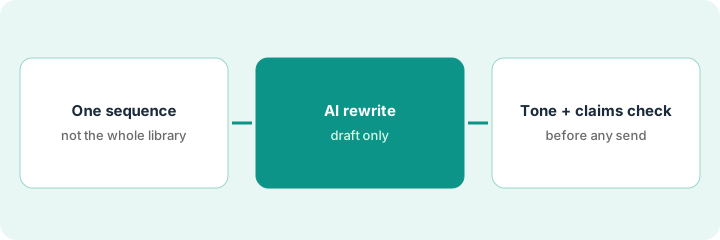
1. Step 1 — Pick one sequence
What it is: Choose the single sequence where a rewrite would matter most, rather than refreshing everything at once.
- Look at which active sequence has the lowest reply rate, or the most candidates enrolled.
- Read it end to end as if you were the candidate.
- Note anything outdated: old team names, a perk you no longer offer, a role that's closed.
- Leave every other sequence alone until this one is done and measured.
The "Senior engineers, silver medalists" sequence has 140 people enrolled and a low reply rate. Email two still mentions a hiring event from last spring.
List each email in the sequence with Subject | Send day | What it asks for | Outdated lines. Fix the outdated list first.
2. Step 2 — Rewrite it with AI
What it is: Use Lever's AI-assisted drafting to rewrite each email from a short, true brief you write first.
- Brief: who the candidates are, why you're reaching out now, and one real reason to reply.
- Ask for shorter emails, around 80 to 120 words each.
- Keep the personalization tokens you already use, and check each one renders.
- Draft every email in the sequence, but don't activate anything yet.
Brief: "Engineers we liked last year. We've opened two senior platform roles. Real reason: the team they met is the team that's hiring." The AI shortens email one from 210 words to 95 and drops the generic culture paragraph.
Prompt: "Rewrite this nurture email for candidates who interviewed with us last year. Under 120 words. Keep the tokens as they are. Only mention facts from this brief: [brief]. Don't add perks, salary, or claims not in the brief."
3. Step 3 — Check tone and claims before sending
What it is: A person reads every draft to check tone and checks every factual claim before the sequence goes live.
- Read each email aloud. Cut anything that sounds like a form letter.
- Check every claim (team, role, location, benefits) against the current job post.
- Make sure each email has a clear, easy way to opt out.
- Activate the new sequence and note the date so you can compare reply rates in a month.
Draft three said "fully remote." The current post says hybrid two days a week. Fixed before activation. The recruiter marks the launch date in the sequence name.
Before activating, fill a three-column check: Email | Claims checked against post (Y/N) | Opt-out present (Y/N).
Pricing context (October 2026)
This how-to isn't a price sheet. Lever pricing is quote-based; packaging notes live on the Lever AI review. Ask your Lever admin which AI features your plan includes. Dated October 2026.
Checked Oct 12, 2026 on the vendor’s own pricing page: Lever shows no public list price. Lever’s pricing page routes to custom quotes rather than published seat figures. This page quotes no Lever dollar amount; ask your Lever admin which AI draft features your plan includes.
Uncertainty: Lever's AI features and packaging change. If your contract and our review disagree, trust your contract. The only prices this site sells here are the optional $9 AI toolkit spreadsheet and $19 AI toolkit audit.
When this helps (honest take)
Useful when Lever is where your nurture lives, you have at least one sequence that's clearly stale, and someone will measure replies afterward.
Not useful when the problem is the list rather than the words. If the wrong people are enrolled, rewriting won't help. It's also not a reason to send more email.
Related options (educational)
| Need | Where to look | Why |
|---|---|---|
| Lever AI features | Lever AI | Primary path on this page |
| Sourcing outreach tool | Juicebox | When outreach lives outside the applicant tracking system |
| Job-post language | Textio | Language guidance for posts and messages |
| Before another seat | Three checks before an AI seat | Live how-to |
FAQ
Should I rewrite all my sequences at once?
No. Do one, measure it for a few weeks, then decide whether the approach is worth repeating.
Can AI personalize each email per candidate?
It can help, but every personalized line still needs to be true. Keep personalization to what's in the candidate's record.
Where do current prices live?
On the Lever AI review and with Lever. This page doesn't invent list prices. Our Oct 12, 2026 check of the vendor’s own pricing page is summarized in the pricing section above.
Why only one sequence?
Rewriting everything at once hides tone problems. One sequence lets you compare the old and new side by side before you widen the change.
Optional next step
Free reviews stay free. If recruiting pays for Lever outreach and a separate sourcing tool sending the same kind of email, the $9 AI toolkit spreadsheet or the $19 AI toolkit audit can help you sort out the overlap.