How-to · Insurance underwriting · Kalepa · Oct 20, 2026
Use Kalepa for submission intake and clearance, and have the underwriter approve every bind and decline
Kalepa takes a submission from the broker’s email through clearance, extraction, triage, and risk research, and can populate a quote the underwriter can “review, edit, or send”. Send is one click from review. This page shows how to run one week through intake and clearance and keep every bind and decline behind an underwriter.
Who this is for
Underwriting managers, underwriters, and underwriting assistants at commercial P&C carriers and MGAs, especially in excess and surplus (E&S) and specialty lines, where submissions pile up. The job here is intake and clearance, then the underwriter’s bind or decline call. Two close neighbours do a different job: reading an AI recommendation’s rationale and citations before a decline, referral, or broker email (Sixfold rationale and citation check), and setting portfolio objectives and guardrails before drafted quotes (Federato Control Tower guardrails).
How to do it
This is a how-to, not a ranking of underwriting tools. Per the Kalepa AI review, Kalepa’s clearance matches submissions to existing accounts, flags broker conflicts, runs sanctions screening, and routes by line, geography, broker, and capacity; separate judging agents check extraction work to set confidence levels; and triage weighs appetite, guideline fit, profitability, and win probability with an explainable factor breakdown. Kalepa’s earlier posts called the product Copilot. The ground rule: an underwriter approves every quote, bind, and decline.

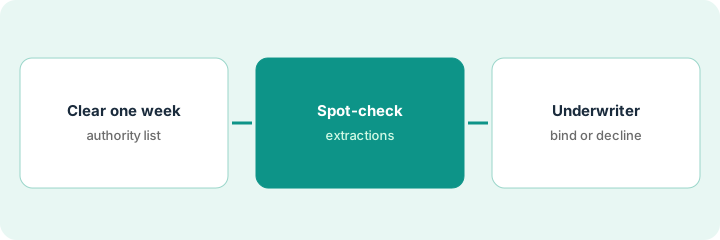
1. Clear one week of submissions
What it is: Run one week of real submissions for one line through Kalepa’s intake and clearance, and write down what Kalepa may finish on its own before you start.
- Write a one-page authority list: for example, classify documents, run sanctions screening, and request missing loss runs on its own; any quote, bind, or decline needs an underwriter.
- Pick one line and one week, not the whole inbox.
- Check each clearance result for the right existing account and broker of record.
- Check the business description in each risk profile against the application, since online research can describe a similarly named company.
- Have the underwriting manager own the clearance rules.
An underwriting manager runs one week of small casualty submissions through Kalepa. Clearance catches two duplicates from competing brokers. One risk profile pulls a lawsuit against a different company with the same name in another state; the underwriter corrects it before anyone quotes.
Write your authority list on one page before the first submission goes in: what Kalepa may finish alone, and what always stops for an underwriter.
2. Spot-check judged extractions and read the triage reasons
What it is: A confidence level is the system grading its own work. Sample high-confidence extractions too, and read the factor breakdown at the bottom of the queue, not only the top.
- Have an underwriting assistant compare twenty extractions field by field with the source documents, including ten marked high confidence.
- Log every miss by field: payroll by class code, loss run lines, locations.
- Read the factor breakdown for the lowest-priority submissions of the week.
- If a growth target is missing from the model’s picture, fix the portfolio target and re-run the week.
- Keep manual review on any field type that missed.
Payroll by class code is right on nineteen of twenty files. On one, a scanned loss run splits a single claim into two lines and was marked high confidence. The manager also sees restaurants ranked low because the team wrote few last year, even though restaurants are now a growth target, and updates the target.
Compare twenty Kalepa extractions with the source files, including ten marked high confidence, and read the triage factors for the thirty lowest-priority submissions.
3. Underwriter approves every bind and decline
What it is: Quotes, binders, and declines are the carrier’s commitment. The underwriter reads the premium inputs, the forms list, and the reason for any decline before approving.
- Read every premium input on a populated quote, not just the total.
- Check the forms and endorsements list against the risk’s jurisdiction and coverage.
- Approve every decline by hand with a one-line reason in the file.
- Record who approved each bind and when.
- Check the audit trail against the authority list once a month.
A senior underwriter checks ten Kalepa-populated fleet quotes. One uses a vehicle count from an old schedule; another is missing a state-specific endorsement because the garaging address was read as the wrong state. She fixes both before binding and asks the team to check vehicle count and garaging state on every fleet quote.
Before any bind or decline, have the underwriter read the premium inputs, forms list, and reason, and initial the file.
Pricing context (October 2026)
This how-to isn’t a price sheet. Per the Kalepa AI review, Kalepa does not publish prices. When we checked on Oct 20, 2026, kalepa.com/pricing returned not found and the site offers demos. Treat it as quote-only and ask which of the seven modules you need and how volume is counted. Dated October 2026.
Checked Oct 20, 2026 on the vendor’s own site: Kalepa publishes no prices; kalepa.com/pricing returned not found and Kalepa’s site lists no prices. This page quotes no Kalepa dollar figure; ask Kalepa for a written quote and see our review for what is known.
Uncertainty: The only prices this site sells here are the optional $9 AI toolkit spreadsheet and $19 AI toolkit audit.
When this helps (honest take)
Useful when you are a commercial carrier or MGA buried in submissions, your appetite and guidelines are written down, and underwriters will check its research and quotes before trusting them.
Not useful when you mainly need actuarial pricing models, you are an agency, or you want binds and declines to go out without an underwriter.
Related options (educational)
| Need | Where to look | Why |
|---|---|---|
| Intake, clearance, and quote-to-bind support | Kalepa AI | Primary path; quote only |
| Recommendation rationale and citations | Sixfold rationale and citation check | A different job |
| Portfolio objectives and guardrails | Federato Control Tower guardrails | A different job |
| Where underwriting AI fits | Stack map: insurance ops | Broader map |
FAQ
Is Kalepa the same as Kalepa Copilot?
Per our review, Kalepa’s older announcements call the product Copilot; its current site calls it a Professional Grade AI platform. Treat Copilot as the earlier name.
Does Kalepa research submissions on its own?
Yes. It adds outside data and public information to each submission, with a link to each source. An underwriter should check those facts against the application.
How much does Kalepa cost?
Kalepa does not publish prices. Treat it as quote-only (checked Oct 20, 2026).
Optional next step
If you want a one-page toolkit map for the tools you already pay for, use the optional $9 AI toolkit spreadsheet. If you want a short review of seat waste and unused tools, use the optional $19 AI toolkit audit. Neither is required to follow this how-to.