How-to · Insurance claims · Guidewire · Oct 20, 2026
Use Guidewire Claim Summarization, and have a claims supervisor check every summary before it informs a reserve
Guidewire’s Claim Summarization for ProNavigator summarises a claim file and its change history so adjusters don’t read every note. A summary leaves things out by design, and the facts that change a reserve are exactly the ones to confirm. This page shows how to test it on open claims and let only checked summaries feed reserve decisions.
Who this is for
Claims leaders, claims supervisors, and adjusters at P&C carriers on Guidewire Cloud. The job here is checking claim summaries before they inform a reserve. For piloting Duck Creek’s Agentic FNOL and approving routing and anomaly referrals — a different job on the other big core system — see Duck Creek Agentic FNOL supervisor routing.
How to do it
This is a how-to, not a ranking of core systems. Per the Guidewire AI review, ProNavigator launched in the Palisades release (16 April 2026) and the Qusar release (3 August 2026) added the Agentic Framework and Guidewire-built agents. Labels matter: Claim Summarization is Restricted Availability in ClaimCenter and Early Access in InsuranceNow, Agentic FNOL is Restricted Availability, and Policy Change is Early Access. The ground rule: the file decides the reserve; a summary is a starting point.

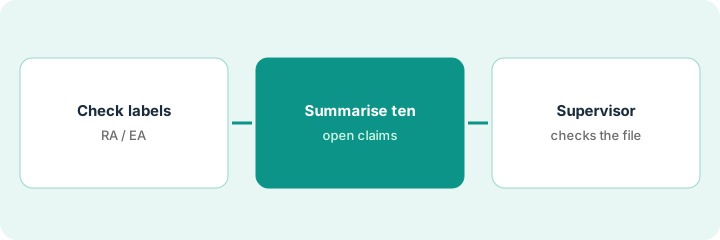
1. Check the availability labels for your setup
What it is: Before planning anything, confirm with Guidewire whether Claim Summarization is available to your carrier, in which product, and in your region.
- Ask whether you are on ClaimCenter (Restricted Availability) or InsuranceNow (Early Access).
- Guidewire notes that certain release features may not be available in all regions; ask about yours.
- Confirm which roles can see summaries under ProNavigator’s role-based access.
- Write the rule: no reserve, coverage, or payment decision rests on a summary alone.
- Name the claims supervisor who checks summaries during the test.
A claims supervisor at a commercial auto carrier confirms her carrier is in the Restricted Availability group for ClaimCenter. She writes the rule at the top of the test log: summaries help find pages faster; the file decides the reserve.
Write down your product, its label for Claim Summarization, and your region before the first summary runs.
2. Summarise ten open claims
What it is: Pick ten open claims with real activity and have ProNavigator write a summary of each claim file and its change history.
- Include claims with recent attorney involvement, late medical bills, or voided payments.
- Include at least two long files with many notes.
- Save each summary with the date it was generated.
- Do not change any reserve during the test based on a summary.
- Note anything the summary says that surprises the adjuster.
The supervisor picks ten open bodily injury and property damage claims, including one where the claimant retained an attorney last week and one with a payment that was later voided.
Generate summaries for ten open claims, including at least one with a new attorney letter and one with a voided payment.
3. Supervisor compares each summary to the file; only checked summaries feed reserves
What it is: The supervisor reads each summary against the claim notes and documents, marks what it missed or got wrong, and only then lets a checked summary support a reserve discussion.
- Compare each summary line with the notes and documents.
- Mark any missing attorney letter, medical bill, recorded statement, or payment change.
- Mark the summary checked or not checked in the file.
- Only a checked summary may be cited in a reserve review.
- Repeat the sample monthly while the feature stays Restricted Availability.
Eight summaries are accurate. One misses the new attorney; one lists the voided payment as paid. The supervisor corrects both in the notes, and in the next reserve review only the eight checked summaries are used, with the file open beside them.
For each summary, write checked or not checked and what it missed. Use only checked summaries in reserve reviews.
Pricing context (October 2026)
This how-to isn’t a price sheet. Per the Guidewire AI review, Guidewire does not publish prices for its cloud products, ProNavigator, or the Agentic Framework. When we checked guidewire.com on Oct 20, 2026, it showed no prices (our direct fetch was rate-limited, so we read it through a reader tool). Treat it as quote-only and ask which AI features your subscription includes. Dated October 2026.
Checked Oct 20, 2026 on the vendor’s own site: Guidewire publishes no prices on Guidewire’s site (our direct fetch was rate-limited, so we read it through a reader tool). This page quotes no Guidewire dollar figure; ask Guidewire for a written quote and see our review for what is known.
Uncertainty: The only prices this site sells here are the optional $9 AI toolkit spreadsheet and $19 AI toolkit audit.
When this helps (honest take)
Useful when you are on Guidewire Cloud, claims files are long, your carrier has access to Claim Summarization, and a supervisor will check summaries against the file.
Not useful when your carrier is not in the Restricted Availability or Early Access group, you run Guidewire on-premises, or you want summaries to set reserves without a person.
Related options (educational)
| Need | Where to look | Why |
|---|---|---|
| Claim summaries on Guidewire | Guidewire AI | Primary path; quote only; RA/EA labels |
| Agentic FNOL on Duck Creek | Duck Creek Agentic FNOL supervisor routing | A different job |
| Choosing a core system | Guidewire vs Duck Creek | Side-by-side explainer |
| Casualty medical summaries with citations | CLARA DocIntel medical summary reserve check | Related claims job |
FAQ
Is Claim Summarization generally available?
Not everywhere. Per our review, Guidewire lists it as Restricted Availability in ClaimCenter and Early Access in InsuranceNow.
Can a summary set a reserve?
No. Use summaries to find pages faster. A claims supervisor checks the file before any reserve decision.
How much does Guidewire AI cost?
Guidewire does not publish prices. Treat it as quote-only (checked Oct 20, 2026).
Optional next step
If you want a one-page toolkit map for the tools you already pay for, use the optional $9 AI toolkit spreadsheet. If you want a short review of seat waste and unused tools, use the optional $19 AI toolkit audit. Neither is required to follow this how-to.