How-to · Insurance claims · Duck Creek · Oct 20, 2026
Pilot Duck Creek’s Agentic FNOL, and have a claims supervisor approve routing and every anomaly referral
Duck Creek’s Agentic FNOL (first notice of loss) turns a claimant’s own words into a structured claim file, verifies coverage, and looks for anomaly signals. It opened to early access customers on 28 September 2026. Coverage matching and anomaly flags are where a wrong call costs most. This page shows how to pilot it on losses you already know the answer to and keep routing and referrals behind a claims supervisor.
Who this is for
Claims leaders, claims supervisors, and IT leads at P&C carriers that run Duck Creek and are in, or joining, the Agentic FNOL early access group. The job here is FNOL routing and anomaly referrals. For checking Guidewire claim summaries before they inform a reserve — a different job on the other big core system — see Guidewire claim summary reserve check.
How to do it
This is a how-to, not a ranking of core systems. Per the Duck Creek AI review, Agentic FNOL runs on the Agentic AI Platform (launched 28 April 2026), which records AI actions in a decision ledger and supports human-in-the-loop steps; the AI Gateway connects outside agents through MCP and A2A; and Document Intelligence summarises long files with citations. Duck Creek says each AI-driven determination is logged, with exceptions flagged for human review. The ground rule: a flag is a reason to look, never a finding of fraud, and a named supervisor approves routing and every anomaly referral.

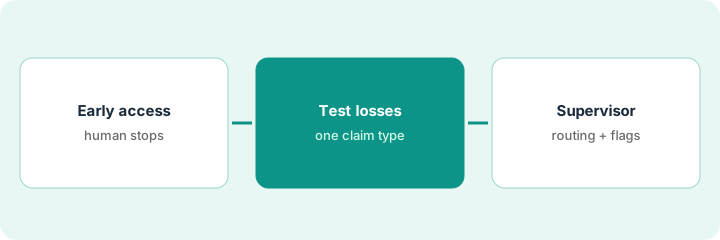
1. Confirm early-access scope and mark the human stops
What it is: Agentic FNOL is “now available for early access customers”. Confirm what your carrier can use, then write down which steps must stop for a person before IT configures anything.
- Ask Duck Creek which channels (digital, voice-to-text, mobile) and lines your early access covers.
- List every step in the planned FNOL flow.
- Mark the steps that must stop for a named person: any coverage question, any injury claim, any anomaly flag.
- Write that anomaly flags go to the claims supervisor, not straight to the special investigations unit (SIU).
- Have IT configure those stops as human-in-the-loop steps.
A claims operations director and her IT lead list the steps in their planned FNOL flow and mark three human stops: coverage questions, injury claims, and anomaly flags. The IT lead configures them, and the director agrees to read a sample of the decision ledger every Monday.
Write one page: every FNOL step, and which ones stop for a named person. Get the claims owner’s signature before IT builds it.
2. Route one claim type with test losses first
What it is: Build test losses from closed files for one claim type, run them through Agentic FNOL, and check each coverage match and anomaly flag against the policy.
- Pick one claim type, such as personal auto collision.
- Build twenty test losses from closed files, including a lapsed policy and a few the SIU team already looked at.
- Check each coverage match against the policy, including which vehicle or location it picked.
- Record every anomaly flag and whether the file was actually clean.
- Keep routing manual until coverage matching is right on the test set.
Seventeen of twenty coverage matches are right; two pick the wrong vehicle on a multi-car policy and one misses a lapse. Four claims are flagged, two of them clean. The supervisor keeps routing manual until vehicle matching is fixed.
Run twenty known losses through Agentic FNOL and fill a sheet: coverage match right or wrong, flag yes or no, file actually clean or not.
3. Supervisor approves routing and every anomaly referral; review AI Gateway settings
What it is: Once live claims flow, the claims supervisor approves each routing decision and decides every anomaly referral. IT and the business owner review what the AI Gateway connects.
- Supervisor reads each anomaly flag and decides refer, clear, or ask for more.
- Supervisor approves routing until a month of clean results.
- Read a week of the decision ledger to confirm the human stops happened.
- Before connecting any outside agent through the AI Gateway, write what it reads, what it may change, and which model it uses; have the business owner sign it.
- Ask Duck Creek what changes before general availability.
In the first live week the supervisor clears three of five anomaly flags after reading the files and refers two. The ledger sample shows every injury claim stopped for a person. The IT architect’s note on a proposed subrogation agent is signed by the claims director before it is connected.
For one week, have the claims supervisor decide every anomaly flag and read the decision ledger to confirm each human stop happened.
Pricing context (October 2026)
This how-to isn’t a price sheet. Per the Duck Creek AI review, Duck Creek does not publish prices for its core systems, the Agentic AI Platform, or agent applications. When we checked on Oct 20, 2026, duckcreek.com/pricing returned not found. Treat it as quote-only and ask which agents your subscription includes and how early access is charged. Dated October 2026.
Checked Oct 20, 2026 on the vendor’s own site: Duck Creek publishes no prices; duckcreek.com/pricing returned not found and Duck Creek’s site lists no prices. This page quotes no Duck Creek dollar figure; ask Duck Creek for a written quote and see our review for what is known.
Uncertainty: The only prices this site sells here are the optional $9 AI toolkit spreadsheet and $19 AI toolkit audit.
When this helps (honest take)
Useful when you run Duck Creek, claims intake is slow or incomplete at first notice, and a claims supervisor will own routing and every anomaly referral.
Not useful when you are not in the early access group, you want flags to go straight to SIU, or you run a different core system.
Related options (educational)
| Need | Where to look | Why |
|---|---|---|
| Agentic FNOL on Duck Creek | Duck Creek AI | Primary path; quote only; early access |
| Claim summaries on Guidewire | Guidewire claim summary reserve check | A different job |
| Choosing a core system | Guidewire vs Duck Creek | Side-by-side explainer |
| Fraud signals and referral thresholds | FRISS referral thresholds | Related claims job |
FAQ
Is Agentic FNOL generally available?
No. Per our review, Duck Creek said on 28 September 2026 that it is available for early access customers.
Does an anomaly flag mean fraud?
No. A flag is a reason to look. A claims supervisor reads the file and decides whether to refer.
How much does Duck Creek AI cost?
Duck Creek does not publish prices. Treat it as quote-only (checked Oct 20, 2026).
Optional next step
If you want a one-page toolkit map for the tools you already pay for, use the optional $9 AI toolkit spreadsheet. If you want a short review of seat waste and unused tools, use the optional $19 AI toolkit audit. Neither is required to follow this how-to.