How-to · Supply chain risk · Everstream · Oct 22, 2026
Check Everstream’s AI risk alerts for your top suppliers, and have the procurement lead decide every mitigation
Everstream Analytics watches world events, filters them for your mapped suppliers, sites, and lanes, and sends alerts it says analysts check first. This page shows how to test Reveal alerts on your most important suppliers for a month while the procurement lead decides every mitigation — pulled orders, second suppliers, buffer stock — and no alert changes a purchase order on its own.
Who this is for
Procurement leads, category managers, supply chain planners, and logistics managers using Everstream or weighing it. The job here is turning alerts into decisions a named person owns. This is an operations how-to, not financial advice. For mapping one product’s suppliers from its bill of materials in Altana — a different job built on supplier links, not alerts — see Altana supplier map.
How to do it
This is a how-to, not a ranking of risk tools. Per the Everstream AI review, Reveal monitors events around the clock, filters them with an AI context engine for relevance to your network, and Everstream says “expert analysts verify all alerts to eliminate false positives.” Network mapping sits underneath every product; Explore covers supplier risk assessment and Discover covers sub-tier suppliers. Action plans and scenario planning record and test responses. Everstream’s figures are its claims, and its numeric risk measures are risk signals to check, not verdicts. The ground rule: an alert is a prediction about your supplier, not a fact, so the procurement lead decides every mitigation.

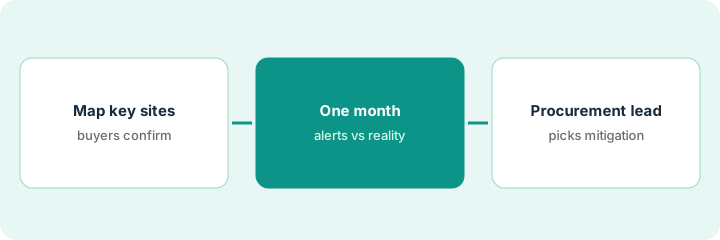
1. Map your twenty most important suppliers’ real sites
What it is: Alerts can only be as good as the map. Everstream recommends starting network mapping with a targeted subset of sites. Load your twenty most important suppliers and have buyers confirm each address is the real production site.
- Pick the twenty suppliers whose disruption would stop a product line.
- Load each production site, not the head office or invoicing address.
- Have the buyer who owns each supplier confirm the address and what it makes.
- Remove sites you no longer buy from before alerts go live.
The category manager loads 20 suppliers with 34 sites. Buyers correct six addresses that were sales offices and remove two sites that closed last year. Alerts go live on 28 confirmed production sites.
Load your twenty most important suppliers into Everstream’s network map and have each owning buyer confirm every site is a real, current production site.
2. Read one month of alerts against what actually happened
What it is: Before alerts shape buying rules, check a month of them. For each alert on a mapped supplier, record whether anything actually happened to your orders.
- Collect every Reveal alert for your mapped suppliers for one month.
- For each, note what happened: delay, partial shipment, nothing.
- Have the procurement lead mark which alerts would have changed an order.
- Open what drove any supplier’s risk signal change before it affects a sourcing decision.
The planner collects 41 alerts in a month. Eight touched real orders: a port strike delayed two containers and a factory fire cut one supplier’s output. The procurement lead marks five alerts that would have changed an order if acted on a week earlier.
Collect one month of Reveal alerts for your mapped suppliers, record what actually happened for each, and have the procurement lead mark the ones that would have changed an order.
3. The procurement lead picks each mitigation after one scenario check
What it is: An action plan records a decision; it does not make one. For each alert that affects a key supplier, the procurement lead checks the impact with the supplier, runs one scenario where it helps, and chooses the mitigation and its cost.
- Check the impact with the supplier through Everstream’s supplier feedback or directly.
- Run one scenario before committing to a second supplier or buffer stock.
- Have the procurement lead choose the mitigation and record the reason in the action plan.
- Write down which decisions, if any, may ever flow automatically into planning systems.
An alert flags flooding near a packaging supplier. The supplier confirms one line is down for a week. The procurement lead runs a scenario on pulling two weeks of orders forward, decides on one week of buffer stock instead, and records the reason and cost in the action plan.
For the next alert on a key supplier, confirm the impact with the supplier, run one scenario, and have the procurement lead choose the mitigation and record why.
Pricing context (October 2026)
This how-to isn’t a price sheet. Per the Everstream AI review, Everstream publishes no prices and offers demo requests, so it is quote-only. Its FAQ says the platform is modular: network mapping comes first, Reveal or Explore can be bought on their own, and Discover is recommended with both, with full onboarding typically taking 4 to 12 weeks. Ask which products the quote includes and how it scales with sites mapped. Dated October 2026.
Checked Oct 22, 2026 on the vendor’s own site: Everstream publishes no prices; everstream.ai/pricing returned not found and Everstream’s site offers demo requests. This page quotes no Everstream dollar figure; see our review for what is known and Everstream’s own site before you budget.
Uncertainty: The only prices this site sells here are the optional $9 AI toolkit spreadsheet and $19 AI toolkit audit.
When this helps (honest take)
Useful when a disruption at a handful of suppliers would stop a product line, buyers will keep the map current, and the procurement lead will decide mitigations from checked alerts.
Not useful when your supplier list changes every month with nobody updating the map, or you would let alerts change purchase orders without a person deciding.
Related options (educational)
| Need | Where to look | Why |
|---|---|---|
| Risk alerts, supplier risk, and sub-tier visibility | Everstream AI | Primary path; quote only |
| One product’s supplier map with confirmed links | Altana supplier map | A different job |
| Planning suites that use risk in scenarios | Kinaxis vs o9 | Planning, not alerts |
| Shipment visibility across carriers | project44 vs FourKites | Shipments, not suppliers |
| Where risk tools fit | Stack map: logistics ops | Broader map |
FAQ
Does Everstream check its alerts before I see them?
Everstream says expert analysts verify alerts before they reach you. Still check a month of alerts against what actually happened before building buying rules on them.
What are Reveal, Explore, and Discover?
Reveal is monitoring and alerts, Explore is supplier risk assessment, and Discover is sub-tier supplier visibility. Network mapping sits underneath all three.
Can Everstream change purchase orders on its own?
Everstream’s Insights-to-Action integrations can send risk data into planning systems. Decide in writing which decisions a system may take and which the procurement lead approves.
How much does Everstream cost?
Everstream publishes no prices and offers demos, so it is quote-only (checked Oct 22, 2026).
Optional next step
If you want a one-page toolkit map for the tools you already pay for, use the optional $9 AI toolkit spreadsheet. If you want a short review of seat waste and unused tools, use the optional $19 AI toolkit audit. Neither is required to follow this how-to.