How-to · Clinical notes · Epic Systems · Oct 21, 2026
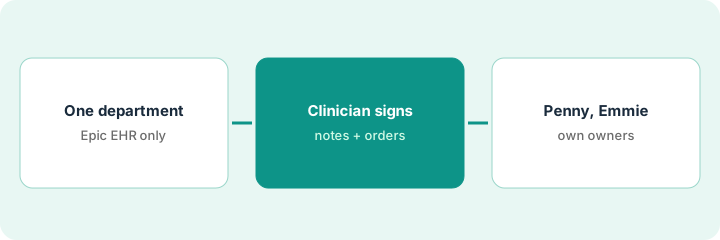
Pilot Epic’s Art AI Charting with one department, and have a named clinician sign every note and order
This page is about Epic Systems’ EHR, the clinical record many health systems run — not Applied Systems’ Applied Epic agency management software. Epic’s Art AI Charting listens during the visit, drafts the note, and queues suggested orders for clinician review. This page shows how to pilot it in one department so a named clinician signs every note and order, and how to keep Penny and Emmie on billing and patient-service work with their own owners.
Who this is for
CMIOs, attending clinicians, coding leads, and patient-access leads at health systems on the Epic EHR. If you were looking for the insurance agency system called Applied Epic, see Applied Epic AI instead. This is an operations how-to, not medical, coding, or billing advice. For athenahealth Express Coding on ambient visits in an ambulatory practice — a different job — see athenahealth Express Coding biller review.
How to do it
This is a how-to, not a ranking of EHRs. Per the Epic Systems EHR AI review, Epic described the release of AI Charting as part of Art on 4 February 2026: ambient listening, draft notes, suggested orders for clinician review, and voice commands to reshape note structure. Epic states clinicians must review drafts and suggested orders before they are placed. Penny handles professional billing coding and denial appeals; Emmie is the patient-facing AI in MyChart and text for scheduling and bill questions. Usage and denial figures are Epic’s. The ground rule: the attending clinician signs every note and every order; Penny and Emmie each get a named owner who samples their work.

1. Confirm it is Epic Systems, and pick one department
What it is: Make sure everyone means the Epic EHR, then start AI Charting in one department where IS has confirmed it is live for your version.
- Confirm the project is Epic Systems’ EHR, not Applied Epic.
- Ask your IS analyst which specialties have AI Charting enabled.
- Pick one department with clinicians willing to read every draft.
- Name the CMIO as pilot owner and each attending who will sign.
- Agree what always gets checked: refusals, orders, differentials, safety-net instructions.
The CMIO confirms with IS that AI Charting is enabled for hospital medicine, picks that department, and names six hospitalists. She writes four items every clinician checks on every draft.
Write down the department, the named attending clinicians, and the four items every draft is checked for, after IS confirms AI Charting is live there.
2. A named clinician signs every AI Charting note and suggested order
What it is: Each attending reads the draft and every suggested order against what was said, fixes what is wrong, and signs or places only what matches.
- Read Assessment and Plan line by line.
- Confirm every refusal is recorded.
- Delete suggested orders the patient declined or that were only discussed.
- Use voice commands to reshape structure, then reread.
- Sign only after every suggested order is settled.
A hospitalist reviews ten AI Charting drafts. Seven need light edits. One missed the patient’s anticoagulation refusal, and one suggested a contrast CT the patient had declined earlier in the admission. She corrects both, signs the rest, and adds “confirm refusals” to her checklist.
Pick ten AI Charting drafts and have the attending read each note and every suggested order against the visit before signing or placing anything.
3. Scope Penny and Emmie to non-clinical work, each with an owner
What it is: Keep Penny on professional billing coding and appeals, and Emmie on scheduling and bill questions. Each has an owner who samples output before autonomy widens.
- Have the coding lead sample fifty Penny-coded professional bills against final coder decisions.
- Hold visit types with repeated misses in dual review.
- Have the patient-access manager sample forty Emmie billing threads.
- Make balance disputes reach a person within one reply.
- Ask IS which Agent Factory items are live before planning any agent.
The coding lead finds six of fifty Penny-coded bills need a different E/M level and holds those visit types in dual review. The patient-access manager finds two Emmie threads mis-explained a balance after insurance and routes all balance disputes to a person.
Have the coding lead sample fifty Penny-coded bills and the patient-access manager sample forty Emmie threads before widening either.
Pricing context (October 2026)
This how-to isn’t a price sheet. Per the Epic Systems EHR AI review, Epic does not publish list prices for EHR modules or AI features. When we checked epic.com on Oct 21, 2026, we found no prices. Treat Art, Penny, and Emmie as quote-only under your Epic agreement, and ask which are included and which need extra licensing. Dated October 2026.
Checked Oct 21, 2026 on the vendor’s own site: Epic publishes no prices on epic.com. This page quotes no Epic dollar figure; ask Epic for a written quote and see our review for what is known.
Uncertainty: The only prices this site sells here are the optional $9 AI toolkit spreadsheet and $19 AI toolkit audit.
When this helps (honest take)
Useful when your health system already runs Epic, clinicians want ambient charting inside the EHR, and named owners will sign notes, sample Penny, and own Emmie escalations.
Not useful when you were looking for Applied Epic, you run an ambulatory-only practice on another EHR, or nobody will sample Penny and Emmie output.
Related options (educational)
| Need | Where to look | Why |
|---|---|---|
| Art AI Charting, Penny, Emmie | Epic Systems EHR AI | Primary path; quote only |
| Express Coding review on athenaOne | athenahealth Express Coding biller review | A different job |
| Choosing an ambulatory vs health-system EHR | athenahealth vs Epic Systems EHR | Side-by-side explainer |
| Insurance agency system named Epic | Applied Epic AI | Different company and product |
FAQ
Is Epic Systems EHR the same as Applied Epic?
No. Epic Systems makes a clinical EHR for health systems. Applied Epic is an insurance agency management system from Applied Systems.
Can AI Charting place orders without a clinician?
Per our review, Epic states clinicians must review suggested orders before they are placed. Keep that rule even if a future setting offers more automation.
How much does Epic AI cost?
Epic publishes no list prices. Treat Art, Penny, and Emmie as quote-only (checked Oct 21, 2026).
Optional next step
If you want a one-page toolkit map for the tools you already pay for, use the optional $9 AI toolkit spreadsheet. If you want a short review of seat waste and unused tools, use the optional $19 AI toolkit audit. Neither is required to follow this how-to.