How-to · Clinical notes · Elation Health · Oct 21, 2026
Use Elation Note Assist Actions for Rx, labs and referrals, and have the physician approve every action
Elation’s Note Assist drafts the visit note inside the EHR, and Actions listens for clinical intent and queues prescriptions, labs, referrals, and patient messages. An Action drafted from what the system heard is only as good as what it heard. This page shows how to turn on Actions for one physician who approves every one before anything is ordered or sent.
Who this is for
Primary-care physicians, nurse practitioners, practice managers, and billers at independent or direct primary care practices on Elation. The job here is Actions — the step where a spoken plan becomes an order. This is an operations how-to, not medical, coding, or billing advice. For letting Suki stage orders from an ambient note for clinician review — a different product — see Suki order staging clinician review.
How to do it
This is a how-to, not a ranking of EHRs. Per the Elation Health AI review, Note Assist drafts a structured note using the patient’s diagnoses and your templates, in 14 languages, and Actions “listens for your clinical intent, such as ordering prescriptions, labs, and referrals or messaging patients”; Elation says it automates their execution “without taking control.” Clinical Insights gives cited chart summaries, and Elation’s billing AI drafts codes from the signed note with a fast lane for claims above a confidence threshold the practice sets. The ground rule: the physician approves every Action that touches a prescription, lab, or referral, and signs every note.

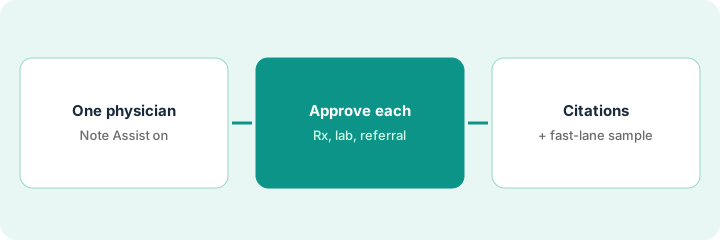
1. Turn on Note Assist and Actions for one physician
What it is: Start with one physician for one or two weeks. That physician owns the trial, and the practice manager tracks results.
- Pick one physician who will check every Action.
- Name the practice manager as trial owner.
- Confirm the physician’s templates are the ones Note Assist uses.
- Agree what counts as a miss: wrong dose, wrong timing, wrong specialist or location.
- Keep a simple log of every Action and whether it was changed.
The practice manager turns on Note Assist and Actions for one physician for two weeks and sets up a one-page log with columns for Action type, accepted, and changed.
Pick one physician and start a log with each Action type and whether it was accepted or changed before the first visit.
2. Physician approves every prescription, lab, and referral Action
What it is: For every visit, the physician reads each queued Action against what she said and approves, edits, or deletes it before anything is ordered or sent. Then she reads and signs the note.
- Check dose and start instructions on every prescription.
- Check timing on every lab — today versus a future date.
- Check the specialist and location on every referral.
- Read patient messages before they are sent.
- Sign the note only after every Action is settled.
Across ten visits, Actions queues twenty-three items; nineteen match. One drafts a full-dose prescription where she said start at half dose, one queues a lab she said to repeat in three months as due today, and two referrals pick the wrong specialist location. She fixes each before anything is ordered.
For your next ten visits, have the physician check every Action against what she said before anything is ordered, and log each change.
3. Open Clinical Insights citations and sample fast-lane claims
What it is: Clinical Insights summaries come with citations back to the chart, and fast-lane claims go straight to submission above the practice’s confidence threshold. Check both before trusting them.
- Have one clinician compare five Clinical Insights summaries with the full chart, opening each citation.
- Add a check for outside records that may not have been imported.
- Have the biller sample thirty fast-lane claims against the signed notes.
- Look for old coding habits the AI learned, such as missing modifiers.
- Raise the confidence threshold only after the sample.
She samples thirty fast-lane claims. Twenty-seven match, two left off a modifier the payer now requires — an old habit the AI learned from past claims — and one missed a wellness visit code. She fixes the modifier rule and keeps wellness visits out of the fast lane for a month.
Open the citations on five Clinical Insights summaries, then have the biller sample thirty fast-lane claims before raising the threshold.
Pricing context (October 2026)
This how-to isn’t a price sheet. Per the Elation Health AI review, Elation publishes no price list. When we checked Elation’s pricing page on Oct 21, 2026, it still says “See EHR Pricing: Now With Free, Native-AI Solutions Included” and asks you to request personalized pricing. The review notes Elation’s pages do not say whether Note Assist and Actions are included, so ask in writing. Dated October 2026.
Checked Oct 21, 2026 on the vendor’s own site: Elation’s pricing page says “See EHR Pricing: Now With Free, Native-AI Solutions Included,” offers tailored pricing, and asks you to request personalized pricing; it lists no amounts. This page quotes no Elation dollar figure; ask Elation for a written quote and see our review for what is known.
Uncertainty: The only prices this site sells here are the optional $9 AI toolkit spreadsheet and $19 AI toolkit audit.
When this helps (honest take)
Useful when you run an independent or direct primary care practice on Elation, physicians spend evenings on orders and notes, and the physician will check every Action.
Not useful when nobody will log Actions in the first weeks, physicians expect Actions to send without review, or you are a multi-specialty group on another EHR.
Related options (educational)
| Need | Where to look | Why |
|---|---|---|
| Note Assist, Actions, Clinical Insights, AI billing | Elation Health AI | Primary path; quote only |
| Order staging before EHR write-back | Suki order staging clinician review | A different job |
| Ambient visits plus biller code review on athenaOne | athenahealth Express Coding biller review | A different job |
| Where clinical notes fit | Stack map: healthcare ops | Broader map |
FAQ
What are Elation Actions?
Per our review, Actions listens for clinical intent and queues prescriptions, labs, referrals, and patient messages for the clinician to check.
Can Actions order a prescription without the physician?
Do not set it up that way. The physician approves, edits, or deletes every Action before anything is ordered or sent.
How much does Elation cost?
Elation publishes no price list and offers personalized pricing; its pricing page says native AI solutions are included (checked Oct 21, 2026). Ask whether Note Assist and Actions are included for your practice.
Optional next step
If you want a one-page toolkit map for the tools you already pay for, use the optional $9 AI toolkit spreadsheet. If you want a short review of seat waste and unused tools, use the optional $19 AI toolkit audit. Neither is required to follow this how-to.