How-to · Multifamily · DoorLoop · Oct 15, 2026
Let DoorLoop's Lease Renewal Agent draft renewal notices, and approve every one before residents see it
DoorLoop's Lease Renewal Agent can draft renewal notices from your records. Residents should only see notices a property manager approved. This page shows how to pull the 90-day list, draft with the agent, and approve every notice before send.
Who this is for
Small residential property managers on DoorLoop Multiply (or with Lease Renewal Agent access) who want drafted renewal notices without unsupervised sends. The job here is manager approval before residents see anything.
How to do it
This is a how-to, not a ranking of residential platforms. Per the DoorLoop AI review, Lease Renewal Agent carries renewals with supervision you set. The property manager approves every AI-drafted resident notice.

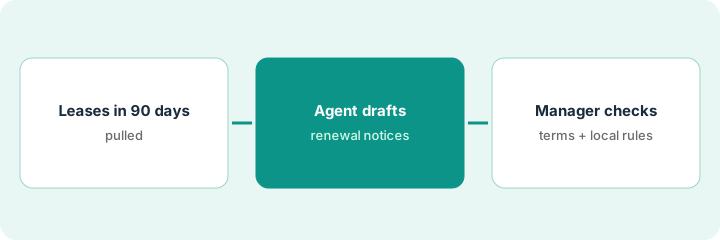
1. Step 1 — Pull leases ending in 90 days
What it is: Export leases ending in the next 90 days and note local notice timing rules.
- Pull the 90-day ending list.
- Note required notice periods for your jurisdictions.
- Flag income-restricted or special program units for extra review.
- Name the property manager who approves sends.
Twenty-two leases end in 90 days. Two are in a city with longer renewal notice rules — those get a separate checklist.
Add a column: “Notice due date by local rule.”
2. Step 2 — Agent drafts notices
What it is: Let the Lease Renewal Agent draft notices into a review queue — send stays off.
- Run drafts for the 90-day list.
- Keep send disabled until approval.
- Watch for wrong rent, wrong end date, or wrong unit.
- Do not batch-send from the draft step.
Twenty-two drafts: one shows last year's rent; two have the wrong end date from a prior partial renewal. All three corrected before approval.
Sort drafts by “data mismatch” first.
3. Step 3 — Manager checks terms and local rules, then sends
What it is: The property manager checks terms and local notice rules, then approves each send.
- Check rent, term, fees, and dates.
- Check local notice timing.
- Approve or edit each notice.
- Send only approved notices.
- Log who approved each one.
Manager approves nineteen, holds three for owner direction on increases. Nothing sends without a name on the approval.
Keep an approval log: “Unit / Notice version / Approved by / Date.”
Pricing context (October 2026)
This how-to isn't a price sheet. Per our Oct 15, 2026 check of DoorLoop’s pricing page, One is $2.50 per unit per month ($1.50 above 100) with a $199 minimum; Connect $4.00 with a $299 minimum; Multiply $5.00 with a $399 minimum. Lease Renewal Agent is listed with Multiply. Dated October 2026.
Checked Oct 15, 2026 on the vendor’s own pricing page: DoorLoop’s pricing page lists DoorLoop One at $2.50 per unit per month ($1.50 per unit above 100) with a $199 monthly minimum, Connect at $4.00 per unit with a $299 minimum, and Multiply at $5.00 per unit with a $399 minimum. Lease Renewal Agent is listed with Multiply.
Uncertainty: Confirm your plan includes Lease Renewal Agent. The only prices this site sells here are the optional $9 AI toolkit spreadsheet and $19 AI toolkit audit.
When this helps (honest take)
Useful when you can review every notice before residents see it.
Not useful when the agent is set to send without approval, or local notice rules are ignored.
Related options (educational)
| Need | Where to look | Why |
|---|---|---|
| DoorLoop AI | DoorLoop AI | Primary path |
| Rentvine AI | Rentvine AI | Related residential path |
| Rentvine Fixie triage | Rentvine Fixie maintenance | A different job |
| AppFolio resident messages | AppFolio Realm-X messages | Related notice gate |
| Property ops stack map | Stack map: property ops | Where DoorLoop fits |
FAQ
Can the agent send on its own?
Not in this routine. Manager approval first.
What about fair-housing language in notices?
Route increase and eligibility wording through your fair-housing reviewer when those topics appear.
Where do DoorLoop prices live?
See the pricing section; we re-checked DoorLoop pricing on Oct 15, 2026. Our Oct 15, 2026 check of the vendor’s own pricing page is summarized in the pricing section above.
Can the agent send notices on its own?
Not in this routine. The property manager approves every notice before residents see it.
Optional next step
If you want a one-page toolkit map for the tools you already pay for, use the optional $9 AI toolkit spreadsheet. If you want a short review of seat waste and unused tools, use the optional $19 AI toolkit audit. Neither is required to follow this how-to.