How-to · Ecommerce · AfterShip · Oct 17, 2026
Let AfterShip Agent handle shipment exceptions and return reviews, and have the customer service lead approve every policy answer
AfterShip Agent groups shipment exceptions, explains its reasoning, and drafts customer messages you edit and run; in Returns it rates return requests by risk. AfterShip says executed actions cannot be undone. This page shows how to write the policy answers first, start with one exception type, and have the customer service lead approve what goes out.
Who this is for
Customer service and ops teams on AfterShip Premium or Enterprise who qualify for AfterShip Agent and want help with exceptions and returns without unreviewed policy answers. For Narvar delivery dates and tracking messages owned by the customer service lead — a different job — see Narvar delivery promise ownership.
How to do it
This is a how-to, not a ranking of post-purchase tools. Per the AfterShip AI review, the exception agent is offered to eligible Premium and Enterprise customers as a limited general-availability programme, return reviews (RMA Review) are US-only on Premium and Enterprise, and each drafted message can be edited and previewed before you click Run. The Post-purchase MCP lists write tools that wait for approval; this routine keeps it read-only.
1. Write return and exception policy answers
What it is: Write the answers the agent's messages must match: delays, failed delivery, return-to-sender, and return eligibility.
- Write one approved answer per exception type.
- Write return rules: window, condition, who pays shipping.
- List what agents may never promise (for example free replacements).
- Name the customer service lead who approves.
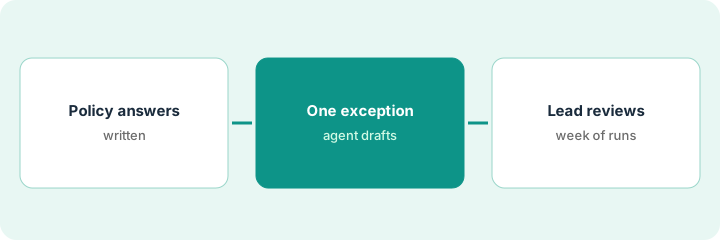
The lead writes four exception answers and a returns summary: 30 days, unopened food only, customer pays return shipping unless the item arrived damaged.
Put the approved answers on one page the whole team can see.
2. Turn on AfterShip Agent for one exception type
What it is: Start the exception agent on one type, such as parcels stalled for several days, and edit every drafted message before Run.
- Choose one exception type with steady volume.
- Read the agent's reasoning for each task.
- Edit drafted messages to match the approved answer.
- Remember executed actions cannot be undone.
- For returns, read the evidence behind every high-risk flag before rejecting.
The agent groups 14 stalled parcels into one task and drafts an apology that offers a free replacement. The lead edits it to the approved answer — a carrier trace and an update in 48 hours — then clicks Run.
Before each Run, check the message against the policy page line by line.
3. Customer service lead reviews a week of answers
What it is: After a week, the customer service lead reads the action log, a sample of messages, and a sample of approved return batches.
- Read the action log: who approved what.
- Sample sent messages for off-policy promises.
- Spot-check approved low-risk return batches.
- Decide whether to add a second exception type.
- Update the policy page if customers keep asking the same thing.
The log shows 40 runs. Two messages promised a delivery date the carrier had not given; the lead adds 'never give a date the carrier has not scanned' to the policy page.
Book a weekly 20-minute action-log review with the customer service lead.
Pricing context (October 2026)
This how-to isn't a price sheet. Per the AfterShip AI review and AfterShip's pricing pages (checked Oct 17, 2026), Tracking Essentials starts at $11 a month and Tracking Premium at $70 a month on monthly billing; Returns Premium starts at $119 a month. AfterShip lists no separate price for the agent. Dated October 2026.
Checked Oct 17, 2026 on the vendor’s own pricing page: AfterShip’s tracking pricing page lists Tracking Essentials from $11 a month and Tracking Premium from $70 a month on monthly billing; AfterShip’s Returns pricing lists Premium from $119 a month. No separate price is listed for AfterShip Agent.
Uncertainty: The only prices this site sells here are the optional $9 AI toolkit spreadsheet and $19 AI toolkit audit.
When this helps (honest take)
Useful when you are on AfterShip Premium or Enterprise, qualify for the agent, and have a customer service lead who owns policy answers.
Not useful when you are not eligible for the agent programme, or your job is pre-checkout delivery promises — see the Narvar how-to.
Related options (educational)
| Need | Where to look | Why |
|---|---|---|
| AfterShip AI features | AfterShip AI | Primary path |
| Narvar AI features | Narvar AI | Compare |
| Narvar delivery promises | Narvar delivery promise ownership | A different job |
| Shopify helpdesk unknowns | Gorgias on Shopify | Support side |
FAQ
How is this different from the Narvar how-to?
A different job: this page is AfterShip Agent handling exceptions and returns, with the customer service lead approving policy answers. The Narvar page is delivery dates and tracking messages owned by that lead.
Is AfterShip Agent available to everyone?
No. Per AfterShip, the exception agent is a limited general-availability programme for eligible Premium and Enterprise customers, and return reviews are US-only.
Where do AfterShip prices live?
Tracking from $11 a month, Tracking Premium from $70, and Returns Premium from $119 on monthly billing on the pages we checked; see the pricing section. Our Oct 17, 2026 check of the vendor’s own pricing page is summarized in the pricing section above.
Can AfterShip Agent actions be undone?
AfterShip’s help centre says executed actions cannot be undone, and every run is logged with who approved it.
Optional next step
If you want a one-page toolkit map for the tools you already pay for, use the optional $9 AI toolkit spreadsheet. If you want a short review of seat waste and unused tools, use the optional $19 AI toolkit audit. Neither is required to follow this how-to.