How-to · Ecommerce · Narvar · Oct 17, 2026
Set Narvar AI delivery dates and tracking messages, and have the customer service lead own every delivery promise
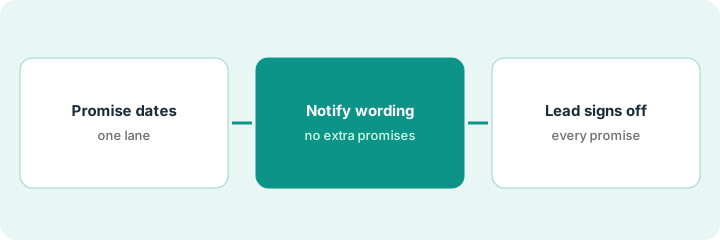
Narvar Promise shows estimated delivery dates before checkout, and Notify sends delay and delivery messages after. A date shown before purchase is part of the sale. This page shows how to check Promise dates for one carrier and region, fix the delay wording, and have the customer service lead own every promise.
Who this is for
Customer service and ecommerce teams at retailers on Narvar who want delivery dates and tracking messages that match what really happens. For letting AfterShip Agent handle shipment exceptions and return reviews with the customer service lead approving policy answers — a different job — see AfterShip Agent exception and return approval.
How to do it
This is a how-to, not a ranking of post-purchase tools. Per the Narvar AI review, Promise uses machine-learning models to set delivery dates and lets you define options and date ranges; Notify sends proactive updates by email and text; and Narvar's NAVI agent was introduced in January 2026 as Narvar 'outlining a direction', with general availability not stated — so this routine does not depend on NAVI.
1. Review Promise dates for one carrier and region
What it is: Pick one carrier and region and compare the dates Promise showed with actual delivery scans.
- Pick your busiest carrier and one region.
- Pull last month's orders: date shown, date delivered.
- Work out how often the shown date was met.
- Decide whether that lane should show a specific date or a range.
For ground shipping to the Mountain region, the shown date was met 82% of the time. The customer service lead switches that lane from a single date to a two-day range.
Make a small table: carrier, region, orders, date met %, single date or range.
2. Edit Notify delay and exception messages
What it is: Read every Notify delay and exception template and remove promises your policies do not make.
- Read each delay, exception, and refund-update message.
- Remove phrases like 'guaranteed' or 'we'll refund shipping' unless policy says so.
- Keep text-message opt-in rules with the brand.
- Check each message in every locale you send.
The delay message says 'We'll make it right with a refund'. Policy offers a shipping refund only on express orders, so the lead rewrites it.
List each template you changed with the old and new line.
3. Customer service lead signs off on promise wording
What it is: The customer service lead signs off on date settings and message wording, and rechecks monthly.
- Approve date-or-range settings per lane.
- Approve each edited message.
- Recheck date-met rates every month and before peak season.
- Keep an easy route to a person in every message.
- Log approvals.
The lead approves the new ranges and three edited templates, and books a re-check for the first week of November ahead of peak.
Keep a promise log: lane, setting, message changes, approved by, date.
Pricing context (October 2026)
This how-to isn't a price sheet. Per the Narvar AI review, Narvar publishes no prices; Promise, Track, Notify, Shield, Assist, and NAVI are quote-only. Narvar Secure is described as free for retailers to offer, with the shopper paying. Dated October 2026.
Checked Oct 17, 2026 on the vendor’s own pricing page: Narvar shows no public list price. Narvar’s Promise page and its other product pages lead to a demo request; Promise, Track, Notify, Shield, Assist, and NAVI are quote-only. This page quotes no Narvar dollar figure; confirm what your contract includes with Narvar or your admin.
Uncertainty: The only prices this site sells here are the optional $9 AI toolkit spreadsheet and $19 AI toolkit audit.
When this helps (honest take)
Useful when you show delivery dates before checkout and send tracking messages through Narvar, and one customer service lead owns what they promise.
Not useful when nobody tracks whether dates were met, or your job is exceptions and returns — see the AfterShip how-to.
Related options (educational)
| Need | Where to look | Why |
|---|---|---|
| Narvar AI features | Narvar AI | Primary path |
| AfterShip AI features | AfterShip AI | Compare |
| AfterShip exceptions and returns | AfterShip Agent approval | A different job |
| Ecommerce stack map | Stack map: ecommerce ops | Where Narvar fits |
FAQ
How is this different from the AfterShip how-to?
A different job: this page is Narvar delivery promises owned by the customer service lead. The AfterShip page is AfterShip Agent handling exceptions and return reviews, with the lead approving policy answers.
Is NAVI generally available?
Narvar introduced NAVI in January 2026 as 'outlining a direction' and has not stated general availability. Ask which actions are on for your account.
Where do Narvar prices live?
Narvar publishes no prices; ask for a quote with each product as a separate line. Our Oct 17, 2026 check of the vendor’s own pricing page is summarized in the pricing section above.
How accurate are Narvar’s delivery dates?
Narvar quotes up to 95% accuracy; that is its claim, not our measurement. Check your own date-met rate by carrier and region.
Optional next step
If you want a one-page toolkit map for the tools you already pay for, use the optional $9 AI toolkit spreadsheet. If you want a short review of seat waste and unused tools, use the optional $19 AI toolkit audit. Neither is required to follow this how-to.