Tool · Ops & automation · Grid / PMO · Sep 2026
Smartsheet AI review (Sep 2026): grid ops for finance/PMO trackers
When Smartsheet AI helps grid-heavy ops and PMO trackers — formula suggestions and variance notes grounded in the sheet — vs Sheets + Gemini and Airtable AI.
What Smartsheet AI is (grid ops for finance/PMO)
Smartsheet AI sits on Smartsheet grids to help PMO and finance ops with formula ideas, short narratives from cells you already have, and status helpers — without pretending the AI owns the tracker. This review focuses on grid-heavy CapEx/PMO sheets when Smartsheet is already SoR. Compare honestly to Gemini in Sheets and Airtable AI.
Major features (with how someone uses them)
Examples at a glance: each feature has a concrete ops example plus a short Try this.
1. Formula suggestions on a grid snippet
What it is: Paste a small table (workstream, Plan $, Actual $, % complete, Owner) and ask for formula suggestions that compute % complete and related fields — using only columns present. Prefer clear formulas a human can audit.
MIN(1, Actual/Plan) (or Smartsheet-equivalent) and flags divide-by-zero when Plan is 0 — without adding new workstreams.
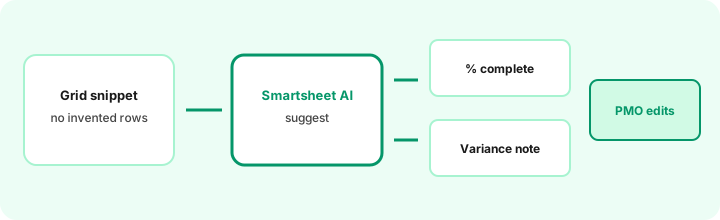
Primary SoT workflow:
From this grid snippet: formula suggestions for % complete and a variance note draft — no invented rows.
2. Variance note draft (board-pack ready)
What it is: Ask for a short variance narrative from Plan vs Actual columns — over/under by workstream, Unknown where Actual is blank. A finance partner edits numbers before the note leaves the sheet.
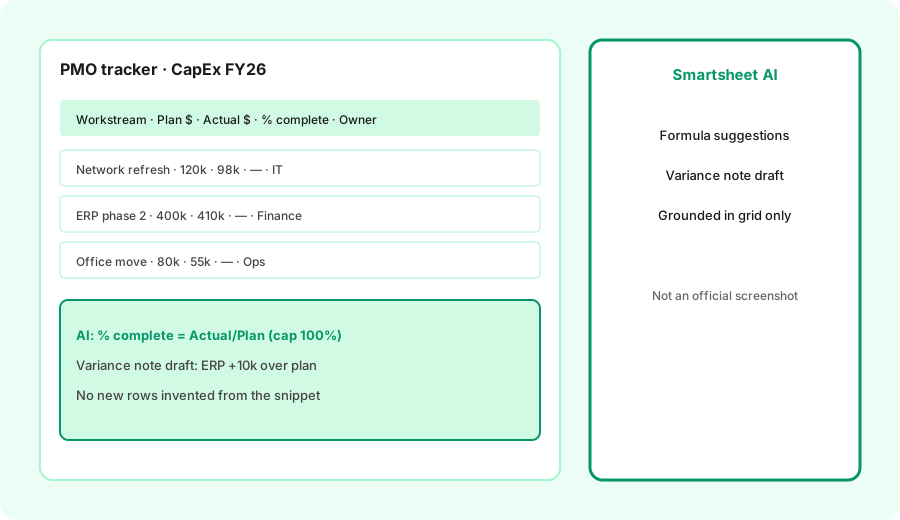
Variance only from cells:
From Plan $ and Actual $ columns only: draft a 5-bullet variance note. Include $ and % where both exist. Write Unknown where Actual is blank. Do not invent workstreams.
3. Grounding rule: no invented rows
What it is: The integrity rule for PMO grids. AI may suggest formulas and prose; it must not add projects, vendors, or owners that were not in the snippet. Hallucinated rows break audit trails.
Integrity check:
List every workstream name in your answer. If any name is not in the pasted grid, delete it and mark the cell Unknown instead.
4. Vs Sheets + Gemini / Airtable AI
What it is: Educational boundary, not a ranking. Smartsheet AI fits when PMO/finance already runs Smartsheet (Gantt, proofs, resource views). Sheets + Gemini fits Google Workspace-centered grids — see Gemini in Sheets. Airtable AI fits bases with interfaces — see Airtable AI. Buying two grid AIs for the same CapEx tracker is usually overlap.
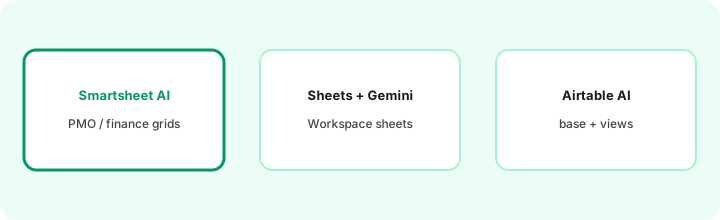
Same snippet in your real home:
Run the same % complete + variance note prompt in Smartsheet AI (or your current grid AI). Note whether the answer invented rows and how much finance editing remained.
Pricing context (September 2026)
Smartsheet publishes Pro, Business, Enterprise (and related) plans; AI features and any AI add-ons or credit limits vary by SKU and region. Always confirm live on smartsheet.com/pricing and your admin’s AI entitlements. Sheets/Gemini and Airtable are separate SKUs. This review is dated September 2026 and is not a price sheet.
Uncertainty: Plan names, AI packaging, and formula/assist limits move. Do not budget from a blog post — use live vendor pages and a pilot sheet with a named owner.
When Smartsheet AI is useful (honest take)
Useful when CapEx/PMO/finance trackers already live in Smartsheet and you want faster formulas and variance drafts with human QA. Less useful when the real grid is Sheets or Airtable, when Actuals are mostly blank, or when you need multi-file narrative synthesis outside the sheet (Claude for finance). AI suggests; controllers own the numbers.
Paying for Smartsheet AI and a few other AI tools? The $9 AI toolkit spreadsheet lists every AI subscription you have, what each one costs, and how fast it pays for itself, so you can see which ones are worth the money.
Want someone to do it for you? AI toolkit audit — $19
Related options (educational)
| Need | Better home | Why |
|---|---|---|
| PMO/finance already on Smartsheet | Smartsheet AI | Formulas + notes beside existing sheets |
| Google Workspace sheets | Gemini in Sheets | Stay in Drive / Workspace |
| Base + interfaces | Airtable AI | Structured records, not a giant sheet |
| Memo from exports | Claude for finance | Narrative outside the grid |
| Work tracker (tasks) | Asana AI / Asana Intelligence | Tasks/owners, not CapEx grids |
Same job, two products: Airtable AI vs Smartsheet AI.
FAQ
What is Smartsheet AI for ops/PMO?
AI assists on Smartsheet grids for formulas and variance-style notes when the sheet is already the tracker of record.
How does it compare to Sheets + Gemini or Airtable AI?
Pick the grid home you already pay for. Smartsheet vs Workspace Sheets vs Airtable bases — not a brand ranking.
Should Smartsheet AI invent rows?
No. Ground formulas and notes in the pasted snippet only; mark Unknown for blanks.
What does Smartsheet cost with AI in September 2026?
Confirm on smartsheet.com/pricing. Plans and AI entitlements change — this review is dated September 2026.
Optional next step (if seats overlap)
If Smartsheet AI would sit beside Sheets Gemini, Airtable AI, and Claude finance seats, optional help mapping overlap: $19 AI toolkit audit or $9 AI toolkit spreadsheet. Email Audit $19 or Toolkit spreadsheet $9.
Checkout is live via Stripe. After you pay, we email delivery (spreadsheet) or intake next steps (audit).