How-to · Retail · YOOBIC · Oct 17, 2026
Run a YOOBIC VM Copilot photo check, and have the district manager confirm every verdict
YOOBIC's VM Copilot checks store photos against your brand standards and campaign reference images, and YOOBIC says no human reviewer is required. Until you have compared its verdicts with your own eye, a person should confirm them. This page shows how to run one campaign check and have the district manager confirm every verdict.
Who this is for
Retail operations and visual-merchandising teams on YOOBIC who are rolling out a new campaign look to many stores. For Amazon listing approval — a different job — see Jungle Scout listing approval.
How to do it
This is a how-to, not a ranking of retail ops tools. Per the YOOBIC AI review, VM Copilot checks task photos against reference images and gives the store feedback before submission; Store Manager Copilot (generally available in V16) writes daily action plans; and YOOBIC's rules can trigger follow-up tasks automatically. A District Manager Copilot is listed as coming soon, so this routine does not use it.

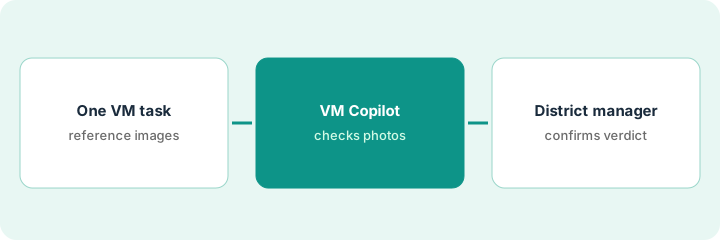
1. Set one planogram task with reference images
What it is: Create one visual-merchandising task for a single campaign, with clear reference images and the photo angles you need.
- Pick one campaign (for example a window display).
- Upload reference images for each display.
- Specify the photo angles stores must take.
- Name the district manager who confirms verdicts in each district.
The VM team sets a spring window task for 40 stores with three reference images and asks for front and side photos.
List the campaign, stores, reference images, angles, and district managers on one sheet.
2. Let VM Copilot check store photos
What it is: Stores take photos in the task; VM Copilot checks them and flags issues before submission.
- Let VM Copilot flag placement, styling, lighting, and consistency issues.
- Keep automatic follow-up rules off for this campaign.
- Collect VM Copilot's verdict for every store.
- Note stores with unusual layouts the reference images do not cover.
VM Copilot passes 31 stores and flags 9. Two flagged stores have narrow windows where the reference layout cannot fit.
Mark each verdict on the sheet: pass, flag, or layout exception.
3. District manager confirms verdicts before follow-ups fire
What it is: Each district manager reviews VM Copilot's verdicts for their stores and confirms or overrules them before any corrective task is assigned.
- Review every flag and a sample of passes.
- Overrule verdicts that miss local layout reasons.
- Assign corrective tasks only for confirmed fails, with a fix-by date.
- Turn on automatic follow-ups only after a few campaigns agree with people.
- Record how often people overruled the AI.
District managers confirm 7 of 9 flags and overrule 2 narrow-window stores. They also catch one pass where a mannequin faces the wrong way.
Track agreement rate per campaign — confirmed, overruled, missed — and review it with the VM team.
Pricing context (October 2026)
This how-to isn't a price sheet. Per the YOOBIC AI review, YOOBIC publishes no prices: pricing depends on the number of locations or users and the modules you choose, and a package is designed after a call. Treat it as quote-only. Dated October 2026.
Checked Oct 17, 2026 on the vendor’s own pricing page: YOOBIC shows no public list price. YOOBIC’s pricing page says the price depends on locations or users and the modules chosen, with a package designed after a call. This page quotes no YOOBIC dollar figure; confirm what your contract includes with YOOBIC or your admin.
Uncertainty: The only prices this site sells here are the optional $9 AI toolkit spreadsheet and $19 AI toolkit audit.
When this helps (honest take)
Useful when you roll out visual-merchandising campaigns to many stores on YOOBIC and have district managers with time to review verdicts.
Not useful when stores have very different layouts and no reference images, or nobody owns follow-up tasks.
Related options (educational)
| Need | Where to look | Why |
|---|---|---|
| YOOBIC AI features | YOOBIC AI | Primary path |
| Ecommerce stack map | Stack map: ecommerce ops | Where YOOBIC fits |
| Amazon listing approval | Jungle Scout listing approval | A different job |
| Field work approvals | Salesforce Scheduling Agent approval | Approval pattern |
FAQ
Does VM Copilot need a human reviewer?
YOOBIC says no human reviewer is required. In this routine, the district manager confirms verdicts until a few campaigns show people and the AI agree.
Is District Manager Copilot available?
Per our review, YOOBIC lists it as coming soon. This routine does not use it.
Where do YOOBIC prices live?
YOOBIC publishes no prices; ask for a quote based on locations, users, and modules. Our Oct 17, 2026 check of the vendor’s own pricing page is summarized in the pricing section above.
Should automatic follow-up tasks be on from day one?
Not in this routine. Turn rules on after a few campaigns show people and VM Copilot agree, and cap tasks per store.
Optional next step
If you want a one-page toolkit map for the tools you already pay for, use the optional $9 AI toolkit spreadsheet. If you want a short review of seat waste and unused tools, use the optional $19 AI toolkit audit. Neither is required to follow this how-to.