How-to · Ecommerce · Triple Whale · Oct 17, 2026
Ask Triple Whale's Moby one ad-spend question, and have the paid media lead approve any budget change
Triple Whale's Moby answers questions about your numbers, and on Automate and Enterprise, Moby Actions can scale budgets and pause campaigns in connected ad accounts. A fluent answer still depends on the attribution model and date window. This page shows how to ask one question, check it, and keep a named paid media lead on every budget change.
Who this is for
Founders, growth leads, and paid media managers at ecommerce brands on Triple Whale who want Moby's help without letting it move money unchecked. For asking the Northbeam AI assistant an attribution question with the finance lead checking the numbers — a different job — see Northbeam AI finance check.
How to do it
This is a how-to, not a ranking of attribution tools. Per the Triple Whale AI review, Moby chat works on every plan including Free, Moby Automations let you choose Ask every time or Let Moby decide, and Moby Actions (Automate and Enterprise) can scale budgets, pause underperformers, and launch campaigns, with evidence for each suggested Action. The ground rule: the paid media lead approves every Action that moves budget.
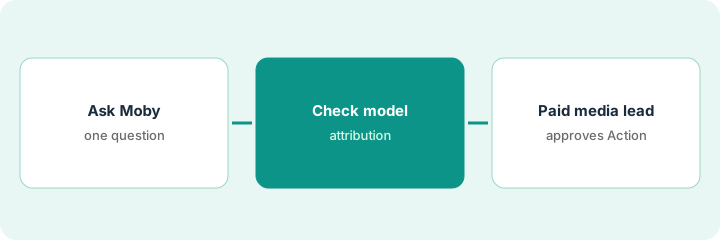
1. Ask Moby one question
What it is: Ask Moby one specific question about last week's ad spend, naming the metric and the date range.
- Pick one question, such as which Meta campaigns had the lowest return last week.
- Name the date range and metric in the question.
- Note the answer and any chart Moby builds.
- Name the paid media lead who approves any change.
The founder asks Moby which three Meta campaigns had the lowest return last week. Moby names three prospecting campaigns and suggests cutting budget on one.
Write the question, the answer, and the suggested change in one note.
2. Check the attribution view
What it is: Open the same numbers in the dashboard and the ad platform, and check which attribution model and window Moby used.
- Confirm the model (for example Triple Attribution or Last Click) and the lookback window.
- Compare with the same view in the dashboard you trust.
- Check the ad platform's own numbers for the same campaigns.
- Write down the model your team quotes, and keep Moby on it.
Moby's answer used Last Click. Under Triple Attribution, one of the three campaigns looks much better because it starts many journeys. The founder drops it from the cut list.
Add the attribution model and window to the note next to Moby's answer.
3. Paid media lead approves any Moby Action
What it is: Keep Moby Automations on Ask every time, and have the paid media lead approve, reject, or adjust every Action that moves budget.
- Set Ask every time for anything that moves money.
- Write hard limits: largest budget change per day, campaigns Moby may never touch.
- Read the evidence behind each suggested Action.
- Approve, reject, or adjust in writing.
- Review all Actions weekly.
Moby suggests a 30% budget cut on one campaign. The paid media lead approves 15% and keeps the campaign live for another week.
Keep an Action log: Action, evidence, approved by, change made, date.
Pricing context (October 2026)
This how-to isn't a price sheet. Per the Triple Whale AI review, Triple Whale has a Free plan; Foundation, Automate, and Enterprise are priced by annual sales and package on a slider, and Moby Actions sit on Automate and Enterprise. This page quotes no paid-plan figure; check the slider or ask sales. Dated October 2026.
Checked Oct 17, 2026 on the vendor’s own pricing page: Triple Whale’s pricing page lists a Free plan at no cost; Foundation, Automate, and Enterprise are priced by annual sales and package on a slider, and the amounts were not in the page text we read. Moby Actions sit on Automate and Enterprise. This page quotes no Triple Whale paid-plan dollar figure; confirm what your contract includes with Triple Whale paid-plan or your admin.
Uncertainty: The only prices this site sells here are the optional $9 AI toolkit spreadsheet and $19 AI toolkit audit.
When this helps (honest take)
Useful when you run paid media across several channels, use Triple Whale, and have one person who owns budget changes.
Not useful when nobody owns budget decisions, or finance needs to sign off on attribution numbers before planning — see the Northbeam how-to.
Related options (educational)
| Need | Where to look | Why |
|---|---|---|
| Triple Whale AI features | Triple Whale AI | Primary path |
| Triple Whale vs Northbeam | Triple Whale vs Northbeam | Side-by-side |
| Northbeam finance check | Northbeam AI finance check | A different job |
| Ecommerce stack map | Stack map: ecommerce ops | Where Triple Whale fits |
FAQ
How is this different from the Northbeam how-to?
A different job: this page is Moby Actions that move budget, approved by the paid media lead. The Northbeam page is a read-only AI assistant answer checked by the finance lead before planning.
Should Moby run on Let Moby decide?
Not for anything that moves money in this routine. Keep budget Actions on Ask every time.
Where do Triple Whale prices live?
Free plan, then paid tiers by annual sales on Triple Whale's slider; ask sales for your tier. Our Oct 17, 2026 check of the vendor’s own pricing page is summarized in the pricing section above.
Can we try Moby for free?
Per our review, the Free plan lets you try Moby chat. Moby Actions that change ad accounts are on Automate and Enterprise.
Optional next step
If you want a one-page toolkit map for the tools you already pay for, use the optional $9 AI toolkit spreadsheet. If you want a short review of seat waste and unused tools, use the optional $19 AI toolkit audit. Neither is required to follow this how-to.