How-to · Fleet safety · Samsara · Oct 14, 2026
Have a safety lead review every Samsara AI coaching note before it reaches a driver file
Samsara's Automated Coaching prioritizes safety events, routes lower-risk ones to driver self-review, and escalates higher-risk patterns to managers. An AI-flagged event is a reason to look, not a closed coaching case. This page shows a safety lead how to make sure every note that goes into a driver's file has been watched and edited by a person.
Who this is for
Fleet safety leads and field-ops managers on Samsara who coach drivers and keep driver files. The job here is reviewing coaching notes before they're filed. For routing rules (which events always go to a manager), see the Samsara AI review.
How to do it
This is a how-to, not a ranking of fleet platforms. Per the Samsara AI review, Automated Coaching ranks events using roughly fifty factors and routes most to self-review while escalating higher-risk patterns; the Safety Program Overview shows how many went to self-coaching versus managers. The review's ground rules: a self-coaching recap is not a disciplinary record until a person decides, and no driver performance files go into a general chat prompt.

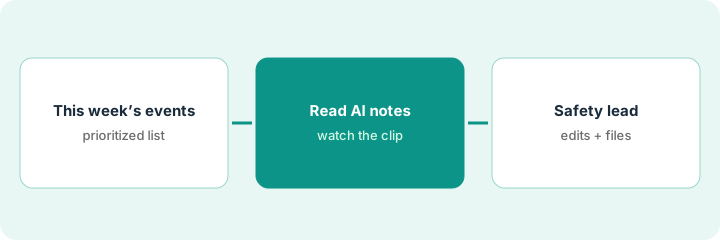
1. Step 1 — Pull this week's prioritized events
What it is: Start from the events Automated Coaching escalated to managers this week. Those are the ones most likely to end in a note on a driver's file.
- Open the manager queue for the week.
- List each escalated event with driver, type, and date.
- Check your written routing rules: did anything that should escalate go to self-review?
- Block time to watch each clip.
The safety lead's queue has nine escalated events: four hard-braking, three following distance, two stop-sign misses. One pedestrian near-miss went to self-review, which breaks her rule, so she adds it to the list.
Compare this week's self-review list against your "always escalate" rules. Pull anything that slipped through into the manager queue.
2. Step 2 — Watch the clip and read the AI notes
What it is: For each event, watch the full clip (including a few seconds before) and read the AI-generated coaching notes. Context the AI can't see, like a car cutting in, often changes the right coaching.
- Watch each clip from before the trigger.
- Read the AI note and mark "agree," "change," or "no coaching needed."
- Note context the AI missed.
- Don't paste driver details into outside chat tools.
One hard-braking clip shows a car merging suddenly into the driver's lane. The AI note suggests coaching on following distance. The safety lead marks "change": the driver reacted well; the note should record the merge as context.
For each AI note, write one sentence of context from the clip before deciding. If the context changes the coaching, the note changes too.
3. Step 3 — The safety lead edits and files
What it is: Only the safety lead files notes into driver records, after editing. Self-coaching recaps stay as coaching, not discipline, unless the safety lead decides otherwise.
- Edit each note to match what the clip shows.
- Decide: coaching only, coaching session, or formal record.
- File only the edited note.
- Tell the driver what was filed and why.
- Review the week's decisions with the regional manager.
The safety lead files five edited notes, marks the merge event as context-only with no formal write-up, and schedules a coaching session for the stop-sign misses with the regional manager.
Add a line to every filed note: "Reviewed by [safety lead], clip watched [date]." File nothing without it.
Pricing context (October 2026)
This how-to isn't a price sheet. Per the Samsara AI review, Samsara doesn't publish a per-vehicle rate card; hardware and software are quoted together through sales. Dated October 2026.
Checked Oct 14, 2026 on the vendor’s own pricing page: Samsara shows no public list price. Samsara’s pricing page sends you to sales for a quote; hardware and software licenses are quoted together. This page quotes no Samsara dollar figure; confirm what your contract includes with Samsara or your admin.
Uncertainty: Which coaching features sit on which package varies by quote and rollout date; confirm in writing. In-cab and recap features depend on camera hardware. The only prices this site sells here are the optional $9 AI toolkit spreadsheet and $19 AI toolkit audit.
When this helps (honest take)
Useful when your fleet keeps driver files, has a safety lead, and uses Automated Coaching. A weekly review keeps records fair and defensible.
Not useful when nobody has time to watch clips. Then turn off any automatic filing and keep coaching informal until someone can.
Related options (educational)
| Need | Where to look | Why |
|---|---|---|
| Samsara AI features | Samsara AI | Primary path on this page |
| A close alternative | Samsara vs Motive | Side-by-side |
| Another fleet safety platform | Motive AI | Comparison point |
| Bookings a person approves | ServiceTitan Virtual Agent | Same day's how-to |
| A whole map of field-service tools | Stack map: field service ops | Where fleet tools fit |
FAQ
Do drivers see self-coaching before the safety lead?
Per our review, self-coaching can reach drivers directly. This routine covers notes that go into a driver's file; those wait for the safety lead.
How long does the weekly review take?
Plan on a few minutes per escalated event. If the queue is long, tighten the routing rules rather than skipping clips.
Where do current prices live?
With Samsara's sales team, as a written quote. Our Oct 14, 2026 check of the vendor’s own pricing page is summarized in the pricing section above.
Should drivers see the AI note before the safety lead does?
Self-coaching can reach drivers directly per Samsara’s design. This routine is about the notes that go into a driver file: those wait for the safety lead.
Optional next step
Free reviews stay free. If you pay for a fleet platform, a separate dash-cam service, and a coaching tool that overlap, the $9 AI toolkit spreadsheet helps you lay them out, or the $19 AI toolkit audit gets you a written memo.