How-to · Ecommerce · Rebuy · Oct 17, 2026
Set up one Rebuy Smart Cart upsell and A/B test, and have the merchandiser approve every offer and discount
Rebuy's Smart Cart adds AI-powered upsells, reward tiers, and discounts to a Shopify cart, and its A/B testing can pick a winner automatically. Every tier and discount is a margin decision. This page shows how to set up one offer, test it fairly, and have the merchandiser approve every discount.
Who this is for
Merchandisers and ecommerce managers at Shopify brands using Rebuy who want to try one cart upsell without guessing at margin. For reviewing Nosto AI Reveals suggestions — a different job — see Nosto AI Reveals approval.
How to do it
This is a how-to, not a ranking of upsell apps. Per the Rebuy AI review, Smart Cart offers AI-powered upsells and cross-sells, reward tiers, and discounts; Data Sources combine AI endpoints with your own rules; and A/B Testing is included with automatic winner selection. The ground rule: the merchandiser approves every offer and discount before it goes live.

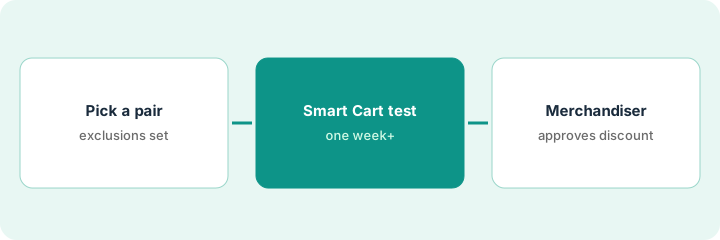
1. Pick one upsell pair and exclude what you never push
What it is: Choose one main product and one add-on, and write the exclusions before the AI picks anything.
- Pick a pair with a clear fit (for example a coffee grinder and filters).
- Exclude final-sale items, low-margin lines, and products with high return rates in Data Sources rules.
- Work out the margin at your average order with and without a discount.
- Name the merchandiser who approves the offer.
The merchandiser picks a hand grinder with a pack of paper filters. She excludes a grinder brush that is often returned, and works out that a 10% filter discount still leaves margin.
Write the pair, exclusions, margin maths, and approver on one sheet.
2. Configure the Smart Cart offer and A/B test
What it is: Set up the upsell in Smart Cart and an A/B test against the cart without it.
- Add the upsell in Smart Cart using the pair and rules from step 1.
- Set the test metric to include returns or margin if you can, not only revenue.
- Run the test for at least one full weekly cycle.
- Use the previewer to check how the cart looks before launch.
- Keep the discount in draft until the merchandiser approves.
The test splits traffic 50/50 with the filter upsell on one side. The metric is revenue per visitor, with returns tracked separately in a weekly report.
Take a screenshot of the cart preview and attach it to your approval note.
3. Merchandiser approves the discount and reads results
What it is: The merchandiser approves the discount before launch, then reads the results — including returns — before keeping the offer.
- Approve the discount amount in writing.
- After a week, compare attach rate, order value, and returns.
- Do not accept an automatic winner without checking returns.
- Keep, change, or stop the offer.
- Log the decision and the numbers behind it.
After eight days the upsell side shows a higher attach rate and no rise in returns. The merchandiser keeps the offer and schedules a re-check after the next price change.
Keep an offer log: pair, discount, approved by, test dates, attach rate, returns, decision.
Pricing context (October 2026)
This how-to isn't a price sheet. Per the Rebuy AI review and Rebuy's pricing page (checked Oct 17, 2026), Rebuy starts from $25 a month for one package, priced by your monthly Shopify orders, with a 14-day free trial. Dated October 2026.
Checked Oct 17, 2026 on the vendor’s own pricing page: Rebuy’s pricing page says Rebuy starts at $25 a month for one package, priced by your store’s monthly Shopify orders, with a 14-day free trial on every package.
Uncertainty: The only prices this site sells here are the optional $9 AI toolkit spreadsheet and $19 AI toolkit audit.
When this helps (honest take)
Useful when you sell on Shopify, have at least one natural add-on, and a merchandiser who owns margin.
Not useful when you cannot measure returns, or your gap is search and recommendations across the whole site — see the Nosto how-to.
Related options (educational)
| Need | Where to look | Why |
|---|---|---|
| Rebuy AI features | Rebuy AI | Primary path |
| Nosto merchandising suggestions | Nosto AI Reveals approval | A different job |
| Shopify helpdesk unknowns | Gorgias on Shopify | Support side |
| Ecommerce stack map | Stack map: ecommerce ops | Where Rebuy fits |
FAQ
Should we let A/B testing pick the winner automatically?
Only after you check returns and margin. Automatic winner selection picks on the metric you set.
Can we stack discounts?
Per our review, stacking a Rebuy and a Shopify discount on one product is a Shopify Plus feature. Work out the margin first and have the merchandiser approve it.
Where do Rebuy prices live?
From $25 a month for one package, priced by monthly orders, on the page we checked; see the pricing section. Our Oct 17, 2026 check of the vendor’s own pricing page is summarized in the pricing section above.
Is Rebuy’s conversational search available?
Per our review, R/AI was described as private beta. This routine does not use it.
Optional next step
If you want a one-page toolkit map for the tools you already pay for, use the optional $9 AI toolkit spreadsheet. If you want a short review of seat waste and unused tools, use the optional $19 AI toolkit audit. Neither is required to follow this how-to.