How-to · Multifamily · RealPage · Oct 15, 2026
Pilot RealPage's Lumina Leasing agent on prospect questions, with a named leasing manager reviewing every conversation
RealPage's Lumina AI Workforce includes a Leasing agent that can handle prospect questions. Scope and transcripts still need a leasing manager. This page stays on tours and FAQs — not rent-setting — and requires week-one transcript review. For EliseAI fair-housing script review — a different job — see that how-to.
Who this is for
Multifamily leasing managers piloting RealPage Lumina Leasing. The job here is a narrow FAQ/tour scope with transcript review. Rent-setting stays out.
How to do it
This is a how-to, not a ranking of multifamily suites. Per the RealPage AI review, Lumina includes a Leasing agent among others; rent-setting software faces legal scrutiny. A named manager reviews; this routine stays off rent-setting.

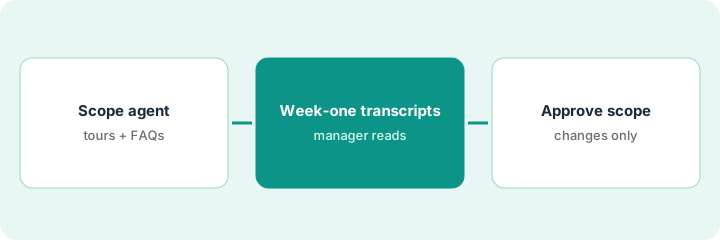
1. Step 1 — Scope the agent to tours and FAQs only
What it is: Write an explicit allow list: tour scheduling and published FAQs. Ban rent negotiation and screening decisions.
- List allowed FAQ topics from your approved site copy.
- Allow tour scheduling only inside published tour hours.
- Ban rent quotes beyond published ranges, screening decisions, and specials not on the allow list.
- Name the leasing manager who reviews conversations.
Allowed: pet policy FAQ, amenity hours, tour booking. Banned: custom rent deals and “waive application fee” promises.
Put the allow/ban list in the agent config notes and in a shared doc the manager signs.
2. Step 2 — Week-one transcript review
What it is: Every business day in week one, the leasing manager reads all Leasing agent conversations.
- Export or open the day's transcripts.
- Flag any off-scope answer.
- Tighten the allow list the same day.
- Keep rent-setting features off.
Day two shows an agent inventing a move-in special. Manager bans specials language and republishes the FAQ list.
End each day with “Transcripts read / Off-scope count / Config change.”
3. Step 3 — Manager approves scope changes
What it is: Only the leasing manager may widen scope — and only in writing after a quiet week.
- Propose any new topic in writing.
- Manager approves or rejects.
- Update the allow list.
- Re-read transcripts for three days after a change.
- Still keep rent-setting out of scope.
After a quiet week, manager allows “storage unit availability” FAQ. Rent negotiation remains banned.
Store versioned allow lists. Do not improvise scope in a live chat.
Pricing context (October 2026)
This how-to isn't a price sheet. Per the RealPage AI review, RealPage is quote-only. Dated October 2026.
Checked Oct 15, 2026 on the vendor’s own pricing page: RealPage shows no public list price. RealPage’s site was not a public price sheet on our check. This page quotes no RealPage dollar figure; confirm what your contract includes with RealPage or your admin.
Uncertainty: Rent-setting faces legal scrutiny per our review — this how-to does not cover pricing agents. The only prices this site sells here are the optional $9 AI toolkit spreadsheet and $19 AI toolkit audit.
When this helps (honest take)
Useful when you can staff daily transcript review for week one and keep rent-setting off.
Not useful when the agent is allowed to negotiate rent or make screening decisions.
Related options (educational)
| Need | Where to look | Why |
|---|---|---|
| RealPage AI | RealPage AI | Primary path |
| EliseAI review | EliseAI | Related leasing AI |
| EliseAI fair-housing scripts | EliseAI fair-housing review | A different job |
| Property ops stack map | Stack map: property ops | Where RealPage fits |
FAQ
Does this cover AI Revenue Management?
No. Stay off rent-setting.
How is this different from EliseAI fair-housing review?
A different job: this page is Lumina Leasing scope and transcripts. EliseAI’s how-to is fair-housing script review.
Where do RealPage prices live?
Quote-only; see the pricing section. Our Oct 15, 2026 check of the vendor’s own pricing page is summarized in the pricing section above.
Does this how-to cover rent setting?
No. Stay off rent-setting. Per our review, rent-setting software faces legal scrutiny; this routine is leasing questions and tours only.
Optional next step
If you want a one-page toolkit map for the tools you already pay for, use the optional $9 AI toolkit spreadsheet. If you want a short review of seat waste and unused tools, use the optional $19 AI toolkit audit. Neither is required to follow this how-to.