How-to · Multifamily · EliseAI · Oct 15, 2026
Put every EliseAI LeasingAI script through a named fair-housing review before it talks to prospects
EliseAI LeasingAI and VoiceAI can talk to prospects at scale. Scripts still need a named fair-housing review before they go live. This page shows how to export scripts, run a checklist, and re-review on every change. For RealPage Lumina Leasing transcript review — a different job — see that how-to.
Who this is for
Multifamily leasing and compliance leads on EliseAI who need a named fair-housing gate on LeasingAI and VoiceAI scripts. The job here is script review — not vendor marketing stats.
How to do it
This is a how-to, not a ranking of leasing bots. Per the EliseAI review, LeasingAI, ResidentAI, and VoiceAI are in scope; fair-housing script review by a named person is required; vendor stats are attributed claims only.

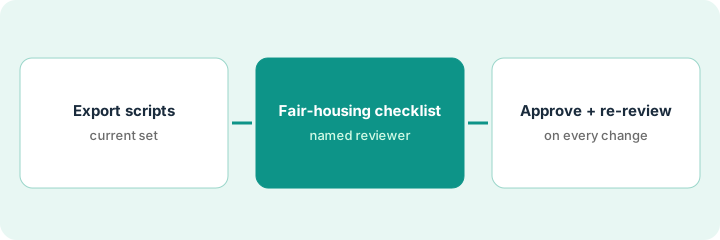
1. Step 1 — Export current scripts
What it is: Export every live LeasingAI and VoiceAI script and prompt the bot uses with prospects.
- Export scripts and canned answers.
- Include VoiceAI prompts if voice is on.
- Version-stamp the export.
- Name the fair-housing reviewer.
Forty-two script blocks exported on Monday. VoiceAI greeting and objection handling included.
Store the export in a controlled folder with date and reviewer name.
2. Step 2 — Fair-housing review checklist
What it is: The named reviewer runs a fair-housing checklist on every script block before anything talks to prospects.
- Check for steering, discriminatory language, and unlawful preference.
- Check disability and assistance-animal language against your policy.
- Check how the bot handles “family,” “students,” and source-of-income topics for your markets.
- Mark each block pass, revise, or block.
Three blocks imply a preference for “quiet professionals.” All three blocked until rewritten neutrally.
Use counsel-approved checklist language for your states. This page is not legal advice.
3. Step 3 — Reviewer approves; re-review on every change
What it is: Only approved blocks go live, and every edit triggers a re-review.
- Reviewer signs the pass list.
- Publish only passed blocks.
- Any edit returns that block to review.
- Re-audit quarterly even without edits.
- Keep RealPage-style rent-setting out of EliseAI scripts too.
Thirty-nine blocks approved; three rewritten and re-approved two days later. No block goes live from a marketing-only edit.
Add “fair-housing re-review required” to your change ticket template.
Pricing context (October 2026)
This how-to isn't a price sheet. Per the EliseAI review, EliseAI is quote-only (pricing URL returned not found on earlier checks). Dated October 2026.
Checked Oct 15, 2026 on the vendor’s own pricing page: EliseAI shows no public list price. EliseAI’s site returned no public plan sheet on our check. This page quotes no EliseAI dollar figure; confirm what your contract includes with EliseAI or your admin.
Uncertainty: This is not legal advice — use counsel for your markets. Vendor performance stats are attributed claims only. The only prices this site sells here are the optional $9 AI toolkit spreadsheet and $19 AI toolkit audit.
When this helps (honest take)
Useful when you have a named reviewer trained on fair-housing language for your markets.
Not useful when scripts go live from marketing without compliance review.
Related options (educational)
| Need | Where to look | Why |
|---|---|---|
| EliseAI review | EliseAI | Primary path |
| RealPage AI | RealPage AI | Related leasing AI |
| RealPage Lumina leasing | RealPage Lumina leasing | A different job |
| Property ops stack map | Stack map: property ops | Where EliseAI fits |
FAQ
Who should be the reviewer?
A named person trained on fair-housing for your markets — often compliance or a leasing manager — not the vendor alone.
How is this different from RealPage Lumina review?
A different job: this page is fair-housing script review. RealPage’s how-to is leasing-agent scope and transcripts.
Where do EliseAI prices live?
No public list price on the pages we checked; see the pricing section. Our Oct 15, 2026 check of the vendor’s own pricing page is summarized in the pricing section above.
Who should do the fair-housing review?
A named person trained on fair-housing language for your markets — often compliance or a leasing manager — not the chatbot vendor alone.
Optional next step
If you want a one-page toolkit map for the tools you already pay for, use the optional $9 AI toolkit spreadsheet. If you want a short review of seat waste and unused tools, use the optional $19 AI toolkit audit. Neither is required to follow this how-to.