How-to · Construction · Procore · Oct 16, 2026
Let Procore's RFI Agent draft an RFI, and have a person review it before anything is issued
Procore's RFI Agent can draft RFIs from field input and project records. Issuing without a person still sends wrong specs to the field. This page shows how to draft one RFI and have a named reviewer edit before anything is issued. Digital Coworker plans are quote-only.
Who this is for
Builder project managers or project engineers on Procore with Digital Coworker agents. For Buildertrend AI Client Updates — a different job — see Buildertrend AI client update project manager approve.
How to do it
This is a how-to, not a ranking. Per the Procore AI review, the RFI Agent drafts RFIs ready for review; agents do not take final action without sign-off. Procore AI is sold as Digital Coworker plans without public dollar amounts.

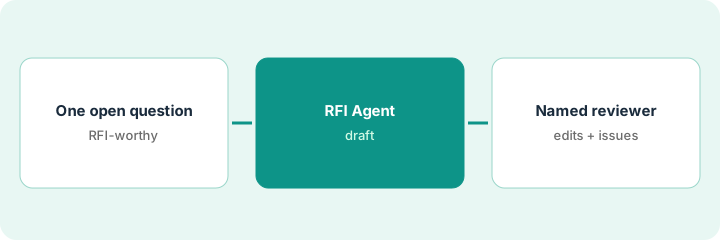
1. Pick one open question
What it is: Choose one field question that truly needs an RFI, not a chat message.
- Confirm drawings and specs were checked first.
- Write the question in plain language.
- Name the reviewer who must issue.
- Avoid bundling five questions into one RFI.
Superintendent asks about beam penetration clearance. One RFI, not a punch list dump.
Write the question and related drawing number before opening the agent.
2. RFI Agent draft
What it is: Let the RFI Agent draft the RFI; keep it unissued.
- Generate the draft from project records.
- Check cited drawings and specs.
- Leave schedule-impact fields for the reviewer.
- Do not distribute yet.
Draft cites the wrong detail sheet. Reviewer catches it before issue.
Highlight every citation the agent used.
3. Named reviewer edits and issues
What it is: A named person edits the draft and issues through your normal Procore workflow.
- Edit question, assignees, and due date.
- Confirm distribution list.
- Issue only after review.
- Track the response like any other RFI.
Project engineer fixes the detail reference, assigns the structural engineer, and issues.
Log: RFI number, agent draft issues, reviewer, issue time.
Pricing context (October 2026)
This how-to isn't a price sheet. Per the Procore AI review, Procore platform and Digital Coworker Starter Pack / Pro / Enterprise plans show no public dollar amounts — request a demo or quote. Dated October 2026.
Checked Oct 16, 2026 on the vendor’s own pricing page: Procore and Digital Coworker plans show no public dollar amounts on Procore’s pricing / AI plans pages; request a demo or quote. Agents draft for human review. This page quotes no Procore dollar figure; confirm what your contract includes with Procore or your admin.
Uncertainty: The only prices this site sells here are the optional $9 AI toolkit spreadsheet and $19 AI toolkit audit.
When this helps (honest take)
Useful when you have Procore AI agents enabled and a named reviewer for every RFI.
Not useful when you need homeowner update drafts on Buildertrend — use that how-to.
Related options (educational)
| Need | Where to look | Why |
|---|---|---|
| Procore AI | Procore AI | Primary path |
| Buildertrend AI | Buildertrend AI | Related construction |
| Buildertrend client updates | Buildertrend client update | A different job |
FAQ
Do agents issue RFIs alone?
Per Procore's materials in our review, agents draft and stage changes for human review. This routine always keeps a named issuer.
How is this different from Buildertrend client updates?
A different job: this page is formal RFIs. Buildertrend is homeowner client update messages.
Does Procore AI publish prices?
No public dollar amounts on the pages we and the review checked. Our Oct 16, 2026 check of the vendor’s own pricing page is summarized in the pricing section above.
Do agents issue RFIs alone?
Per Procore’s materials in our review, agents draft and stage changes for human review.
Optional next step
If you want a one-page toolkit map for the tools you already pay for, use the optional $9 AI toolkit spreadsheet. If you want a short review of seat waste and unused tools, use the optional $19 AI toolkit audit. Neither is required to follow this how-to.