How-to · Construction · Buildertrend · Oct 16, 2026
Let Buildertrend draft a client update, and have the project manager approve every message
Buildertrend AI Client Updates can draft homeowner messages from logs and schedule items. Messages that send without the project manager still get facts wrong. This page shows how to draft one update and have the project manager approve every client-facing message.
Who this is for
Home builder or remodeler project managers on Buildertrend. For Procore RFI Agent drafts — a different job — see Procore RFI Agent draft review.
How to do it
This is a how-to, not a ranking. Per the Buildertrend AI review, AI Client Updates draft from Daily Logs, schedule, change orders, and invoices; the project manager approves every client-facing message. Pricing is custom quote.

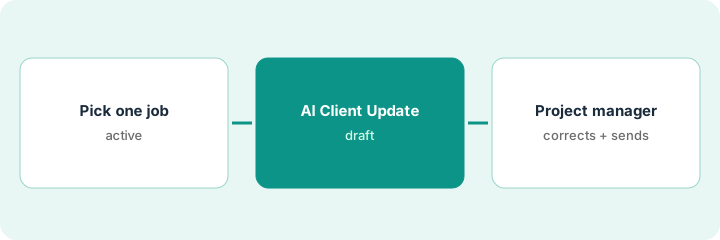
1. Pick one active job
What it is: Choose one job with recent Daily Logs and a homeowner who expects updates.
- Pick a job mid-build, not a warranty-only file.
- Confirm Daily Logs are current.
- Name the project manager who approves sends.
- Park marketing-style blasts for another process.
They pick the Maple Street kitchen. Spec homes wait until the process is proven.
Write job name and project manager before drafting.
2. AI Client Update draft
What it is: Generate the AI Client Update; keep it unsent.
- Draft from logs, schedule, and open change orders.
- Strip anything financial the homeowner should not see yet.
- Keep the message in draft.
- Flag schedule dates the AI may have guessed.
Draft mentions cabinet delivery Friday. Project manager knows it slipped to Monday.
Highlight every date and dollar for the project manager.
3. Project manager corrects facts and sends
What it is: The project manager corrects facts, then sends.
- Fix dates, selections, and change-order status.
- Remove internal commentary.
- Send only after approval.
- Log what the AI got wrong for the next draft.
Project manager fixes the delivery date and removes an internal cost note, then sends.
Log: job, draft issues, approver, send time.
Pricing context (October 2026)
This how-to isn't a price sheet. Per the Buildertrend AI review, Buildertrend's pricing page publishes no dollar amounts — custom quote with unlimited users called out. Dated October 2026.
Checked Oct 16, 2026 on the vendor’s own pricing page: Buildertrend shows no public dollar amounts. Buildertrend’s pricing page routes to a custom quote and highlights unlimited users. This page quotes no Buildertrend dollar figure; confirm what your contract includes with Buildertrend or your admin.
Uncertainty: The only prices this site sells here are the optional $9 AI toolkit spreadsheet and $19 AI toolkit audit.
When this helps (honest take)
Useful when you already keep Daily Logs and a project manager will approve every homeowner message.
Not useful when you need RFI drafts on Procore — use that how-to.
Related options (educational)
| Need | Where to look | Why |
|---|---|---|
| Buildertrend AI | Buildertrend AI | Primary path |
| Procore AI | Procore AI | Related construction AI |
| Procore RFI Agent | Procore RFI draft review | A different job |
FAQ
How is this different from Procore RFI Agent?
A different job: this page is homeowner client updates. Procore RFI Agent is formal RFI drafts with a named reviewer.
Can AI Client Updates send alone?
Not in this routine. The project manager approves every message.
Does Buildertrend publish prices?
No public dollar amounts on the pages we and the review checked. Our Oct 16, 2026 check of the vendor’s own pricing page is summarized in the pricing section above.
Can AI Client Updates send alone?
Not in this routine. The project manager approves every message.
Optional next step
If you want a one-page toolkit map for the tools you already pay for, use the optional $9 AI toolkit spreadsheet. If you want a short review of seat waste and unused tools, use the optional $19 AI toolkit audit. Neither is required to follow this how-to.