How-to · Patient access · Phreesia · Oct 20, 2026
Set up Phreesia VoiceAI for scheduling and refills, and have the front-desk lead check every triage route
Phreesia VoiceAI answers patient calls, confirms identity, books or changes appointments, handles refills, and routes urgent concerns to clinicians. Every intent that changes the schedule is a rule someone has to own, and routing rules decide who hears about a symptom and when. This page shows how to set it up narrowly with the front-desk lead checking every route.
Who this is for
Front-desk leads, practice managers, and nurse supervisors at practices using Phreesia. The job here is inbound phone triage and routing. For running one Luma Health recall and care-gap outreach campaign with agent controls set before it texts patients — a different job on outbound access — see Luma Health recall outreach agent scope.
How to do it
This is a how-to, not a ranking of patient-access tools. Per the Phreesia AI review, VoiceAI writes results back to the chart with a time-stamped audit trail; Phreesia runs real-time eligibility and benefits checks; and Phreesia advertises free access to its full Intake platform until spring 2027. The review notes it is not stated whether VoiceAI is included in that offer. The ground rule: the front-desk lead owns every intent that books, cancels, or reschedules, and a nurse supervisor owns which symptom calls route straight to a clinician.

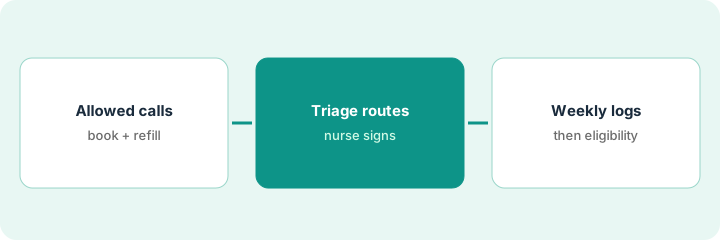
1. Pick the call types VoiceAI may handle
What it is: Start with scheduling and refill requests, and write which call types always go to a person.
- Allow: book, reschedule, and refill requests for established patients.
- Always to a person: new-patient visit types until mapping is checked, records requests with legal questions, anything the caller describes as urgent.
- Check the visit-type mapping before turning on booking.
- Make cancel versus reschedule wording explicit.
- Name the front-desk lead who owns every intent.
A front-desk lead at a five-provider practice allows book, reschedule, and refill for established patients. New-patient booking waits until the visit-type mapping is checked.
Write the call types VoiceAI may finish and the ones that always go to a person, with the owner’s name on each.
2. Map triage routes with the clinical lead
What it is: Sit down with a nurse supervisor and write which words and call types route straight to a clinician, day and after hours.
- List urgent phrases: bleeding, chest pain, trouble breathing, medication reaction.
- Decide which go to the on-call provider after hours.
- Decide which go to a nurse line during the day.
- Write that VoiceAI does not give medical advice.
- Have the nurse supervisor sign the route list.
A nurse supervisor lists urgent phrases and signs the route list. In the first week, every bleeding and pain call reaches the on-call provider within minutes, but three calls about a rash after a new medication were filed as routine refill questions. She adds medication-reaction phrases to the urgent route.
With your nurse supervisor, write every phrase that must route straight to a clinician, and sign it before VoiceAI answers a live call.
3. Front-desk lead reviews call logs; then turn on eligibility checks
What it is: Each week the front-desk lead reviews a sample of VoiceAI conversations for wrong books, cancels, and routes. Once those are clean, turn on real-time eligibility checks with billing confirming flags.
- Review fifty conversations a week at first.
- Flag every wrong book, cancel, or reschedule and fix the intent.
- Have the nurse supervisor listen to every call routed non-urgent that mentioned a symptom.
- When turning on eligibility checks, have the billing lead confirm flags with the payer before staff tell a patient coverage is inactive.
- Add new intents one at a time.
Of fifty conversations, forty-three are fine; four booked established patients into new-patient visits and two cancelled when the caller only asked to move the visit. The lead fixes both intents. When eligibility checks go on, the billing lead finds two flagged patients had simply switched plans.
Every week, review fifty VoiceAI conversations and list every wrong book, cancel, or route before adding any intent.
Pricing context (October 2026)
This how-to isn’t a price sheet. Per the Phreesia AI review, Phreesia publishes no price list. When we checked Phreesia’s pricing page on Oct 20, 2026, it still said Phreesia Intake is free until spring 2027 (it gives standard pricing beginning May 1, 2027 in one place and the offer running through May 31, 2027 in its FAQ), and that pricing after that is a custom quote. Ask in writing whether VoiceAI is included. Dated October 2026.
Checked Oct 20, 2026 on the vendor’s own site: Phreesia’s pricing page says Phreesia Intake is free until spring 2027 (standard pricing begins May 1, 2027 per the page; its FAQ says the offer runs through May 31, 2027) and that pricing after that is a tailored quote. It does not say whether VoiceAI is included. This page quotes no Phreesia dollar figure; ask Phreesia for a written quote and see our review for what is known.
Uncertainty: The only prices this site sells here are the optional $9 AI toolkit spreadsheet and $19 AI toolkit audit.
When this helps (honest take)
Useful when phones swamp your front desk, your practice system is on Phreesia’s integration list, and a front-desk lead will review conversations every week.
Not useful when your EHR already bundles a contact center you plan to use, or nobody will own the triage routes.
Related options (educational)
| Need | Where to look | Why |
|---|---|---|
| Phone agent, intake, and eligibility | Phreesia AI | Primary path; custom quote; Intake free until spring 2027 per Phreesia |
| Recall and care-gap outreach | Luma Health recall outreach agent scope | A different job |
| Patient billing calls | Cedar Kora billing voice agent scope check | Related access job |
| Where patient access fits | Stack map: healthcare ops | Broader map |
FAQ
Can VoiceAI give medical advice?
It should not. Per our review, Phreesia says it captures clinical concerns and routes urgent ones to the clinical team; a nurse supervisor should own the routes.
Is VoiceAI included in the free Intake offer?
Our review found it is not stated. Ask Phreesia in writing.
How much does Phreesia cost?
There is no public price list; pricing is a custom quote (checked Oct 20, 2026).
Optional next step
If you want a one-page toolkit map for the tools you already pay for, use the optional $9 AI toolkit spreadsheet. If you want a short review of seat waste and unused tools, use the optional $19 AI toolkit audit. Neither is required to follow this how-to.