How-to · Patient access · Luma Health · Oct 20, 2026
Run one Luma Health recall and care-gap outreach campaign, and set agent controls before it texts patients
Luma Health’s recall and care-gap outreach agents send messages when a patient is due, follow up, and help patients book. A recall that names the wrong visit type books the wrong appointment length, or tells a patient they are due for something they are not. This page shows how to run one campaign with the agent’s limits written down before any text goes out.
Who this is for
Practice managers, access directors, and IT leads at practices, community health centers, and health systems on Luma. The job here is one outbound recall campaign with agent controls set first. For setting up Phreesia VoiceAI and having the front-desk lead check every inbound triage route — a different job — see Phreesia VoiceAI triage routing check.
How to do it
This is a how-to, not a ranking of patient engagement tools. Per the Luma Health AI review, Luma says your team defines which workflows each agent handles, which EHR actions it can take, and what hours it runs, with escalation rules at the platform and agent level, and that agents don’t give clinical advice, interpret symptoms, or change medications. Luma also offers waitlist and no-show rebooking, the Navigator agent for calls, chat, and text, and an MCP Server in Early Access; agentic referral scheduling is marked coming soon. The ground rule: the practice manager approves every outreach template before it goes out.

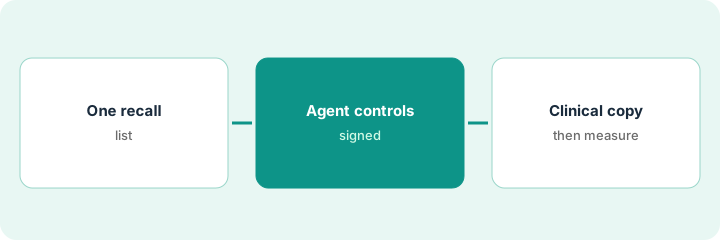
1. Pick one recall list
What it is: Start with one recall type and one cohort, such as annual wellness visits for one age range at one site.
- Pick a recall with a clear visit type and length.
- Confirm the visit type name matches what patients’ plans call it.
- Exclude patients whose care gap was already closed at an outside clinic.
- Exclude patients who have left the practice.
- Write the cohort size and the visit type at the top of the plan.
A practice manager picks annual wellness visit recalls for patients 65 and older at one site, about 140 patients. She removes patients whose outside clinic already completed the visit and three who have left the practice.
Write the recall type, visit type, age range, site, and cohort size before building anything.
2. Set agent controls
What it is: With the IT lead, write the agent’s allowed EHR actions, sending hours, and escalation rules, and get the practice manager’s sign-off.
- Allowed: send the recall, follow up, offer times with the right provider and visit type, book.
- Not allowed in this campaign: cancel any visit, change medications, answer clinical questions.
- Set texting hours, for example no texts after 7 pm.
- Route clinical questions and requests for a person to staff.
- Keep the MCP Server off unless compliance has reviewed which assistants may send lists.
The IT lead writes the recall agent’s limits and finds it was also allowed to cancel duplicate visits, which no one had approved. She removes that permission and gets the practice manager’s signature before the campaign starts.
Write each allowed action, the sending hours, and the escalation rule for the recall agent on one page, and get the practice manager to sign it.
3. Review copy with a clinical lead, then measure rebooked visits
What it is: Before the first message, the practice manager and a clinical lead read the copy in each language. After the campaign, measure booked visits and check a sample for the right visit type.
- Preview the message with five real patient records in each language.
- Have a clinical lead check the visit is described correctly and nothing sounds like medical advice.
- Respect opt-outs; Luma can opt out patients who say they do not need the visit.
- After two weeks, count booked visits from the campaign.
- Sample twenty bookings for the right provider, visit type, and length.
The clinical lead changes one line that implied every patient needed bloodwork. After two weeks, the practice manager counts the visits booked and samples twenty: seventeen match, two booked a short follow-up slot, and one went to a provider who has left. She tightens the visit-length rule before the next cohort.
Preview the recall copy with a clinical lead and five real records, then after two weeks sample twenty booked visits for provider, visit type, and length.
Pricing context (October 2026)
This how-to isn’t a price sheet. Per the Luma Health AI review, Luma publishes no price list. When we checked on Oct 20, 2026, lumahealth.io/pricing returned not found and the site asks you to book a demo. Treat it as quote-only and ask whether outbound AI calls, Navigator, and the MCP Server are priced separately. Dated October 2026.
Checked Oct 20, 2026 on the vendor’s own site: Luma publishes no price list; lumahealth.io/pricing returned not found and Luma’s site lists no prices. This page quotes no Luma Health dollar figure; ask Luma Health for a written quote and see our review for what is known.
Uncertainty: The only prices this site sells here are the optional $9 AI toolkit spreadsheet and $19 AI toolkit audit.
When this helps (honest take)
Useful when you have high recall and no-show volume, your EHR is one Luma integrates with, and the practice manager will approve every outreach template.
Not useful when nobody will write the agent’s limits, you want the agent to answer clinical questions, or your gap is front-desk intake and copays.
Related options (educational)
| Need | Where to look | Why |
|---|---|---|
| Recall and care-gap outreach | Luma Health AI | Primary path; quote only |
| Inbound phone triage routing | Phreesia VoiceAI triage routing check | A different job |
| Care-gap programs on a population-health platform | Innovaccer AI | Different scale |
| Where patient access fits | Stack map: healthcare ops | Broader map |
FAQ
Can Luma agents give clinical advice?
Per our review, Luma says its agents do not give clinical advice, interpret symptoms, or change medications, and that clinical questions are escalated. Check this in your own samples.
Is the MCP Server available?
Per our review, it is in Early Access. Keep it off until your compliance officer reviews it.
How much does Luma Health cost?
Luma publishes no prices. Treat it as quote-only (checked Oct 20, 2026).
Optional next step
If you want a one-page toolkit map for the tools you already pay for, use the optional $9 AI toolkit spreadsheet. If you want a short review of seat waste and unused tools, use the optional $19 AI toolkit audit. Neither is required to follow this how-to.