How-to · Freight brokerage · Parade · Oct 21, 2026
Set Parade’s Auto-Accept Under Max for one lane, and have the carrier sales lead own every rate limit
Parade’s CoDriver answers carrier emails and calls, and with Auto-Accept Under Max switched on it books email offers under a load’s Max Rate without a rep stepping in. That setting turns CoDriver from an assistant into a buyer, so the Max Rate is now the approval. This page shows how to set it for one lane with the carrier sales lead owning every rate limit.
Who this is for
Carrier sales leads, capacity managers, and brokerage operations leaders on Parade. The job here is the one setting that lets CoDriver book on its own. For setting HappyRobot’s rate negotiation limits on voice calls — a different job — see HappyRobot rate limit approval.
How to do it
This is a how-to, not a ranking of brokerage tools. Per the Parade AI review, a Parade help article dated 13 August 2026 says Auto-Accept Under Max runs in CoDriver email: an offer under the load’s Max Rate is accepted and booked, with optional extra carrier confirmation, one auto-book attempt per load, carrier questions sent to a rep, and the rate confirmation still coming from your TMS. Estimated Carrier Bid shows a live asking-rate estimate with a quote count. Parade was acquired by Mudflap on 15 April 2026 and says “Parade stays Parade.” Parade’s figures are its claims. The ground rule: the carrier sales lead sets and owns every Max Rate, and the compliance lead owns the carrier checks that run before any booking.

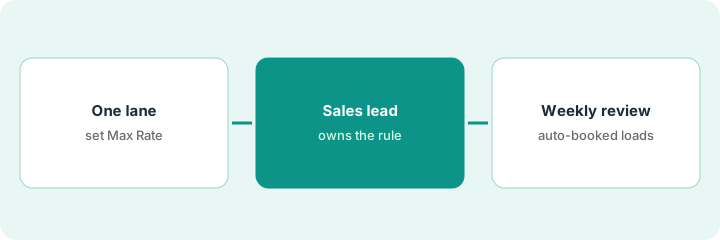
1. Pick one lane, and set its Max Rate from Estimated Carrier Bid and your history
What it is: Start with one recurring lane. Set the Max Rate from what you actually paid and from Estimated Carrier Bid, but only where the quote count is high enough to trust.
- Pick one recurring lane with steady volume and equipment type.
- Compare Estimated Carrier Bid with what you paid on twenty recent loads on that lane.
- Write the minimum quote count you trust before using the estimate.
- Set the Max Rate below your margin floor for the shipper rate.
- Write the Max Rate and the reasoning on one page.
The pricing lead compares Estimated Carrier Bid with twenty recent loads on one dry-van lane. The estimate tracks paid rates closely when the quote count is high and drifts on two low-count days. She writes a minimum quote count and sets the Max Rate from paid history on those days.
Compare Estimated Carrier Bid with your last twenty paid loads on one lane, write a minimum quote count, and set the Max Rate on one page.
2. Carrier sales lead owns the rule, with extra carrier confirmation on
What it is: Turn on Auto-Accept Under Max for that lane only, with extra carrier confirmation, and confirm which carrier checks run before CoDriver can book.
- Have the carrier sales lead approve the Max Rate on every eligible load.
- Switch on extra carrier confirmation so CoDriver asks the carrier to confirm the rate first.
- Have the compliance lead confirm which carrier checks run before booking.
- Confirm carriers marked Do Not Use are excluded.
- Write who may change a Max Rate.
The sales lead approves Max Rates for the lane’s loads, switches on extra carrier confirmation, and asks the compliance lead to confirm the compliance tool check runs before any booking. Only she and her deputy may change Max Rates.
Turn on Auto-Accept Under Max for one lane only, with extra carrier confirmation, after the compliance lead confirms the carrier checks that run first.
3. Review every auto-accepted load each week
What it is: For the first weeks, the carrier sales lead reviews every load CoDriver booked on its own and adjusts the Max Rate or eligibility rules.
- List every auto-accepted load for the week.
- Check the rate, the carrier, and the confirmation for each.
- Check the rate confirmation came from your TMS.
- Note any carrier you would not have offered the load to.
- Add a second lane only after two clean weeks.
In week one CoDriver auto-books nine loads. Seven are fine. One goes to a carrier with poor on-time history on that lane, and one books at the Max Rate on a day the market dropped. She tightens eligibility and lowers the Max Rate before week two.
Review every auto-accepted load each week for rate, carrier, and confirmation, and add a second lane only after two clean weeks.
Pricing context (October 2026)
This how-to isn’t a price sheet. Per the Parade AI review, Parade does not publish prices. When we checked on Oct 21, 2026, parade.ai/pricing returned not found and the site lists no prices. Treat it as quote-only and ask whether CoDriver email, CoDriver Voice, and Estimated Carrier Bid are priced separately. Dated October 2026.
Checked Oct 21, 2026 on the vendor’s own site: Parade publishes no prices; parade.ai/pricing returned not found and Parade’s site lists no prices. This page quotes no Parade dollar figure; ask Parade for a written quote and see our review for what is known.
Uncertainty: The only prices this site sells here are the optional $9 AI toolkit spreadsheet and $19 AI toolkit audit.
When this helps (honest take)
Useful when you run a brokerage with more carrier emails than reps, some lanes are steady and well understood, and the carrier sales lead will own every Max Rate.
Not useful when your lanes swing too fast for a fixed Max Rate, compliance checks are not wired in, or nobody will review auto-booked loads.
Related options (educational)
| Need | Where to look | Why |
|---|---|---|
| CoDriver, Auto-Accept Under Max, Estimated Carrier Bid | Parade AI | Primary path; quote only |
| Rate negotiation limits on voice calls | HappyRobot rate limit approval | A different job |
| Choosing between broker AI tools | HappyRobot vs Parade | Side-by-side explainer |
| Where freight tools fit | Stack map: logistics ops | Broader map |
FAQ
Can CoDriver book loads without a person?
Per our review, yes, if you enable Auto-Accept Under Max: CoDriver books qualifying email offers under the Max Rate, with optional carrier confirmation and one attempt per load.
Did the Mudflap acquisition change Parade?
Per our review, Mudflap acquired Parade on 15 April 2026, and Parade says the platform, support, and integrations stay the same.
How much does Parade cost?
Parade publishes no prices. Treat it as quote-only (checked Oct 21, 2026).
Optional next step
If you want a one-page toolkit map for the tools you already pay for, use the optional $9 AI toolkit spreadsheet. If you want a short review of seat waste and unused tools, use the optional $19 AI toolkit audit. Neither is required to follow this how-to.