How-to · Freight brokerage · HappyRobot · Oct 21, 2026
Set HappyRobot’s rate negotiation limits, and have the carrier sales lead approve every rate the voice agent can offer
HappyRobot’s voice agents take carrier calls, counter offers with live market data, and log every offered and accepted rate. An agent that negotiates needs a written ceiling per lane and a rule for what happens above it. This page shows how to set those limits so the carrier sales lead approves every rate the agent may offer.
Who this is for
Carrier sales leads, track-and-trace managers, and operations leaders at freight brokerages and 3PLs with busy phone lines. The job here is the rate limits a voice agent negotiates within. For setting Parade’s Auto-Accept Under Max for one lane — a different job where bids under a maximum are accepted without a call — see Parade Auto-Accept Under Max rate limit.
How to do it
This is a how-to, not a ranking of freight tools. Per the HappyRobot AI review, HappyRobot’s agents follow the persona, boundaries, and operating procedures written in their prompt; northstars turn rules into checkable conditions, such as always running a lookup and “never quote from memory”; adversarial agents try prompt injection and data extraction in a sandbox; and audits sample from 1% to 100% of production sessions. Workflows run in separate dev, staging, and production environments. HappyRobot’s customer results are its claims. The ground rule: the carrier sales lead approves every rate ceiling, and anything above it goes to a person.

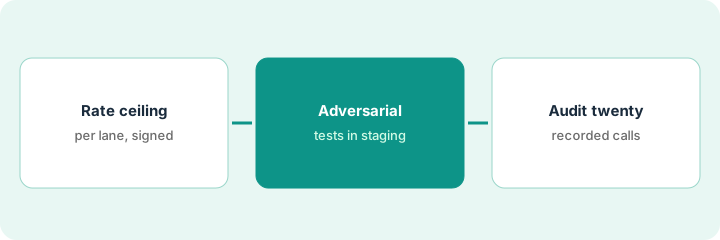
1. Write a rate ceiling and handoff rule per lane
What it is: For each test lane, the carrier sales lead writes the highest rate the agent may offer and what happens above it, and those rules go into the agent’s procedure and northstars.
- Pick two or three test lanes with steady volume.
- Write a ceiling per lane, with the market data source the agent must look up.
- Write the handoff rule: above the ceiling, the agent transfers or takes a callback number.
- Add northstars such as “run the rate lookup before any offer” and “never quote from memory.”
- Have the carrier sales lead sign the lane sheet.
The sales lead writes ceilings for three dry-van lanes and a handoff rule that sends any counter above the ceiling to a live rep. She adds a northstar requiring a rate lookup before every offer and signs the sheet.
Write a ceiling and handoff rule for each test lane, add them to the agent’s procedure as checkable rules, and have the carrier sales lead sign the sheet.
2. Attack the agent with adversarial tests before live calls
What it is: Before any live carrier call, run HappyRobot’s adversarial agents against the workflow in staging to see whether a caller can talk it past its ceiling or pull load details.
- Run adversarial callers that push for a higher rate.
- Run callers that try to get load or shipper details without an identity check.
- Add a northstar for identity checks before sharing load details.
- Turn every failure into a regression test.
- Promote to production only after the suite passes.
In staging, one adversarial caller gets the agent to offer above the ceiling by claiming a competing offer, and another gets a pickup address before any identity check. The operations lead fixes both, adds regression tests, and reruns the suite until it passes.
Run an adversarial test suite against the rate workflow in staging and fix every ceiling breach and data leak before the agent takes a live call.
3. Audit twenty recorded calls before covering more lanes
What it is: After the first week on live test lanes, the carrier sales lead listens to recordings and checks every offered and accepted rate against the ceiling.
- Listen to twenty recorded calls, including some the audit marked as passed.
- Check every offered and accepted rate against the lane ceiling.
- Check handoffs happened when they should.
- Set production audit sampling for the next month.
- Add lanes one at a time after a clean week.
The sales lead listens to twenty calls. Eighteen stay under the ceiling and hand off correctly. One accepts a rate at the ceiling with a different equipment type, and one fails to log the accepted rate. She fixes the equipment check and the logging step before adding a fourth lane.
Have the carrier sales lead listen to twenty recorded calls and check every rate against the ceiling before the agent covers another lane.
Pricing context (October 2026)
This how-to isn’t a price sheet. Per the HappyRobot AI review, HappyRobot does not publish prices. When we checked on Oct 21, 2026, happyrobot.ai/pricing returned not found and the site offers demos. Treat it as quote-only and ask how calls, minutes, or tasks are counted. Dated October 2026.
Checked Oct 21, 2026 on the vendor’s own site: HappyRobot publishes no prices; happyrobot.ai/pricing returned not found and HappyRobot’s site lists no prices. This page quotes no HappyRobot dollar figure; ask HappyRobot for a written quote and see our review for what is known.
Uncertainty: The only prices this site sells here are the optional $9 AI toolkit spreadsheet and $19 AI toolkit audit.
When this helps (honest take)
Useful when you run carrier sales at a brokerage, repetitive calls eat your reps’ day, and a carrier sales lead will write and approve every ceiling.
Not useful when nobody will listen to recordings, you want the agent to set its own ceilings, or your lanes change rates faster than anyone updates the sheet.
Related options (educational)
| Need | Where to look | Why |
|---|---|---|
| Voice agents for carrier calls with rate limits | HappyRobot AI | Primary path; quote only |
| Auto-accept under a maximum for one lane | Parade Auto-Accept Under Max rate limit | A different job |
| Choosing between broker AI tools | HappyRobot vs Parade | Side-by-side explainer |
| Where freight tools fit | Stack map: logistics ops | Broader map |
FAQ
Can HappyRobot negotiate rates?
Per our review, HappyRobot says its agents counter offers with live market data and log every offered and accepted rate. Write a ceiling per lane and a handoff rule above it.
What are northstars?
Per our review, explicit rules for how an agent behaves, checked automatically on sampled sessions.
How much does HappyRobot cost?
HappyRobot publishes no prices. Treat it as quote-only (checked Oct 21, 2026).
Optional next step
If you want a one-page toolkit map for the tools you already pay for, use the optional $9 AI toolkit spreadsheet. If you want a short review of seat waste and unused tools, use the optional $19 AI toolkit audit. Neither is required to follow this how-to.