How-to · Sales ops · Outreach · Oct 12, 2026
Sort Outreach replies into three buckets a rep confirms
After a sequence goes out, replies pile up: "sure, send times," "ask me in Q1," "take me off your list," and a lot of out-of-office mail. This page shows a sales team how to sort them into three buckets with an AI first pass, while a rep confirms each one and opt-outs are handled before anything else.
Who this is for
Sales development rep, AEs, and sales ops on Outreach whose sequences get more replies than reps can sort by hand each morning. If you run cadences in Salesloft instead, the same three buckets work there; see the Salesloft AI review. This page is about replies to email sequences. For what to do after a call, see Follow-up email from a call.
How to do it
This is a how-to, not a ranking of sales engagement tools. Feature detail lives on the Outreach AI review. Which reply features your Outreach plan includes depends on your contract, so confirm with your admin before relying on any built-in sorting. The routine below works either way.

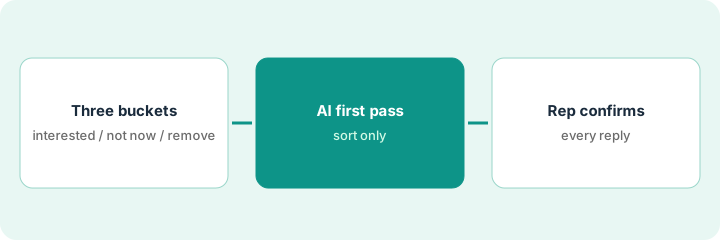
1. Step 1 — Define three buckets and nothing else
What it is: Every human reply goes into one of three buckets. Fewer choices means faster, more consistent sorting.
- Interested: they want a call, pricing, or more information. Next action is the rep's, today.
- Not now: they named a later time, a different person, or a reason that might change. Next action is a dated follow-up.
- Remove: they asked to stop, said they'll never buy, or the email reached the wrong person. Next action is to stop all contact.
- Out-of-office and bounces aren't buckets. They go back to the sequence settings.
The team used to have eleven reply labels and nobody used them the same way. They drop to three. "Talk to my colleague Priya" goes to Not now, with Priya as the new contact to research. "Unsubscribe" goes to Remove.
Write the three buckets on one card: Bucket | What counts | Next action | Deadline.
2. Step 2 — Let AI take the first pass
What it is: An AI sort suggests a bucket for each reply, with the sentence that made it choose. It's a suggestion, not a decision.
- If your Outreach plan includes reply sorting, use it. If not, paste a day's replies with names and emails removed into the chat tool you already pay for and ask for a suggested bucket per reply.
- Ask for one quoted line from each reply as the reason. "Interested because they wrote 'send me times next week'" is easy to check.
- Any reply that could be an opt-out goes to Remove, even if it's polite or unclear. When in doubt, it's a remove.
- The AI doesn't write follow-up dates it can't see in the reply. "Ask me later" with no date becomes Not now with the date marked Unknown.
Of 22 replies, the AI suggests 4 Interested, 9 Not now, and 6 Remove, and sets 3 aside as out-of-office. One reply reads "not interested right now, maybe next year." The AI suggests Not now and quotes "maybe next year." Because it also says "not interested," the rep moves it to Remove, which is the team's rule for mixed signals.
Prompt: "For each reply, suggest Interested, Not now, or Remove, and quote the line that decided it. Put anything that might be an opt-out in Remove. Mark any follow-up date not stated in the reply as Unknown."
3. Step 3 — The rep confirms every reply
What it is: A rep reads each reply and confirms or changes the bucket before anything happens. Removes are handled first, the same day.
- Remove first. The rep confirms each one, stops the sequence for that person, and marks them opted out in the CRM so no other tool emails them.
- Interested next. The rep replies personally the same day. AI can draft the reply, but the rep sends it.
- Not now last. The rep sets the follow-up date the person gave. If they didn't give one, the rep picks one and notes it as the rep's choice, not the prospect's.
- Once a week, sales ops looks at what reps moved between buckets to see where the AI keeps guessing wrong.
Sales ops sees reps moved 14 replies out of Not now into Remove last week, all versions of "we just signed with someone else." They add that phrase to the Remove rule in Step 1.
Add a weekly line to the sales ops notes: "Replies moved by reps: [count]. Most common change: [from → to]. Rule updated: Y/N."
Pricing context (October 2026)
This how-to isn't a price sheet. Outreach is usually sold through sales-assisted plans, and when our Outreach AI review checked in September 2026 it didn't list exact prices; which AI features come with which package can change. Confirm seats and AI features with your Outreach rep. Dated October 2026.
Checked Oct 12, 2026 on the vendor’s own pricing page: Outreach shows no public seat list price. Outreach’s pricing page describes packages and an AI credits consumption model and routes to custom pricing. This page quotes no Outreach dollar figure; confirm seats and AI features with your Outreach rep. Also confirm with your admin whether your package includes reply-sorting assists; if not, use a paste/notes fallback with the same three buckets.
Uncertainty: Opt-out rules differ by country and channel. Your legal or compliance owner decides what counts as an opt-out request. The only prices this site sells here are the optional $9 AI toolkit spreadsheet and $19 AI toolkit audit.
When this helps (honest take)
Useful when sequences get enough replies that sorting eats a rep's morning, and labels are used differently by each rep.
Not useful when you get a few replies a day. A rep can read them in five minutes, and the AI pass just adds a step.
Related options (educational)
| Need | Where to look | Why |
|---|---|---|
| Outreach features | Outreach AI | Primary path on this page |
| Cadences on Salesloft | Salesloft AI | Same buckets, different tool |
| Clean lists first | Apollo.io | Fewer wrong-person replies |
| After a call | Follow-up email from a call | Live how-to |
| Sales ops stack | Stack map for sales ops | Job, tool, and owner in one view |
Free: seat-waste calculator if two sales tools are both sorting the same inbox.
FAQ
Can the AI unsubscribe people automatically?
Stopping contact is the safe direction, so some teams let a clear "unsubscribe" pause the sequence right away. A rep still confirms it and marks it in the CRM so every tool respects it.
Why only three buckets?
More labels mean more disagreement between reps. Three buckets each lead to one clear next action.
Where do current prices live?
With Outreach. The Outreach AI review notes what its public pages showed. This page doesn't invent prices. Our Oct 12, 2026 check of the vendor’s own pricing page is summarized in the pricing section above.
What if the reply is an opt-out?
Treat it as remove and follow your compliance owner’s rule. AI does not decide legal opt-out handling.
Optional next step
Free reviews stay free. If Outreach, a CRM inbox tool, and a chat seat are all reading the same replies, the $9 AI toolkit spreadsheet helps you see the overlap, or the $19 AI toolkit audit gets you a written memo.