How-to · Supply chain planning · o9 Solutions · Oct 21, 2026
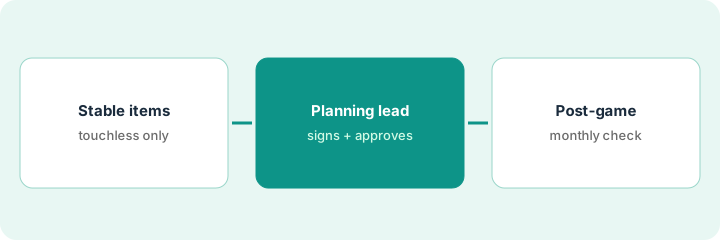
Turn on o9 touchless forecasting for stable items, and have the planning lead approve every AI-suggested change
o9 promotes touchless forecasting, where the system produces forecasts with minimal human intervention, and its APEX operating model describes “flexible autonomy” from human-in-the-loop to touchless execution. Someone on your side chooses the setting. This page shows how to turn touchless on for stable items only, with the planning lead approving every AI-suggested change outside the signed list.
Who this is for
Demand planners, supply planners, and planning leads at companies on o9 or comparing planning platforms. The job here is forecasting autonomy — which forecasts run without a person. For running one Kinaxis Maestro disruption scenario with a supply planner approving it — a different job — see Kinaxis Maestro scenario approval.
How to do it
This is a how-to, not a ranking of planning platforms. Per the o9 Solutions AI review, o9’s demand forecasting evaluates statistical, machine learning, and AI models and tracks Forecast Value Add — whether each manual adjustment improved the forecast; o9’s own article on touchless planning recommends starting with low-risk decisions; APEX (26 March 2026) describes agent-assisted planning within “defined governance guardrails”; and Post-Game Analysis compares what was planned with what happened. o9’s accuracy figures are its claims. The ground rule: the planning lead signs the list of what may run touchless and approves every AI-suggested change outside it.

1. Turn on touchless for one group of stable items only
What it is: Pick items with steady demand and no planned launches or promotions, and turn touchless on for those alone.
- Pick one group of stable items with low forecast error history.
- Exclude items with launches, promotions, or end-of-life dates in the horizon.
- Record current Forecast Value Add for those items as a baseline.
- Name the demand planning manager who reviews results.
- Run two cycles before adding anything.
The manager picks 120 long-running items with steady demand and no promotions next quarter, records their current Forecast Value Add, and turns touchless on for those items only.
Pick one group of stable items, record their Forecast Value Add, and turn touchless on for that group alone for two cycles.
2. Write the governed-autonomy list; the planning lead approves every change outside it
What it is: List recurring planning decisions, mark which may run touchless, and route every other AI-suggested change to the planning lead.
- List ten recurring planning decisions.
- Mark which may run touchless and which always wait for a named planner.
- Ask your o9 team for the AI agents active in your account and which can change a plan.
- Keep every acting agent on planner approval for a month.
- Have the planning lead sign the list.
The planning lead marks three of ten decisions as touchless — baseline forecasts for the stable group, among them — and keeps promotions, new items, and supply allocation on approval. After a month she approves most AI-suggested changes, rejects two that ignored a customer’s confirmed order cut, and keeps the list as is.
List ten recurring planning decisions, mark touchless or approval for each, and have the planning lead sign the list before any automated workflow goes live.
3. Run post-game analysis monthly on the plan people worked to
What it is: Use o9’s Post-Game Analysis each month to see where the plan and the outcome differed, after checking it compares the right plan snapshot.
- Confirm which plan snapshot the analysis used.
- Make sure it is the plan people actually worked to, not a later revision.
- Trace the biggest root cause by hand.
- Check Forecast Value Add for the touchless group against the baseline.
- Widen touchless only where the numbers support it.
The planner runs post-game analysis for one region and finds it compared against a mid-month revision. She reruns it on the published plan, traces the largest miss to a customer’s order pattern change, and confirms touchless items held their accuracy over two cycles.
Each month, confirm the plan snapshot, trace the biggest root cause by hand, and compare Forecast Value Add for touchless items with the baseline before widening.
Pricing context (October 2026)
This how-to isn’t a price sheet. Per the o9 Solutions AI review, o9 does not publish prices. When we checked on Oct 21, 2026, o9solutions.com/pricing returned not found and the site lists no prices. Treat it as quote-only and ask whether AI agents and Post-Game Analysis are included in your subscription. Dated October 2026.
Checked Oct 21, 2026 on the vendor’s own site: o9 publishes no prices; o9solutions.com/pricing returned not found and o9’s site lists no prices. This page quotes no o9 dollar figure; ask o9 for a written quote and see our review for what is known.
Uncertainty: The only prices this site sells here are the optional $9 AI toolkit spreadsheet and $19 AI toolkit audit.
When this helps (honest take)
Useful when your company runs o9, many items have steady demand, and the planning lead will sign the autonomy list and approve changes outside it.
Not useful when most items are promotional or new, nobody tracks Forecast Value Add, or you want touchless across the whole catalog at once.
Related options (educational)
| Need | Where to look | Why |
|---|---|---|
| Touchless forecasting, APEX, Post-Game Analysis | o9 Solutions AI | Primary path; quote only |
| One disruption scenario with supply planner approval | Kinaxis Maestro scenario approval | A different job |
| Choosing between planning platforms | Kinaxis vs o9 | Side-by-side explainer |
| Where supply chain tools fit | Stack map: logistics ops | Broader map |
FAQ
What is touchless forecasting in o9?
Per our review, o9 promotes forecasts and plans produced with minimal human intervention, and its own article recommends starting with low-risk decisions.
What is o9 APEX?
Per our review, an operating model o9 introduced on 26 March 2026 that progressively automates well-governed decisions within guardrails you set.
How much does o9 cost?
o9 publishes no prices. Treat it as quote-only (checked Oct 21, 2026).
Optional next step
If you want a one-page toolkit map for the tools you already pay for, use the optional $9 AI toolkit spreadsheet. If you want a short review of seat waste and unused tools, use the optional $19 AI toolkit audit. Neither is required to follow this how-to.