How-to · Supply chain planning · Kinaxis · Oct 21, 2026
Run one Kinaxis Maestro scenario, and have a named supply planner approve it before it becomes the plan
Kinaxis Maestro lets planners copy the live plan into a scenario, change one thing, and see the effect on orders, inventory, and capacity in seconds. A scenario is only as good as the lead times and rules behind it. This page shows how to run one disruption scenario so a named supply planner checks it and approves it before anyone is told the plan changed.
Who this is for
Supply planners, demand planners, and supply chain leads at companies on Kinaxis Maestro or comparing planning platforms. The job here is one scenario and the approval that makes it the plan. For turning on o9 touchless forecasting for stable items — a different job on the forecasting side — see o9 touchless forecast approval.
How to do it
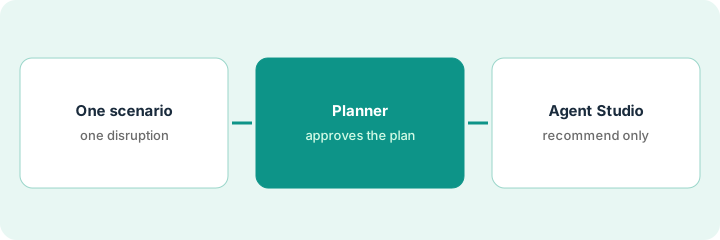
This is a how-to, not a ranking of planning platforms. Per the Kinaxis AI review, Maestro runs scenarios on your own KPIs; Maestro Agents work through building blocks that include triggers, tools, and approvals; Maestro Agent Studio (announced 5 February 2026) is a no-code way to compose agents; Kinaxis reported an NVIDIA cuOpt test that sped up a large planning run; and its semantic graph shows traceable impact paths. Kinaxis’ speed figures are its claims. Kinexions EMEA runs 26–28 October 2026, after our check date. The ground rule: a named supply planner approves every scenario before it becomes the plan, and nobody tells customers, suppliers, or the factory until then.
1. Frame one disruption scenario
What it is: Pick one real or likely disruption and change only that in a copy of the live plan.
- Pick one disruption, such as a two-week delay from one supplier.
- Copy the live plan into a scenario.
- Change only the disruption; leave other assumptions alone.
- Check the lead times and safety stocks the scenario uses for the affected parts.
- Name the supply planner who owns the decision.
The planner copies the live plan and adds a two-week delay on one component supplier. Before running it, she finds the scenario still uses an old lead time for a substitute part and corrects it.
Copy the live plan into one scenario with a single disruption, and check the lead times and safety stocks for the affected parts before running it.
2. Compare with the current plan; the named supply planner approves
What it is: Compare the scenario’s results with the current plan, check the biggest impacts by hand, and have the supply planner approve before it becomes the plan.
- Compare orders, inventory, and capacity against the current plan.
- Check the three biggest order impacts by hand.
- Trace one impact path through the bill of materials and open orders.
- List the trade-offs in cost, service, and inventory.
- Approve, revise, or reject — in writing — before anyone is told the plan changed.
The scenario shows three customer orders slipping. Checking by hand, the planner finds one could ship on time from another site the scenario did not consider. She revises the scenario, lists the cost of the expedite, and approves it before sales is told.
Check the three biggest order impacts by hand and write the cost, service, and inventory trade-offs before the supply planner approves the scenario as the plan.
3. Decide when a Maestro Agent Studio agent is worth it
What it is: If the same kind of scenario keeps coming up, consider an agent — but start with one that only recommends, and put an approval step before anything that changes the plan.
- Count how often you ran the same kind of scenario last quarter.
- Build one Agent Studio agent that only makes recommendations.
- Put an approval step before any action that changes the plan.
- Have the demand planner review a month of recommendations.
- Connect it to automated workflows only after the planning lead decides in writing.
Supplier-delay scenarios came up eleven times last quarter. The planning lead approves one recommend-only agent that drafts the scenario when a supplier confirms a delay. After a month of review, she keeps it recommend-only because two drafts used stale lead times.
Count last quarter’s repeat scenarios, and if one repeats often, build a recommend-only agent with an approval step and review a month of output before connecting it to anything.
Pricing context (October 2026)
This how-to isn’t a price sheet. Per the Kinaxis AI review, Kinaxis does not publish prices. When we checked on Oct 21, 2026, kinaxis.com/en/pricing returned not found and the site lists no prices. Treat it as quote-only and ask whether Maestro Agents and Agent Studio are included in your subscription. Dated October 2026.
Checked Oct 21, 2026 on the vendor’s own site: Kinaxis publishes no prices; kinaxis.com/en/pricing returned not found and Kinaxis’ site lists no prices. This page quotes no Kinaxis dollar figure; ask Kinaxis for a written quote and see our review for what is known.
Uncertainty: The only prices this site sells here are the optional $9 AI toolkit spreadsheet and $19 AI toolkit audit.
When this helps (honest take)
Useful when your company runs Kinaxis Maestro, disruptions force replanning often, and a named supply planner will approve every scenario.
Not useful when nobody checks lead times and safety stocks, scenarios go to customers before review, or you want agents changing the plan without an approval step.
Related options (educational)
| Need | Where to look | Why |
|---|---|---|
| Scenarios, Maestro Agents, Agent Studio | Kinaxis AI | Primary path; quote only |
| Touchless forecasting for stable items | o9 touchless forecast approval | A different job |
| Choosing between planning platforms | Kinaxis vs o9 | Side-by-side explainer |
| Where supply chain tools fit | Stack map: logistics ops | Broader map |
FAQ
What is a Maestro scenario?
Per our review, a copy of the live plan where planners change something — a supplier delay, a demand spike — and see the effect on orders, inventory, and capacity.
What is Maestro Agent Studio?
Per our review, a no-code tool announced 5 February 2026 for composing your own agents from Maestro’s data, workflows, and tools, with human-in-the-loop oversight.
How much does Kinaxis cost?
Kinaxis publishes no prices. Treat it as quote-only (checked Oct 21, 2026).
Optional next step
If you want a one-page toolkit map for the tools you already pay for, use the optional $9 AI toolkit spreadsheet. If you want a short review of seat waste and unused tools, use the optional $19 AI toolkit audit. Neither is required to follow this how-to.