How-to · Insurance pricing · hyperexponential · Oct 20, 2026
Use hx’s Actuarial Agent to draft a pricing-model change, and have an actuary approve it before the versioned release
hx’s Actuarial Agent helps actuaries write, explain, and check Python pricing models, and every model change goes through a versioned, governed release. A rebuilt model can look right and still drift by a rounding rule or a loading applied in the wrong order. This page shows how to make one change and release it only after an actuary approves the comparison.
Who this is for
Pricing actuaries, heads of pricing, and underwriting leaders at commercial and specialty carriers, MGAs, and reinsurers on hx. The job here is one governed model change: draft, compare, approve, release. It is not about intake or triage queues.
How to do it
This is a how-to, not a ranking of pricing platforms. Per the hyperexponential AI review, hx’s pricing platform was earlier sold as hx Renew; the Actuarial Agent takes plain-English requests such as spotting inconsistencies or explaining a model; releases are versioned so underwriters and systems call the current approved release; and Portfolio Intelligence runs what-if scenarios on live book data. hyperoperator, a separate agent, was announced for a controlled customer rollout and is not part of this how-to. The ground rule: a pricing actuary approves every model change and a second actuary checks it against the old version.

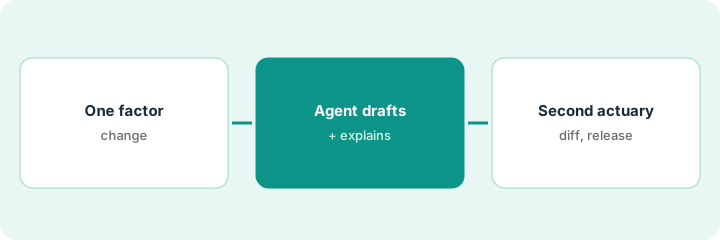
1. Pick one pricing-factor change
What it is: Choose a single, bounded change, such as one territory loading or one minimum premium, and write down what should move and what should not.
- Name the model, the factor, the old value, and the new value.
- Write which premiums you expect to change and roughly by how much.
- Name the pricing actuary who drafts and the second actuary who checks.
- Pick a test set of past quotes (a few hundred is typical).
- Agree with the head of pricing who may approve the release.
A pricing actuary on a professional liability book plans one change: raise one territory loading. She writes that only quotes in that territory should move, names a second actuary, and picks 500 past quotes as the test set.
Write one line: model, factor, old value, new value, and which premiums should change. Name the second actuary before you start.
2. Draft the change with the Actuarial Agent
What it is: Ask the Actuarial Agent to make the change, explain what it did, and spot potential inconsistencies. Treat its output as a draft.
- Ask it to make the change and add comments to the code.
- Ask it to explain the change to a non-actuary, so the head of pricing can read it.
- Ask it to spot potential inconsistencies in the model.
- Read the code diff yourself; do not rely on the explanation alone.
- Keep the draft in a guide, not the live release.
The agent updates the loading and adds comments. Its inconsistency check notes that the minimum premium is applied before the territory loading, not after. The actuary confirms this matches the existing model and leaves the order unchanged for this release.
Ask the Actuarial Agent: make this one change, comment the code, explain it to a non-actuary, and list any inconsistencies. Then read the diff yourself.
3. Second actuary diffs premiums, checks a scenario, then release a new version
What it is: The second actuary runs the test set through old and new versions and checks every difference. A Portfolio Intelligence what-if shows the effect on the in-force book before release.
- Run every test quote through both versions and list each premium that differs.
- Confirm every difference is in the territory you meant to change.
- Run one what-if scenario and confirm its policy count matches the in-force book.
- Have the head of pricing approve the release in writing.
- Release as a new version and store the comparison run with it.
Of 500 quotes, only those in the target territory change, all by the expected amount. The what-if scenario first includes forty lapsed policies; the actuary fixes the in-force filter and re-runs it. The head of pricing approves, and the release goes out as a new version with the comparison stored.
Before release, list every premium that differs between versions, confirm the scenario’s policy count matches the in-force book, and get the head of pricing’s written approval.
Pricing context (October 2026)
This how-to isn’t a price sheet. Per the hyperexponential AI review, hx does not publish prices. When we checked on Oct 20, 2026, hyperexponential.com/pricing returned not found. Treat it as quote-only and ask whether the Actuarial Agent and Portfolio Intelligence are included. Dated October 2026.
Checked Oct 20, 2026 on the vendor’s own site: hx publishes no prices; hyperexponential.com/pricing returned not found and hx’s site lists no prices. This page quotes no hx dollar figure; ask hx for a written quote and see our review for what is known.
Uncertainty: The only prices this site sells here are the optional $9 AI toolkit spreadsheet and $19 AI toolkit audit.
When this helps (honest take)
Useful when your pricing team has models in spreadsheets or Python, actuaries comfortable reading code, and a written release process.
Not useful when you need intake-to-bind underwriting first, you are an agency, or nobody has time to run a comparison before release.
Related options (educational)
| Need | Where to look | Why |
|---|---|---|
| Governed pricing-model changes | hyperexponential AI | Primary path; quote only |
| Intake and clearance | Kalepa AI | Different stage |
| Portfolio guardrails on submissions | Federato AI | Different layer |
| Where pricing fits | Stack map: insurance ops | Broader map |
FAQ
Is hx Renew the same product?
Per our review, hx’s earlier announcements called its pricing platform hx Renew; its current site does not use that name. Ask which name your contract carries.
Is hyperoperator available?
Per our review, hx announced it for a controlled customer rollout later in 2026, with a register-interest page; it was not generally available when the review was written.
How much does hx cost?
hx does not publish prices. Treat it as quote-only (checked Oct 20, 2026).
Optional next step
If you want a one-page toolkit map for the tools you already pay for, use the optional $9 AI toolkit spreadsheet. If you want a short review of seat waste and unused tools, use the optional $19 AI toolkit audit. Neither is required to follow this how-to.