How-to · Time tracking · Harvest AI · Oct 11, 2026
Draft a client week summary from Harvest labels a human reviews
A “client week summary” here means a short narrative for one client, grounded in Harvest time you already labeled — not invented hours, rates, or delivery claims. A human edits amounts and wording before anything goes to the client. Terms: QA means a quality check done by a person.
Who this is for
Client ops and agency leads whose time system of record is already Harvest and who want a weekly narrative assist without inventing billable truth. If Toggl Track is the home, see Toggl Track AI. This page is not legal, tax, or invoice advice. If you are buying a second time-AI seat for the same weekly summary, read three checks before an AI seat first.
How to do it
This page is a how-to. It is not a ranking of time-tracking AI products. Product detail and dated packaging notes live on Harvest AI. Confirm which AI or report assists exist on your Harvest plan before you pilot.

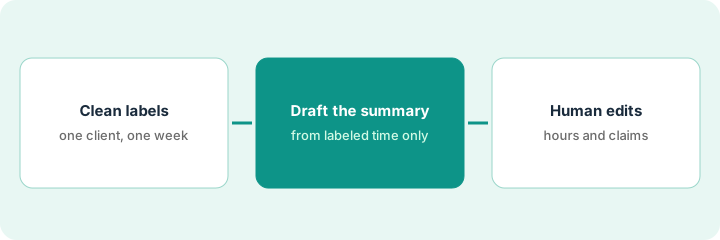
1. Step 1 — Fix label hygiene for one client week
What it is: Pick one client and one week. Clean projects, tasks, and tags so the export matches reality.
- Require every entry: client/project, task type, billable flag if you use it.
- Fix unlabeled or “misc” buckets before drafting.
- Do not invent hours to round up for the narrative.
- Name the human who owns billable truth (project manager or finance).
Client Acme, week of Sep 28. Entries tagged Design / project management / QA. Two “misc” rows reassigned to Design after checking Slack. No hours added. Billable flags match the statement of work categories you already use.
Export or filter one client-week. Count unlabeled rows. Target zero unlabeled before any AI draft. If labels are chaos, spend the week on hygiene — skip the draft.
2. Step 2 — Draft the summary from labeled time
What it is: Ask Harvest AI (or paste a sanitized export into your approved assist) to draft a short client-facing summary only from the labeled rows.
- Prompt pattern: summarize themes by task type; list hours only as in the export; if a claim is not in the data write Unknown; do not invent deliverables, discounts, or rates.
- Keep the draft internal.
- Cap length (e.g. 150–200 words) so humans will actually edit.
- Reject any sentence that adds a metric not in Harvest.
Draft: “This week: 12.5h Design (checkout flow), 4h project management (status + scope), 3h QA. Unknown: whether homepage copy revisions were accepted — not in time notes.” Model tried to add “increased conversion 8%” — deleted (not in Harvest).
Paste only the sanitized weekly rows. Require Unknown for missing outcomes. Delete every invented KPI.
3. Step 3 — Human edits amounts and claims
What it is: project manager or finance edits hours, $ claims, and delivery language before the client sees anything.
- Reconcile hours to Harvest totals (source of truth).
- Strip speculative outcomes and unapproved discounts.
- Send or paste into the client update channel you already use.
- Do not buy Toggl AI solely to draft the same Acme weekly if Harvest remains system of record.
Human corrects Design from 12.5 → 12.0 after a mistyped entry. Removes “on track for Nov launch” (not committed). Sends a six-bullet update. Invoice amounts still come from Harvest invoices — not the narrative draft.
Edit checklist: Hours match export | No invented KPIs | No rates AI guessed | Reviewer initials. Anything failing stays internal.
Pricing context (October 2026)
This how-to is not a price sheet. Plan notes live on Harvest AI. Recheck getharvest.com pricing and your account before you budget. Related path: Toggl Track AI. Dated October 2026.
Checked Oct 11, 2026 on the vendor’s own pricing page: Harvest’s pricing page lists Free at $0; Teams starting from $9 per seat per month billed annually ($108 per seat per year) or from $11 month to month; and Enterprise starting from $14 per seat per month billed annually ($168 per seat per year) or from $17.50 month to month, each with a 30-day free trial. The page says the base rate covers core features and that extra invoices, projects, clients and tasks are billed by usage.
Uncertainty: Which AI-labeled report or summary assists exist on your Harvest plan change by tier and rollout. If an invoice and a review disagree, trust the invoice. Do not paste a marketing list price you did not pay. The only prices this site sells here are the optional $9 AI toolkit spreadsheet and $19 AI toolkit audit.
When this helps (honest take)
Useful when Harvest labels are mostly clean, one client-week is in scope, and a human owns billable truth.
Not useful when labels are fiction, you want AI to invent ROI for the client, or finance has not named a reviewer.
Related options (educational)
| Need | Where to look | Why |
|---|---|---|
| Harvest time + AI assists | Harvest AI | Primary path on this page |
| Toggl tags + weekly insight | Toggl Track AI | When Toggl is system of record |
| Finance stack inventory | Stack map for finance ops | Job | Tool | Owner table |
| Before another seat | Three checks before an AI seat · Find unused AI seats | Live how-tos |
Related reviews: Harvest AI · Toggl Track AI. Free: seat-waste calculator if two time-AI seats draft the same client summary.
FAQ
Can the AI set invoice amounts from the summary?
No. Invoices stay in Harvest’s billing flow with human review. The summary is narrative only.
What if time notes are empty?
Write Unknown for outcomes. Fix note hygiene next week instead of inventing story.
Where do dated prices live?
On the Harvest AI review plus the vendor site. This October 2026 how-to does not invent list prices. Our Oct 11, 2026 check of the vendor’s own pricing page is summarized in the pricing section above.
Does the weekly summary change what Harvest bills?
No. The summary is a narrative a person edits. Hours and invoice amounts stay whatever the project manager or finance approves in Harvest.
Optional next step
Free reviews stay free. Neither offer is required to use this page. If Harvest and another time-AI seat already draft the same client weekly, optional help: $9 AI toolkit spreadsheet or $19 AI toolkit audit when you want a written memo.