How-to · Restaurants · Harri · Oct 16, 2026
Let Harri's Salli assistant propose a schedule, and have the GM publish every one
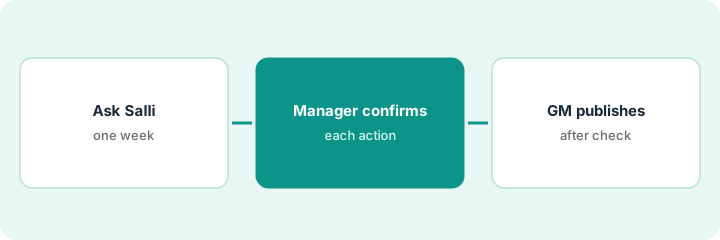
Harri's Salli assistant can propose schedule fixes and wait for confirmation. Schedules that publish without the GM still break labor rules. This page shows how to ask Salli for a draft, confirm actions, and publish only after the GM's compliance check. One-Click Schedule is marked Coming soon on US pricing — this routine does not depend on it.
Who this is for
Restaurant GMs or multi-unit ops leads on Harri using Salli. For 7shifts forecast and auto-fill accept — a different job — see 7shifts forecast schedule GM accept.
How to do it
This is a how-to, not a ranking. Per the Harri AI review, Salli waits for manager confirmation before actions; One-Click Schedule is Coming soon on the US pricing page. The GM publishes every schedule.
1. Ask Salli for one week's draft
What it is: Ask Salli for a draft week and treat every suggestion as unconfirmed.
- Ask for one location and one week only.
- Note which agents Salli used (compliance, requests, warnings).
- Do not publish from the draft.
- Ignore One-Click Schedule unless Harri confirms it is on for your US account.
Salli proposes covering two call-outs. GM does not publish yet.
Save the draft summary before any confirm click.
2. Manager confirms actions
What it is: Managers confirm or reject each Salli action; nothing runs unconfirmed.
- Confirm only actions that match policy.
- Reject anything that breaks break or minor rules.
- Document rejects for Harri setup fixes.
- Keep timesheet edits with payroll norms.
One overtime suggestion is rejected; a shift swap is confirmed. Still held as a draft.
List confirmed vs rejected actions on one sheet.
3. GM publishes after compliance check
What it is: The GM runs a compliance check, then publishes the schedule.
- Review break, minor, and predictive-scheduling flags.
- GM publishes only after the check.
- Tell stores the publish time.
- Re-open with Salli midweek only with another GM publish.
GM publishes Thursday for the following week after clearing two minor flags.
Log: week, Salli actions confirmed, compliance notes, publish time.
Pricing context (October 2026)
This how-to isn't a price sheet. Per the Harri AI review, Harri publishes no prices — every bundle is custom quote; Salli is listed as an add-on; One-Click Schedule is Coming soon on US pricing. Dated October 2026.
Checked Oct 16, 2026 on the vendor’s own pricing page: Harri shows no public list price. Harri’s pricing page marks bundles custom; Salli is an add-on; One-Click Schedule is Coming soon on US pricing — this how-to does not use One-Click Schedule steps. This page quotes no Harri dollar figure; confirm what your contract includes with Harri or your admin.
Uncertainty: The only prices this site sells here are the optional $9 AI toolkit spreadsheet and $19 AI toolkit audit.
When this helps (honest take)
Useful when you run Harri with Salli and the GM will publish every schedule.
Not useful when you need published per-location prices and 7shifts auto-fill — use the 7shifts how-to.
Related options (educational)
| Need | Where to look | Why |
|---|---|---|
| Harri AI | Harri AI | Primary path |
| 7shifts vs Harri | 7shifts vs Harri | Side-by-side |
| 7shifts forecast accept | 7shifts GM accept | A different job |
| Restaurant stack map | Stack map: restaurant ops | Where Harri fits |
FAQ
Is One-Click Schedule available in the US?
Per our review, the US pricing page lists it Coming soon. Ask Harri before you plan around it; this routine uses Salli drafts instead.
How is this different from 7shifts?
A different job: this page is Harri Salli proposals the GM publishes. 7shifts is forecast and auto-fill with GM accept.
Does Harri publish prices?
No; get a written quote that lists Salli separately. Our Oct 16, 2026 check of the vendor’s own pricing page is summarized in the pricing section above.
Is One-Click Schedule available in the US?
Per our review, the US pricing page lists it Coming soon. This routine uses Salli drafts instead.
Optional next step
If you want a one-page toolkit map for the tools you already pay for, use the optional $9 AI toolkit spreadsheet. If you want a short review of seat waste and unused tools, use the optional $19 AI toolkit audit. Neither is required to follow this how-to.