How-to · Restaurants · 7shifts · Oct 16, 2026
Accept a 7shifts sales forecast and auto-filled schedule only after the GM reviews compliance alerts
7shifts can forecast sales and auto-fill schedules with compliance alerts. Publishing without a GM review still creates overtime and break surprises. This page shows how to read the forecast, review alerts, and accept only after the GM signs off.
Who this is for
Restaurant GMs or kitchen managers on 7shifts who want forecasts and auto-filled schedules with a named accept step. For Harri Salli schedule publish — a different job — see Harri Salli schedule GM publish.
How to do it
This is a how-to, not a ranking. Per the 7shifts AI review, machine-learning sales forecasts, labor targets, auto-filled schedules, and compliance alerts need GM acceptance before publish.
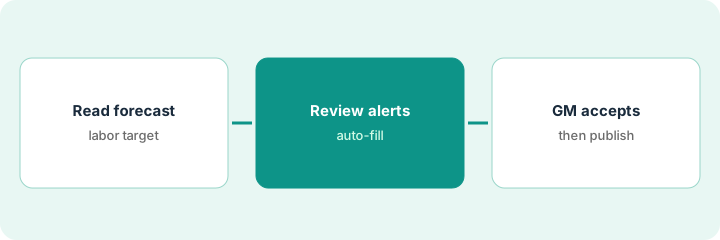
1. Read the forecast and labor target
What it is: Open the sales forecast and labor target for the week you will publish.
- Compare forecast to last year's same week if you have it.
- Note events the forecast may miss.
- Set or confirm the labor target.
- Name the GM who accepts.
Forecast looks high for Wednesday; a local game was not in last year. GM notes a manual override may be needed.
Write forecast vs your gut on one line before opening the draft schedule.
2. Review auto-filled schedule and alerts
What it is: Review the auto-filled schedule and every compliance alert before anyone publishes.
- Check breaks, minors, overtime, and fair-workweek flags.
- Fix undersstaffed peaks by hand if needed.
- Do not publish from this step.
- Ask HR about any rule you do not understand.
Two minor-hour alerts and one overtime risk. GM edits before accept.
List each alert and the fix (or accept-as-is with reason).
3. GM accepts before publish
What it is: The GM accepts the schedule in writing, then publishes.
- GM accepts or sends back for edits.
- Publish only the accepted version.
- Tell managers the labor target for the week.
- Re-check midweek if sales diverge hard.
GM accepts Tuesday noon. Midweek rain cuts sales; GM trims a Thursday shift with a second accept.
Keep accept log: week, alerts cleared, GM initials, publish time.
Pricing context (October 2026)
This how-to isn't a price sheet. Per the 7shifts AI review, 7shifts lists Comp free, Essentials about $44.99, Pro about $89.99, and Premium about $149.99 per location per month on monthly billing (annual lower). Dated October 2026.
Checked Oct 16, 2026 on the vendor’s own pricing page: 7shifts’ plan page in our 7shifts AI review lists Comp free, Essentials $44.99, Pro $89.99, and Premium $149.99 per location per month on monthly billing (annual lower). Confirm current figures on 7shifts’ pricing page.
Uncertainty: The only prices this site sells here are the optional $9 AI toolkit spreadsheet and $19 AI toolkit audit.
When this helps (honest take)
Useful when you use 7shifts forecasts and need a GM on compliance before publish.
Not useful when you run Harri with Salli instead — use that how-to.
Related options (educational)
| Need | Where to look | Why |
|---|---|---|
| 7shifts AI | 7shifts AI | Primary path |
| 7shifts vs Harri | 7shifts vs Harri | Side-by-side |
| Harri Salli publish | Harri Salli GM publish | A different job |
| Restaurant stack map | Stack map: restaurant ops | Where 7shifts fits |
FAQ
How is this different from Harri Salli?
A different job: this page is 7shifts forecast and auto-fill with GM accept. Harri Salli proposes schedules the GM publishes.
Should we publish with open compliance alerts?
Not in this routine. Clear or consciously accept each alert with a reason.
Where do 7shifts prices live?
See the pricing section; add-ons like Log Book are separate. Our Oct 16, 2026 check of the vendor’s own pricing page is summarized in the pricing section above.
How is this different from Harri Salli?
A different job: this page is 7shifts forecast and auto-fill with GM accept. Harri Salli proposes schedules the GM publishes.
Optional next step
If you want a one-page toolkit map for the tools you already pay for, use the optional $9 AI toolkit spreadsheet. If you want a short review of seat waste and unused tools, use the optional $19 AI toolkit audit. Neither is required to follow this how-to.