How-to · Finance · FreshBooks AI · Oct 11, 2026
Propose invoice categories in FreshBooks without inventing amounts
“Invoice categories” here means a clean category/service list AI may suggest against — while humans lock every amount. This is not bookkeeping or tax advice. Terms: QA means a quality check done by a person.
Who this is for
Lean finance and founder-led teams whose invoicing home is already FreshBooks and who want category assists without invented line amounts. If Xero is general ledger system of record, see Xero AI. If QuickBooks is the books home, see QuickBooks AI.
How to do it
This page is a how-to. It is not a ranking of small business accounting AI. Product detail and dated packaging notes live on FreshBooks AI. Confirm AI features on your FreshBooks plan before you pilot.

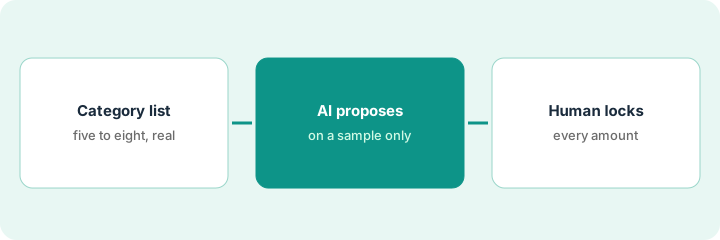
1. Step 1 — Build the category list
What it is: Write the categories/services you already sell — from past invoices, not from AI imagination.
- Pull last quarter’s invoice line descriptions; cluster into ≤12 categories.
- Merge duplicates (“Consulting” vs “Advisory consult”).
- Map each category to your existing FreshBooks product/service items where possible.
- Ban inventing new products or services you do not sell.
Categories: Design retainer · Design project · Rush fee · project-management support · Pass-through software. AI suggested “AI strategy workshop” — rejected (not sold). Items updated in FreshBooks to match.
Export recent line descriptions. Cluster by hand into ≤12. Publish the list in a pinned doc before any AI propose step.
2. Step 2 — AI propose on a sample only
What it is: On a sample of draft invoices (or pasted line text), AI suggests a category from the locked list.
- Prompt: choose only from the provided list; if unclear mark Unknown; never invent amounts, taxes, or discounts.
- Sample size: e.g. 15 historical invoices.
- Log mismatches where a human would pick differently.
- Do not enable unattended categorize-all until the sample passes your bar.
15 invoices: 13 category matches, 2 Unknowns (bundled lines). No amounts changed by AI. One wrong “Rush fee” suggestion corrected to “Design project.”
Blind test: hide the historical category, ask AI to pick from your list, compare. Tune descriptions until miss rate is acceptable.
3. Step 3 — Human locks amounts
What it is: Every quantity, rate, tax, and total is human-entered or human-confirmed from your rate card / statement of work — never AI-invented.
- Category may be AI-suggested; amounts come from statement of work or rate card paste.
- Reviewer initials before send.
- Client-facing invoice send stays on your normal FreshBooks send path.
- Do not add Xero/QuickBooks AI solely to categorize the same FreshBooks invoices if FreshBooks remains system of record.
AI category = Design project. Human enters hours × rate from statement of work. Tax per FreshBooks settings you already configured. Send after owner initials. No AI-written “goodwill discount.”
Invoice checklist: Category OK | Amounts from statement of work/rate card | Tax OK | Initials. Fail any → do not send.
Pricing context (October 2026)
This how-to is not a price sheet. Plan notes live on FreshBooks AI. Recheck freshbooks.com/pricing and your account before you budget. Related paths: Xero AI, QuickBooks AI. Dated October 2026.
Checked Oct 11, 2026 on the vendor’s own pricing page: FreshBooks’ pricing page (Monthly view) lists Lite at $23, Plus at $43 and Premium at $70 USD per month, and Select by quote, with time-limited promotions on top (Lite at $1 per month for the first year, or 80% off Plus or Premium for three months). Team members are $11 per user per month and Advanced Payments $20 per month. A Yearly view with an extra discount exists; we did not record its figures.
Uncertainty: FreshBooks AI-labeled features vary by plan and rollout. If an invoice and a review disagree, trust the invoice. Do not paste a marketing list price you did not pay. The only prices this site sells here are the optional $9 AI toolkit spreadsheet and $19 AI toolkit audit.
When this helps (honest take)
Useful when FreshBooks is invoicing system of record, categories are few, and humans own amounts.
Not useful when you want AI to invent rates, the catalog is undefined, or Xero/QuickBooks is already the books system of record for the same invoices.
Related options (educational)
| Need | Where to look | Why |
|---|---|---|
| FreshBooks AI | FreshBooks AI | Primary path on this page |
| Xero bank reconciliation QA | Xero AI | When Xero is general ledger system of record |
| QuickBooks AI | QuickBooks AI | When QuickBooks is books home |
| Finance stack map | Stack map for finance ops | Job | Tool | Owner |
| Before another seat | Three checks before an AI seat · Find unused AI seats | Live how-tos |
Related reviews: FreshBooks AI · Xero AI · QuickBooks AI. Free: seat-waste calculator if multiple books AI seats categorize the same invoices.
FAQ
Can AI fill unit prices from “market rates”?
No. Amounts come from your statement of work or rate card. Market guesses are invented prices — out of scope. Our Oct 11, 2026 check of the vendor’s own pricing page is summarized in the pricing section above.
Is this tax advice?
No. Tax settings and filings stay with your bookkeeper/CPA (certified public accountant).
Where do dated prices live?
On the FreshBooks AI review plus the vendor site. This October 2026 how-to does not invent list prices. Our Oct 11, 2026 check of the vendor’s own pricing page is summarized in the pricing section above.
Should I trust a promotional FreshBooks price for budgeting?
Budget on the regular monthly figure, not the promotion. On Oct 11, 2026 the page showed both, and promotions end.
Optional next step
Free reviews stay free. Neither offer is required to use this page. If FreshBooks and another books AI seat already categorize the same invoices, optional help: $9 AI toolkit spreadsheet or $19 AI toolkit audit when you want a written memo.