How-to · Clinical notes · Microsoft Dragon Copilot · Oct 21, 2026
Turn on Dragon Copilot multi-party capture for family-present visits, and have the clinician review every ambient note
Microsoft Dragon Copilot combines DAX ambient notes and Dragon Medical dictation in one assistant, and markets multi-party capture so a parent, caregiver, or interpreter can be told apart from the patient and clinician. Speaker labels can still swap. This page shows how to turn on multi-party capture for family-present visits while the clinician reviews every ambient note before it becomes part of the legal record.
Who this is for
CMIOs, attending clinicians, and clinical informatics leads whose organization uses or is evaluating Dragon Copilot. The job here is multi-party visits — pediatrics, geriatrics, visits with an interpreter — and speaker attribution. This is an operations how-to, not medical advice, and it is not about Microsoft 365 Copilot for office work.
How to do it
This is a how-to, not a ranking of ambient scribes. Per the Microsoft Dragon Copilot AI review, ambient capture drafts a clinical note and queues it for clinician review before it is part of the legal record; Dragon Copilot also includes Dragon Medical One-style dictation, specialty note styles, and EHR integration including Epic. Multi-party capture is marketed to distinguish patient, clinician, and sometimes a caregiver or interpreter. The ground rule: the clinician who saw the patient reviews and signs every ambient note, and multi-party visits need clear consent from everyone in the room.
1. Pick visit types with more than two speakers
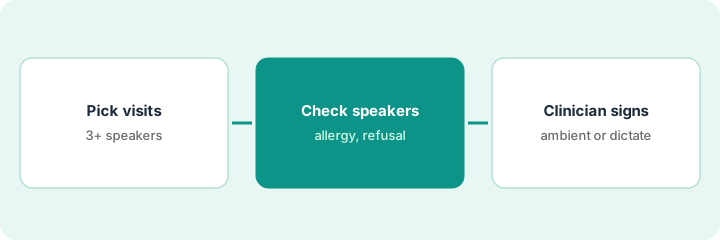
What it is: Choose the visits where multi-party capture matters — a parent at a pediatric visit, an adult child at a geriatric visit, an interpreter — and set a consent habit for everyone in the room.
- List two or three visit types with a third speaker.
- Write a short consent script that covers every person in the room.
- Have IS confirm which specialties and EHR versions have Dragon Copilot enabled.
- Name the clinicians in the pilot and the CMIO as owner.
- Skip visits where consent is unclear.
A pediatric clinic picks well visits with a parent present and follow-ups with an interpreter. The clinic lead writes a one-line consent script for parents and interpreters and asks IS to confirm the drafts land in the right note type in Epic.
List the visit types with a third speaker, write a consent line for everyone in the room, and name the pilot clinicians.
2. Check speaker attribution on every allergy and refusal
What it is: Before anything else in the draft, the clinician checks who said each allergy, refusal, and medication detail. A swapped speaker label can put a parent’s statement in the patient’s history.
- Read every allergy line and confirm who said it.
- Read every refusal and confirm it came from the patient or legal guardian.
- Check interpreter clarifications are present.
- Check family history is not written as the patient’s history.
- Mark each mismatch on a short log.
A pediatrician reviews eight multi-party drafts. Six are fine. One attributes a medication allergy to the clinician instead of the parent, and one drops an interpreter’s clarification. She corrects both and reads allergy and refusal lines aloud before signing.
On your next eight multi-party drafts, confirm the speaker for every allergy and refusal before reading the rest of the note.
3. Clinician edits and signs; decide dictation or ambient per visit type
What it is: The clinician fixes every mismatched line and signs. After two weeks, decide which visit types stay on ambient multi-party capture and which go back to dictation.
- Correct every mismatch before signing; do not rely on the audio later.
- Read Assessment and Plan every time.
- Check laterality and medication names in dictated addenda.
- Count mismatches per visit type after two weeks.
- Keep ambient where mismatches are rare; use dictation where they are not.
After two weeks the CMIO sees speaker mismatches are rare at parent-present well visits but frequent at interpreter visits with three or more speakers. She keeps multi-party capture for well visits, has clinicians dictate interpreter visits for now, and reviews again in a month.
After two weeks, count speaker mismatches by visit type, and have the CMIO decide ambient or dictation for each type in writing.
Pricing context (October 2026)
This how-to isn’t a price sheet. Per the Microsoft Dragon Copilot AI review, Microsoft and Nuance do not publish a simple public retail seat price for Dragon Copilot. Treat it as quote-only through Microsoft healthcare channels and ask whether ambient, dictation, multi-party capture, and Epic integration are bundled. Dated October 2026.
Checked Oct 21, 2026 on the vendor’s own site: Microsoft lists no price on the Dragon Copilot page. This page quotes no Microsoft dollar figure; ask Microsoft for a written quote and see our review for what is known.
Uncertainty: The only prices this site sells here are the optional $9 AI toolkit spreadsheet and $19 AI toolkit audit.
When this helps (honest take)
Useful when multi-party visits are common, clinicians already trust Dragon Medical dictation, and someone will check speaker attribution before signing.
Not useful when you need a sentence-to-audio audit trail as your main control, consent from everyone in the room is hard to get, or you were looking for office Copilot.
Related options (educational)
| Need | Where to look | Why |
|---|---|---|
| Ambient and dictation in one assistant | Microsoft Dragon Copilot AI | Primary path; quote only |
| Choosing between ambient tools | Abridge vs Microsoft Dragon Copilot | Side-by-side explainer |
| Verify linked passages before signing | Abridge Linked Evidence clinician verify | A different job |
| Where clinical notes fit | Stack map: healthcare ops | Broader map |
FAQ
What is multi-party capture?
Per our review, Microsoft markets it so the patient, clinician, and sometimes a caregiver or interpreter can be distinguished in the ambient draft. Speaker labels can still swap, so check them.
Is Dragon Copilot the same as Microsoft 365 Copilot?
No. Dragon Copilot is for clinical documentation; Microsoft 365 Copilot is for office apps.
How much does Dragon Copilot cost?
No simple public seat price is listed. Treat it as quote-only (checked Oct 21, 2026).
Optional next step
If you want a one-page toolkit map for the tools you already pay for, use the optional $9 AI toolkit spreadsheet. If you want a short review of seat waste and unused tools, use the optional $19 AI toolkit audit. Neither is required to follow this how-to.