How-to · Restaurants · Crunchtime · Oct 16, 2026
Run a Crunchtime voice inventory count, and have the kitchen manager own the count and the order
Crunchtime Voice-Based Inventory and AI Forecasting can speed counts and suggest demand. Orders that skip the kitchen manager still miss what the cooler actually holds. This page shows how to voice-count one cooler, compare to the forecast, and have the kitchen manager own both the count and the order.
Who this is for
Multi-unit kitchen managers on Crunchtime Inventory. For Restaurant365 AI purchase orders — a different job — see Restaurant365 AI purchase order GM approve.
How to do it
This is a how-to, not a ranking. Per the Crunchtime AI review, Voice-Based Inventory and AI Forecasting are part of Crunchtime's AI suite; commercial terms are quote-only. The kitchen manager owns counts and orders.

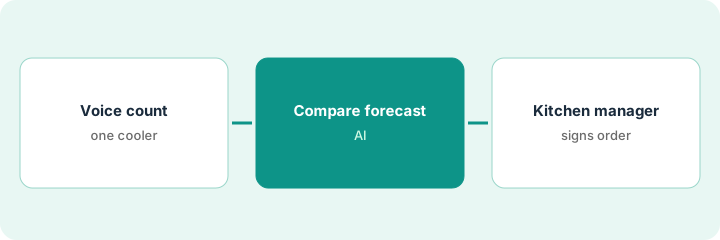
1. Voice count one cooler
What it is: Run a voice count on one cooler; spot-check a sample by hand.
- Pick one cooler or storeroom.
- Complete the voice count in the Inventory app.
- Hand-count a sample of high-value items.
- Confirm voice licensing on your quote (trial terms may have ended).
Voice count finishes in twenty minutes; hand check finds one case of chicken under-counted. Count corrected before ordering.
Write cooler name, voice total, hand-check exceptions.
2. Compare to AI Forecasting
What it is: Compare on-hand plus forecast usage before building the order.
- Open AI Forecasting for the next few days.
- Adjust for known events the forecast may miss.
- Do not auto-send an order from forecast alone.
- Note forecast vs actual from last week.
Forecast wants more fries before a game day the model underweighted. Kitchen manager adds a case.
List forecast suggestion vs manager adjustment.
3. Kitchen manager signs count and order
What it is: The kitchen manager signs the count and the purchase order before it leaves.
- Sign the count as accurate enough to order.
- Approve the order lines.
- Send only after both signatures.
- Review variance after the next delivery.
Kitchen manager signs cooler count and produce order at 10 a.m.; meat order waits on butcher price.
Log: cooler, count exceptions, order id, signer, date.
Pricing context (October 2026)
This how-to isn't a price sheet. Per the Crunchtime AI review, Crunchtime's public pricing URL returned no usable list — treat plans and AI licensing as quote-only. Dated October 2026.
Checked Oct 16, 2026 on the vendor’s own pricing page: Crunchtime shows no usable public list price. Crunchtime’s site did not publish plan dollar figures on our checks; AI and voice licensing are on the quote. This page quotes no Crunchtime dollar figure; confirm what your contract includes with Crunchtime or your admin.
Uncertainty: The only prices this site sells here are the optional $9 AI toolkit spreadsheet and $19 AI toolkit audit.
When this helps (honest take)
Useful when you have Crunchtime Inventory and a kitchen manager who will sign counts and orders.
Not useful when you need accounting-side purchase orders in Restaurant365 — use that how-to.
Related options (educational)
| Need | Where to look | Why |
|---|---|---|
| Crunchtime AI | Crunchtime AI | Primary path |
| Restaurant365 AI | Restaurant365 AI | Related back office |
| Restaurant365 purchase orders | R365 AI purchase order | A different job |
| Restaurant stack map | Stack map: restaurant ops | Where Crunchtime fits |
FAQ
Is voice inventory free forever?
Support notes in our research described a mid-2026 trial window then premium licensing — confirm on your quote.
Does forecasting send orders alone?
Not in this routine. The kitchen manager signs the order.
Does Crunchtime publish prices?
No usable public list on the check we and the review cite; get a written quote. Our Oct 16, 2026 check of the vendor’s own pricing page is summarized in the pricing section above.
Does forecasting send orders alone?
Not in this routine. The kitchen manager signs the order.
Optional next step
If you want a one-page toolkit map for the tools you already pay for, use the optional $9 AI toolkit spreadsheet. If you want a short review of seat waste and unused tools, use the optional $19 AI toolkit audit. Neither is required to follow this how-to.