How-to · Ops memos · Claude · Oct 22, 2026
Turn a CSV into an ops memo with a chart in Claude Artifacts, and check every number before you send it
Claude Artifacts open substantial work, such as a table, chart, or memo, in a pane beside the chat so you can refine it without re-pasting. This page shows how to turn one monthly CSV into a memo table and chart, then check every number against the source before the memo goes anywhere.
Who this is for
Ops and finance staff who write a weekly or monthly memo from a spreadsheet export. The job here is one CSV, one table and chart, and every number checked.
How to do it
This is a how-to, not a ranking of AI assistants. Per the Claude Artifacts review, you attach a CSV or paste a small table, ask Claude explicitly to create an Artifact, refine it with short follow-ups in the pane, and spot-check rows against the CSV before pasting into a memo; Artifacts are accelerators, not a substitute for finance review. Prefer a Project if you reuse the same files weekly. The ground rule: every number in the memo is checked against the CSV by a person.
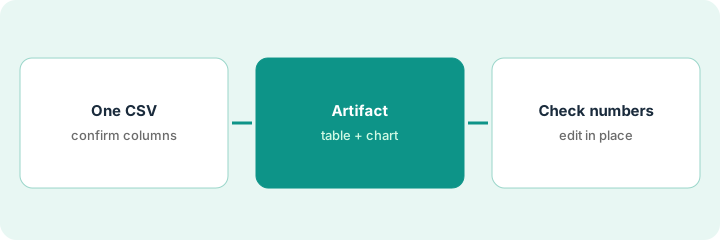
1. Upload one CSV and confirm the columns
What it is: Attach last month’s spend or metrics CSV and ask Claude to list the columns it will use before building anything.
- Export one CSV, such as spend by vendor for the last two months.
- Remove anything you would not share outside finance.
- Ask Claude to list the column headers it will use.
- If a needed column is missing, add it to the export before going on.
The analyst attaches vendor spend for September and October. Claude lists the columns and notes there is no prior-month column for two new vendors, so the analyst marks them new in the CSV.
Attach one CSV, ask Claude to list the columns it will use, and fix the export if a needed column is missing before building the Artifact.
2. Ask for a memo table, chart, and caption as an Artifact
What it is: Ask explicitly for an Artifact so the table and chart open in the pane. Keep the ask narrow: one table, one chart, one short caption.
- Ask for an Artifact: spend by vendor with month-over-month change.
- Ask it to highlight vendors up more than 20%.
- Ask for one bar chart and a three-bullet caption for the memo.
- Ask it to flag any figure that depends on missing prior-month data.
The Artifact shows a table of 18 vendors, a bar chart of the ten largest changes, and three caption bullets. It flags the two new vendors as having no prior month, so their change is shown as new, not a percentage.
Ask Claude to create an Artifact with one table, one chart, and a three-bullet caption from the CSV, and to flag figures that depend on missing data.
3. Check each number against the CSV and edit in place
What it is: Before the memo goes out, check every number in the table and caption against the CSV. Fix problems with short follow-ups in the same Artifact instead of starting a new chat.
- Check every figure in the caption against the CSV.
- Check at least the rows behind the highlighted vendors.
- Fix errors with short follow-ups that update the Artifact only.
- Paste into the memo only after the check is done.
The controller checks the caption and the four highlighted vendors. One percentage was computed on the wrong month. A one-line follow-up fixes it in the Artifact, and the controller rechecks before pasting the table and chart into the monthly memo.
Check every caption figure and the highlighted rows against the CSV, fix errors with short follow-ups in the same Artifact, and paste into the memo only after the check.
Pricing context (October 2026)
This how-to isn’t a price sheet. Per the Claude Artifacts review, Artifacts ship with Claude on Free (limited) and paid plans. We rechecked the review’s September 2026 plan prices on Claude’s pricing page on Oct 22, 2026 (below). Dated October 2026.
Checked Oct 22, 2026 on the vendor’s own site: Claude’s pricing page lists Pro at $20/month billed monthly or $17/month with annual billing, Max from $100/month, and Team standard seats at $25 per seat billed monthly; a limited Free plan is also listed (September 2026, per our review; checked Oct 22).
Uncertainty: The only prices this site sells here are the optional $9 AI toolkit spreadsheet and $19 AI toolkit audit.
When this helps (honest take)
Useful when you write a recurring memo from a spreadsheet, want a table and chart you can refine, and will check every number.
Not useful when you need a live dashboard that refreshes on its own, or nobody will check the figures before the memo goes out.
Related options (educational)
| Need | Where to look | Why |
|---|---|---|
| Memo tables and charts beside chat | Claude Artifacts | Primary path |
| Small weekly charts for ops dashboards | Claude Artifacts for ops dashboards | Extends this pattern |
| Assistants compared for ops files | Claude vs ChatGPT for ops | Broader comparison |
| Where finance tools fit | Stack map: finance ops | Broader map |
FAQ
What is a Claude Artifact?
When Claude generates a substantial document, table, chart, or small app, it can open in a pane beside the chat so you can preview and refine it without losing the thread.
Do I need a paid Claude plan for Artifacts?
Per our review, Artifacts are available on Free with limits; paid plans raise usage.
Is an Artifact chart a replacement for a BI tool?
No. It is a quick chart for a memo. Our dashboards guide covers when you still need real BI.
What does Claude cost?
On Oct 22, 2026 Claude’s pricing page listed Pro at $20 a month billed monthly or $17 a month with annual billing, Max from $100 a month, and Team standard seats at $25 per seat billed monthly (September 2026, per our review; checked Oct 22).
Optional next step
If you want a one-page toolkit map for the tools you already pay for, use the optional $9 AI toolkit spreadsheet. If you want a short review of seat waste and unused tools, use the optional $19 AI toolkit audit. Neither is required to follow this how-to.