How-to · Insurance claims · CCC · Oct 20, 2026
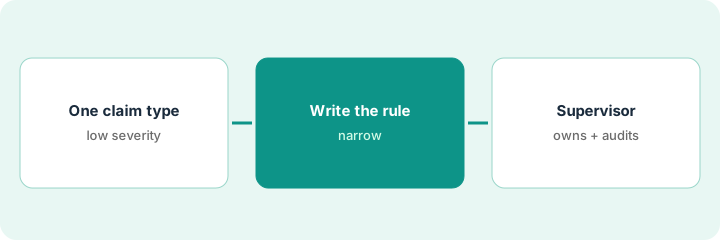
Write one CCC Estimate – STP straight-through rule, and have a claims supervisor own it before any estimate skips review
CCC’s Estimate – STP settings decide which AI-written estimates from CCC Intelligent Estimating are approved without an appraiser. Each rule is a decision to pay without a person looking, and widening one threshold can move thousands of claims a month. This page shows how to write one rule narrowly and keep a named supervisor as its owner.
Who this is for
Auto physical damage claims leaders, claims supervisors, and appraisers at insurers on CCC. The job here is owning one straight-through rule. For using Tractable photo estimates at first notice of loss and having the appraiser approve every estimate and total-loss call — a different job — see Tractable photo estimate appraiser approval.
How to do it
This is a how-to, not a ranking of estimating tools. Per the CCC AI review, CCC’s help site documents Estimate – STP as the configuration behind automatic approval: eligible states, post-check bands, part-level AI damage thresholds set between 70% and 99%, and auto-release rules by state and preliminary repair total, with a change log. First Look gives early predictions such as repairable vs total loss. On 15 October 2026 CCC agreed to be acquired by a GTCR-led group including Elliott, expected to close in early 2027; ask how renewal terms may change. The ground rule: no rule is deployed until a named claims supervisor owns it.

1. Pick one low-severity claim type
What it is: Start where a wrong auto-approval costs least: one state, one simple damage pattern, a low preliminary repair total.
- Pick one eligible state and one claim type, such as minor front-bumper damage.
- Pull last quarter’s closed claims of that type and their final repair invoices.
- Note how often they were supplemented for hidden damage.
- Exclude any pattern where supplements are common, such as rear impacts if your data shows that.
- Keep First Look total-loss predictions out of this rule; route those to an appraiser.
A claims supervisor picks minor front-bumper damage in one state. Last quarter’s invoices show few supplements, while rear impacts were supplemented often for hidden damage, so rear impacts stay out of scope.
Write the claim type, the state, and the supplement rate from last quarter before you touch any setting.
2. Write the straight-through rule
What it is: Set the post-check band, the part-level damage threshold, and the repair-total cap for that one claim type, and nothing else.
- Use a high damage threshold to start.
- Set a low preliminary repair-total cap.
- Send the middle band to manual review.
- Write the rule in plain words next to the settings.
- Remember changes take effect only once deployed in the portal; do not deploy yet.
The supervisor writes: front-bumper estimates in one state, high band only, damage threshold near the top of the range, low repair-total cap; everything else to an appraiser. The settings are saved but not deployed.
Write the rule as one plain sentence, then match each setting to a word in it before deploying.
3. Supervisor signs off, then audit a weekly sample
What it is: The claims supervisor signs the rule as its owner, deploys it, and samples straight-through estimates against repair invoices every week.
- Supervisor signs and dates the rule; the change log records who deployed it.
- Each week, sample twenty straight-through estimates against the repair invoices.
- Log every supplement by part and impact area.
- Do not widen the cap or threshold without a month of clean samples.
- A staff appraiser reviews every estimate the rule did not approve.
In the first weekly sample, seventeen of twenty match the invoices; three were supplemented for a hidden bracket. The supervisor keeps the cap where it is and asks for the monthly report before any change.
Every week, compare twenty straight-through estimates with repair invoices and write down any supplement before changing the rule.
Pricing context (October 2026)
This how-to isn’t a price sheet. Per the CCC AI review, CCC does not publish prices. When we checked on Oct 20, 2026, cccis.com/pricing returned not found. Treat it as quote-only and ask how AI estimating and straight-through processing are priced and how the acquisition agreement may affect renewal terms. Dated October 2026.
Checked Oct 20, 2026 on the vendor’s own site: CCC publishes no prices; cccis.com/pricing returned not found and CCC’s site lists no prices. This page quotes no CCC dollar figure; ask CCC for a written quote and see our review for what is known.
Uncertainty: The only prices this site sells here are the optional $9 AI toolkit spreadsheet and $19 AI toolkit audit.
When this helps (honest take)
Useful when your claims operation runs on CCC and a named claims supervisor will own every straight-through rule and sample it weekly.
Not useful when you want a photo-estimating specialist across several systems, or nobody will audit what skips review.
Related options (educational)
| Need | Where to look | Why |
|---|---|---|
| Straight-through rules on CCC | CCC AI | Primary path; quote only |
| Photo estimates and total-loss approval | Tractable photo estimate appraiser approval | A different job |
| Choosing between the two | Tractable vs CCC | Side-by-side explainer |
| Where auto claims AI fits | Stack map: insurance ops | Broader map |
FAQ
What is Estimate – STP?
Per our review, the straight-through processing settings on CCC’s help site that decide which AI estimates are approved without a person. CCC’s marketing page describes the same option under CCC Intelligent Estimating.
Is CCC being sold?
Per our review, CCC announced on 15 October 2026 an agreement to be acquired by a GTCR-led group including Elliott, expected to close in the first quarter of 2027 subject to approvals.
How much does CCC cost?
CCC does not publish prices. Treat it as quote-only (checked Oct 20, 2026).
Optional next step
If you want a one-page toolkit map for the tools you already pay for, use the optional $9 AI toolkit spreadsheet. If you want a short review of seat waste and unused tools, use the optional $19 AI toolkit audit. Neither is required to follow this how-to.