How-to · Close · BlackLine AI · Oct 12, 2026
Review BlackLine reconciliation exceptions first, not every account
Most close teams spend their review time where it's least needed: rereading reconciliations that already tie. This page shows a close lead how to point the team's attention at BlackLine's exception list first, give each exception one owner, and check the clean work with a small sample so loose matching rules still get caught.
Who this is for
Close leads, shared-services managers, and senior accountants whose balance-sheet reconciliations and transaction matching already run in BlackLine. If you're still reconciling in spreadsheets, start with build a close checklist from your books instead.
How to do it
This is a how-to, not a ranking of close tools. Feature detail lives on the BlackLine AI review. Check which Verity agents your contract includes before you lean on them.

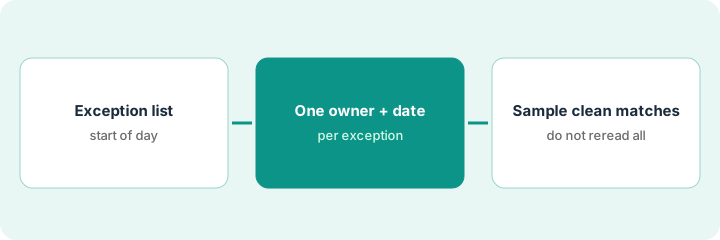
1. Step 1 — Start the day from the exception list
What it is: Transaction Matching applies your rules, matches what it can, and flags what it can't. Verity Match suggests matches for the harder cases. The flagged items are where judgment is needed, so that's where the morning starts.
- Open the exceptions view for the accounts in today's close tasks, not the full account list.
- Sort by amount, then by age. A large exception from day one matters more than a small one from this morning.
- Separate repeat exceptions (the same kind every month) from one-offs. Repeat ones usually point to a rule that needs fixing.
- Treat a Verity Match suggestion as a suggestion. The accountant accepts it only after looking at both sides.
Day two of close: 46 exceptions across card settlement, payroll clearing, and intercompany. Nine are over the team's review threshold. Those nine get worked first; the 31 small timing items from card settlement are reviewed as a batch after lunch.
Write the order on a sticky note for the team: "Exceptions over threshold, then repeat exceptions, then the rest. Clean recs last, and only as a sample."
2. Step 2 — Give every exception one owner and a date
What it is: An exception without an owner sits until someone notices it on the last day. One name and one expected clearing date per item fixes that.
- Assign each open exception to one person, not a team.
- Add the expected clearing date and the source document that will clear it.
- If an item is labeled "timing," it still needs a date. "Timing" with no date goes back to the preparer.
- If Verity Prepare drafted the reconciling item, the reviewer checks the support before signing, the same as for a person's draft.
A Verity-prepared plant-and-equipment clearing rec ties, but one reconciling item says "timing" with no date. The reviewer sends it back asking for the expected clearing date and the invoice behind it. It comes back the same afternoon with both.
For every open exception, fill one line: Account | Item | Amount | Owner | Expected clearing date | Source document. Blank cells mean the item isn't ready for sign-off.
3. Step 3 — Sample the clean matches, don't reread them
What it is: Clean matches aren't proof that the rules are right. A rule that's too loose matches the wrong things quietly. A small monthly sample finds that without rereading everything.
- Each month, pick ten auto-matched items from one high-volume account.
- Check each against the outside source (processor report, bank statement, subledger).
- If one is wrong, look at the rule that matched it, not just the item.
- Rotate the account each month so every high-volume account is sampled at least once a quarter.
A sample of ten card settlement matches turns up one refund paired with the wrong charge because the rule matched on amount alone. The team adds a date window to the rule, and the next month's sample is clean.
Add a recurring close task: "Sample 10 matched items from [account]. Record the account, the result, and any rule change." Name the owner.
Pricing context (October 2026)
This how-to isn't a price sheet. BlackLine doesn't publish prices; when we checked on 6 October 2026, its pricing page returned an error and the site offered a demo request. Packaging notes live on the BlackLine AI review. Ask BlackLine for a written quote. Dated October 2026.
Checked Oct 12, 2026 on the vendor’s own pricing page: BlackLine shows no public list price. BlackLine’s pricing URL returned a not-found / demo-oriented response on Oct 12, 2026; the site pushes schedule-a-demo rather than figures. This page quotes no BlackLine dollar amount; ask BlackLine for a written quote.
Uncertainty: Which Verity agents are included depends on your contract. If your contract and our review disagree, trust your contract. The only prices this site sells here are the optional $9 AI toolkit spreadsheet and $19 AI toolkit audit.
When this helps (honest take)
Useful when BlackLine is already your reconciliation system, the team reviews most accounts in full every month, and exceptions regularly slip to the last day.
Not useful when the matching rules haven't been set up yet, or most accounts don't have reliable outside data to match against. Fix the rules and the data feeds first.
Related options (educational)
| Need | Where to look | Why |
|---|---|---|
| BlackLine AI features | BlackLine AI | Primary path on this page |
| Smaller-team close tools | FloQast vs Numeric | Same job, different scale |
| Finance ops stack | Stack map for finance ops | Job, tool, and owner in one view |
| Close basics | Close checklist from your books · Ramp digest before close | Live how-tos |
Free: seat-waste calculator if several finance tools are matching the same transactions.
FAQ
Does BlackLine's AI sign off on reconciliations?
No. Verity Prepare delivers a reconciliation for human review, and this pattern keeps sign-off with the reviewer.
Why sample clean matches at all?
Because a loose rule produces matches that look clean. Ten items a month is a cheap way to catch it.
Where do current prices live?
With BlackLine. The BlackLine AI review notes what we could and couldn't find. This page doesn't invent prices. Our Oct 12, 2026 check of the vendor’s own pricing page is summarized in the pricing section above.
Do clean reconciliations get zero review?
No. Sample them. The point is to stop rereading every clean match before you have cleared the exceptions.
Optional next step
Free reviews stay free. If BlackLine, a separate close checklist tool, and spreadsheets all track the same reconciliations, the $9 AI toolkit spreadsheet helps you lay them out, or the $19 AI toolkit audit gets you a written memo.